XPPen Upgraded Artist 15.6 Pro V2 Drawing Tablet with Screen…
$599.99Original price was: $599.99.$399.99Current price is: $399.99.
Product Description
1 Paper-like
2 16.7 Million Colors
3 Stunning Color Accuracy
4 Portable Display
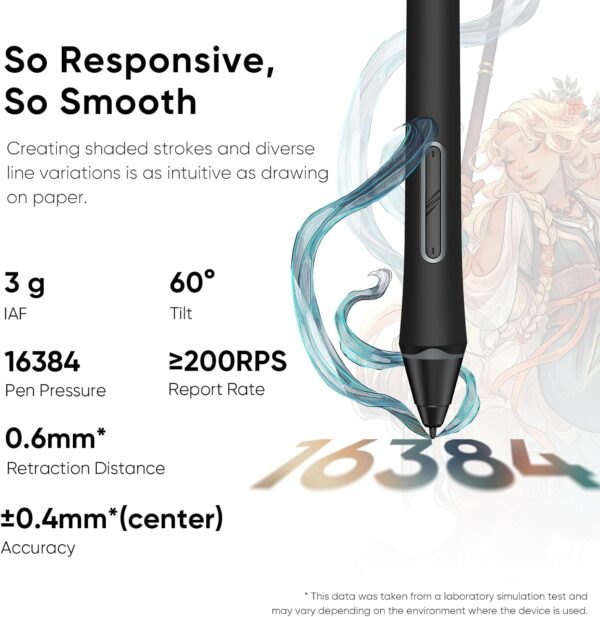
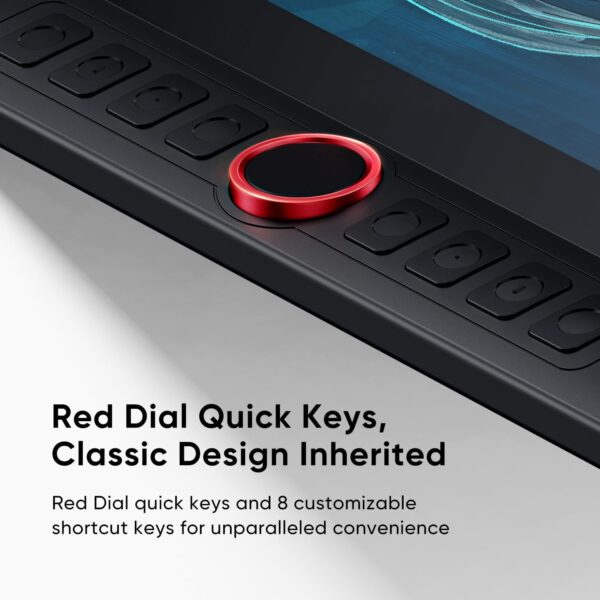
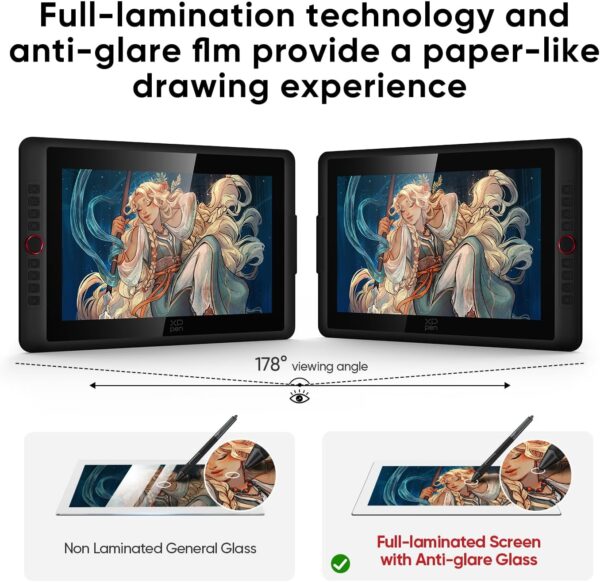
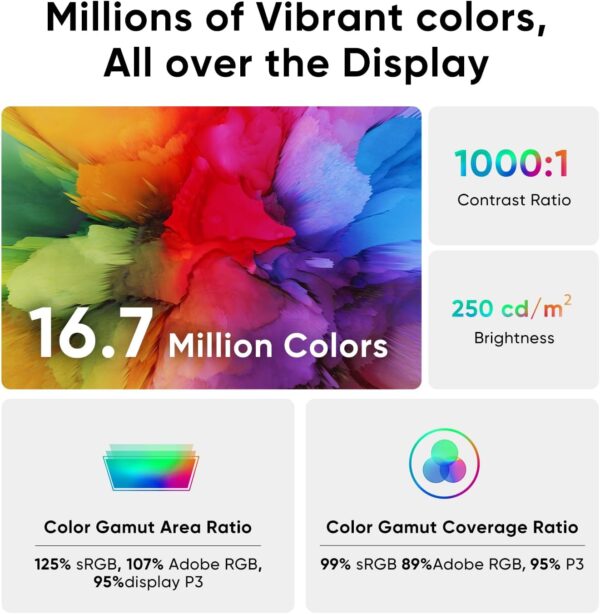
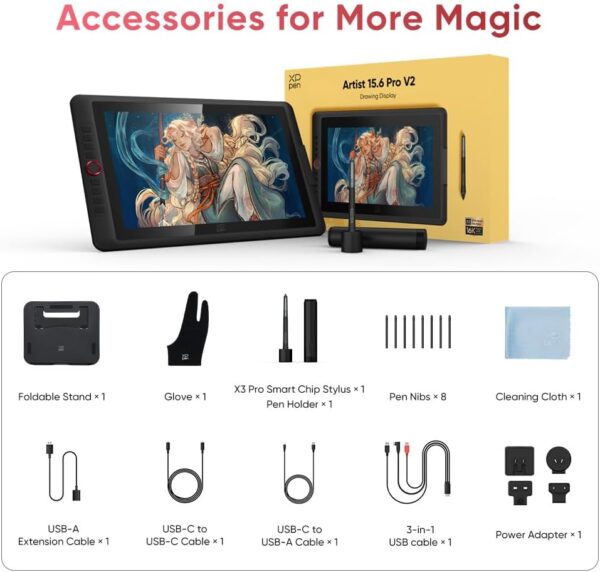
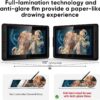
16K Pressure Sensitive: XPPen Artist 15.6 Pro V2 drawing tablet introducing X3 Pro smart chip stylus, which has 16384 pressure levels, 100%* higher than that of its peers. It delivers much more precise and smoother lines than ever before, excelling at hyper-nuanced creation, a game-changer in details Easy Control, One Red Dial for All: The innovative Red Dial interface is designed for a smooth workflow and optimal efficiency, allowing illustrators or designers to master essential controls such as brush size, navigation, and zoom In/Out. It fits comfortably in your hand and ensures a natural hand position, reducing wrist strain during prolonged use Full Laminated Anti-glare Screen: The 15.4-inch graphic art tablet adopts full laminated technology, anti-glare etched glass, and a wide angle of 178°, which will help you avoid parallax errors between the stylus nib and cursor, precisely positioning every single one of your strokes 8 customized express keys: The Artist 15.6 Pro V2 drawing display features 8 fully customizable shortcut keys and puts more customization options at your fingertips to suit your preferred work style, allowing you to capture and express your ideas easier and faster for optimized workflow Stunning Color Accuracy: Featuring 99% sRGB, 96% Adobe RGB, and 96% display P3 color gamut, this tablet ensures every stroke has exceptional color fidelity. With 16.7 million colors, you can enjoy smooth gradients and rich transitions. The 250 cd/m² brightness and 1000:1 contrast ratio provide clearer, more vivid images, allowing artists to see their creations accurately. Ideal for both professionals and hobbyists Sleek and Smart Design: The XPPen Artist 15.6 Pro V2 computer drawing tablet features a slim 11 mm profile, and with an easily accessible smart screen-brightness button, you can easily adjust it to your preferred brightness for comfortable drawing Foldable Stand AC41: The foldable stand (330.15 mm x 223.17 mm) provides a stable base for tablets up to 15.6 inches, ensuring security and better heat dissipation. Its 90-degree angle adjustment promotes better posture and reduces neck and wrist strain, making it ideal for artists and designers during long sessions Wide Compatibility: XPPen Artist 15.6 Pro V2 digital graphic monitor is compatible with Windows 11/10/8/7(32/64 bit), Mac OS X 10.10 or later, Chrome OS 88 (or later) and works with major graphics software like Photoshop, Painter, Illustrator, Clip Studio, and many more PLEASE NOTE: The 3 in 1 cable is included. It is NOT a standalone drawing tablet, you need to use it with your computer or laptop
Price: $599.99 - $399.99 (as of May 07, 2025 10:17:57 UTC – Details)
Customers say
Customers find the graphic tablet easy to set up and use, with crisp screen quality and good color reproduction, making it suitable for both amateur and professional digital artists. They appreciate its value for money and its ability to make digital drawing feel like drawing on paper, allowing for fine detail work. The functionality receives mixed feedback – while it works well with drawing programs like Clip Studio, some report it stops working. The size receives mixed opinions, with some finding it perfect for portability while others say it’s too small. The connectivity is problematic, with customers reporting flimsy connections and frequent disconnections.
7 reviews for XPPen Upgraded Artist 15.6 Pro V2 Drawing Tablet with Screen…
Jack Winters –
Excellent in almost every way
This item has only been a positive impact on my small but satisfying art career. I bought the XP-pen deco tablet before this and after using it for a while decided I could use an upgrade. Boy what an upgrade this was!First things first, the colors on the screen are better than most laptop screens. It was very noticeable to me, and I was actually quite surprised when my background picture looked so much better on the drawing screen than my laptop screen.The pen for this tablet was one of the whole reasons that I bought it. Unlike many other tablets out there, even the high end ones like Wacom tablets tend to have a stylus that is chunky to say the least. I would never see myself EVER writing with an actual pencil with that weird shape and thick profile, but this stylus is sleek and feels exactly like an everyday pencil. This means that I can draw with it for hours on end, and the first thing that stops me is getting tired mentally, not getting tired of holding a chunky pencil.Next is the quality of use. The driver is easy to find and install, and allows for almost endless customizability for the shortcut keys and even the scrolling strip. I may not yet be a very well seasoned digital artist, but for anyone who wants to strreamline their workflow, this tablet has enough options to satisfy someone in at least the intermediate stages of learning. The pen has a good number of pressure levels, and after adjusting the pressure curves (also easily done in the driver) it feels almost effortless to get the right thickness in your lines. The point where the pen draws a line is snappy and will only lag behind the pen tip when moving quickly across the screen, at which point you don’t even notice.The resolution might not seem mind blowing at first, but considering that the drawing screen is smaller than most laptop screens, the pixels will be smaller than on most regular computer screens. Maybe you might notice if you have a very high end screen you use.The overall form factor of the tablet is small and easy to carry. I lug mine around in my backpack along with my laptop and notebooks and it doesn’t feel too much heavier. It is nice that it comes with a pen case as well, as I doubt the pen would be quite as resilient without it.There is only one or two things that I wish this tablet did better, and they are more a fault of the product that I selected than the quality of the product itself.I wish the screen were just a bit bigger at times. It feels a bit unfortunate that the tablet is the size of a normal laptop, but the screen is noticeably smaller. Then again, this would come at the tradeoff of larger pixel size, so I can live with it.Lastly, the cables that you have to plug in to get the thing working feel like a hassle if you want to be able to draw between classes or in a spare 20 minutes. You have to spend the first 2 minutes plugging the thing in, and then you have to spend the last 4 unplugging everything and packing it all away. This is comparable to most other tablets in this range or slightly higher though, so I can’t say that I would expect more. I do hope that with the widespread nature of lightning ports on computers these days, we’ll start to see a few more tablets that have some lesser port needs than 2 usb and 1 HDMI cable to work.Overall, if anyone is looking for a drawing tablet that is on the cheaper end but wants to really up their digital art game, I think this is the perfect choice, as it did that very same thing for me.
Amazon Customer –
Beginners Beware!
This drawing monitor is insanely good for the price. I’ll have to admit that I’ve only used it for a week or so at the time of me writing this. Yet the one thing I wanted to point out was something I found to be quite inconvenient and possibly challenging/ impossible for beginners as they set up their new drawing monitor. I started out by deleting my previous tablet driver and downloaded the one that my computer needed on the XP-PEN website. It was a walk in the park, super simple. The thing was when I rest my computer and connected the cables it wasn’t working. I turned on the monitor and it gave me an error message, then enabled battery saver mode. Long story short I had to fidget around with my cables for about 30 minutes and reset my computer a dozen times to actually get it going. Once inside my program I found that even though the cursor was popping up on screen once it went over the canvas it was going haywire. I went into the driver and calibrated it a bunch, then reset it again. Then I ended up having to change my virtual monitor set up so that the XP-PEN monitor would mirror my main one. After all that I came a across a slight problem, in multiple programs that I had tested I was seeing that the lines were coming out pixel-y. It actually wasn’t a problem with the monitor that time but just the custom DPI settings I had on all my programs, so keep that in mind if you come around a similar issue. Anyways, it took me about 15 resets before it was working functionally, then another one when the stylus went haywire again. Right after reset 16 I started to question my purchase but once I got into the rhythm of things with the touch bar, shortcut keys and the really great screen quality, my doubts just went away. The inclusion of the pen case and smudge guard plus cloth were nice but also incredibly practical. The drawing monitor didn’t give me any problems from then on, the only thing would maybe be that I have to disconnect and reconnect the HDMI to USB adapter cable every time I turn on my computer, this isn’t new to me though, I’ve had similar issues with that adapter when using other monitors, but hey maybe another reset would be necessary! All in all I would consider it easy to use but not easy to set up. There were a few aforementioned issues I encountered which weren’t from the monitor itself but instead as a result of the monitor such as the DPI and HDMI adapter, which is important to differentiate between as it helps better find the solution. If this were my first encounter with drawing virtually then I would love using it but maybe find it impossible to set up. If you’re planning on buying this product specifically for someone who doesn’t know anything about computers, drawing programs, or tablets in the slightest then it’s better to either A. Have it set up for them by someone who either knows about it or has the extreme patience and time to learn about it, or B. Buy a simpler type of drawing TABLET as it would most likely be 10 times easier to set up than a drawing monitor. Though they are XP-PEN’s competition, Wacom, and the Wacom Intuos tablets are really awesome for beginners, I had one starting out and at that time they even included drawing and animation programs ( all be it not very good ones). A Wacom tablet would be a better choice if choice A isn’t possible. Yet I understand the interest with this particular monitor with its size and price point. I highly recommend it regardless of my initial problems.
Lisbeth Cavey –
Increíble tableta digitalizadora, con una calidad que no me esperaba por su bajo precio. Tuve problemas al configurarla, pero no tenían que ver con la tableta, es Windows 10 junto a photoshop, pero lo pude solucionar instalando unos drivers más antiguos, concretamente los de marzo en la página de XP-Pen, desactivando Windows ink y modificando un archivo para seguir teniendo el control de presión. Solucionado ese problema, que ya me lo encontré con otra tableta de otra marca en el pasado, comenzó a funcionar genial, puedo dibujar casi como si lo hiciera en un papel y con total precisión. Es una buena solución para los que nos gusta dibujar directamente como si estuviéramos en un lienzo. Aviso, días después al actualizar windows, me encontré con otro problema, Windows no detectaba la tableta como un segundo monitor, si os pasa, solo teneis que actualizar el controlador de la tarjeta gráfica del ordenador. Al resolver estos temas de configuración tendréis una magnífica herramienta para hacer ilustraciones increíbles.
Bianca –
I have not had this for very long but I’m so far pleased with it. This is not my first graphic tablet but it is my first display one. The XP-Pen Artist 12 is a display graphic tablet which must be plugged into a laptop or monitor for it to work, it is not functional as a standalone product just to be clear. Inside the box includes wires to plug in, several wall mounts for different regions, a drawing glove, a screen cleaning cloth, some manuals, the pen (which also has an eraser on the other end of it as well as extra nibs in the holder) and of course, the tablet. There is no stand included.Display: The display matches the monitor almost perfectly. There may be a small difference color-wise but it is almost undetectable. The working space is slightly smaller than 12 inches (and forgive me if I’m off as I am not the best when it comes to measuring) so it may feel a little small at times. The contrast and color scales are customizable in the settings so you may adjust it to better replicate your computer monitor. But do be aware that turning up the brightness (buttons on the side near the input plug) on the tablet itself may also affect the contrast and cause things to look weird.If you have overhead lights on while using it, you may notice some glare issues that can obstruct your vision.As the display is not laminated, there is a small observable gap between where you place your pen and where your cursor appears on the screen. This parallax issue is easily overcomable in my personal experience and doesn’t actually affect the way you draw but it may bug you if you are prone to being displeased by that.Pressure and Drawing Experience: The pressure sensitivity is rather decent (I’m no expert though) and though the display looks smooth, there is a grippy, textured feel to drawing on it. The pen detection distance is rather short, however, so the pen tip must be pretty close to the screen at all times if you want to hover over something without clicking or drawing. I am satisfied with the drawing experience though. Because there is no stand included, you may find yourself in awkward positions or practicing poor ergonomics so I do recommend purchasing one.Shortcut keys: The tablet includes short cut buttons to the side and a scroll wheel all of which are mappable in the settings. The scroll bar is not very sensitive but its still useful. The pen also has a shortcut button on one of its sides but is incredibly inconvenient to use as it rests flat and is therefore undetectable by feel. You’ll have to stop what you’re doing to look at it if you’re determined to use it and there have been times where I gripped a little too hard after habitually rotating it and accidentally pressed it while drawing.Software: You must first uninstall any drivers from other brands you had installed and then search for the XP-Pen drivers on their official website. I have not had any driver issues but there may be select software incompatibilities that you should be aware of.I used Paint Tool Sai on my previous Wacom tablet before getting this one only to find that XP-Pen has some strange issues with the program. The pressure sensitivity completely stopped working and the pen eraser is rendered obsolete. The pressure sensitivity can be fixed by installing and using a special version/pack of Paint Tool Sai but I am not aware of any eraser end fix.Durability: I researched about this Tablet before buying and this aspect was completely inconclusive. I used to have a Wacom graphic tablet and I wanted a display (that wasn’t Wacom prices) but I was concerned that I would spend a good 200 dollars for a month or two of use. Obviously the XP-Pen Artist 12 isn’t a tank and should therefore be treated with utmost care. There is an included warranty but I hope to never need to use it. I will most likely update this aspect after further use down the line.Price: This one speaks for itself. The price tag is so good for a display tablet, its near irresistible.Overall, the XP-Pen artist 12 is a great display tablet, especially for the price and I can wholeheartedly recommend it.
Joaovictordaniel –
Muito bom, produto perfeitamente embalado e protegido sem nenhum arranhão ou dano, com um tempo de envio bem rápido e um produto que atende suas expectativas
Menno –
Ik heb deze tablet gekocht voor mijn vrouw. Ze wilde eigenlijk een “blinde” van Wacom maar tijdens onze zoektocht liepen we tegen deze aan die voor een vergelijkbare prijs een scherm biedt. Ik teken zelf niet, maar kon me voorstellen dat dit veel en veel fijner werkt. Dus we hebben de gok genomen, na wat reviews te hebben bekeken, en deze tablet gekocht.Ik ben niet bekend met de concurenten, ook niet met Wacom, dit is onze eerste tablet voor tekenen maar hij is erg prettig en mijn vrouw is er dolgelukkig mee. Ik raad hem dus ook zonder meer aan voor mensen die een keer willen proberen of digitaal tekenen iets is voor ze.Het werkoppervlak is groot genoeg en het scherm is erg scherp en mooi van kleur (al ben ik geen kenner en zal er natuurlijk voldoende op aan te merken zijn als je gaat kalibreren en zo, maar ok, in deze klasse (zowel van tablet als artiest :+ ) doet dat er niet zo veel toe.De pen zelf ligt lekke rin de hand en zelfs ik kon er prima mee schrijven, het is echt net of je op papier werkt.
Nicolas –
Je souhaite découvrir le dessin par tablette graphique et dans cet optique la tablette est presque parfaite.J’ai été surpris du nombre de ports nécessaire au fonctionnement (2 usb + un hdmi) mais tout était indiqué, je n’ai juste pas fait assez attention.Actuellement je ne peux l’utiliser que sur mon pc portable par manque de ports dispo sur la carte graphique de mon pc fix (un gtx 3070) mais j’ai acheté des adaptateurs hdmi/display port pour voir si ça peut marcher, j’éditerais le poste en fonction.Attention toute fois, moi ça ne me dérange pas mais pour des personnes plus pointilleuses sur leur dessins l’écran de la tablette ne donne pas le même rendu couleur que l’écran du pc et je n’ai pas trouvé d’option dans le logiciel pour modifier ça (d’après des recherches sur le net c’est normal, les écrans ont un rendu différent malgré les mêmes paramétrages).À noté également, l’agencement des boutons de la tablette est prévu pour droitier, étant gaucher, il faut basculer de 180 degrés sur le logiciel pour être à l’aise en dessinant.Le packaging est propre et bien pensé, et le stylo est bien protégé dans un sylo (ça semble logique mais attention à ne pas le faire tomber tout de même, c’est bien précisé dans la notice d’ailleurs). Il y a également quelques mines de rechange à l’arrière du sylo.En conclusion pour débuter elle est nikel mais pour des personnes plus expérimenté il vaut mieux prendre les versions plus récentes (et plus coûteuses) de la même marque.














Jack Winters –
Excellent in almost every way
This item has only been a positive impact on my small but satisfying art career. I bought the XP-pen deco tablet before this and after using it for a while decided I could use an upgrade. Boy what an upgrade this was!First things first, the colors on the screen are better than most laptop screens. It was very noticeable to me, and I was actually quite surprised when my background picture looked so much better on the drawing screen than my laptop screen.The pen for this tablet was one of the whole reasons that I bought it. Unlike many other tablets out there, even the high end ones like Wacom tablets tend to have a stylus that is chunky to say the least. I would never see myself EVER writing with an actual pencil with that weird shape and thick profile, but this stylus is sleek and feels exactly like an everyday pencil. This means that I can draw with it for hours on end, and the first thing that stops me is getting tired mentally, not getting tired of holding a chunky pencil.Next is the quality of use. The driver is easy to find and install, and allows for almost endless customizability for the shortcut keys and even the scrolling strip. I may not yet be a very well seasoned digital artist, but for anyone who wants to strreamline their workflow, this tablet has enough options to satisfy someone in at least the intermediate stages of learning. The pen has a good number of pressure levels, and after adjusting the pressure curves (also easily done in the driver) it feels almost effortless to get the right thickness in your lines. The point where the pen draws a line is snappy and will only lag behind the pen tip when moving quickly across the screen, at which point you don’t even notice.The resolution might not seem mind blowing at first, but considering that the drawing screen is smaller than most laptop screens, the pixels will be smaller than on most regular computer screens. Maybe you might notice if you have a very high end screen you use.The overall form factor of the tablet is small and easy to carry. I lug mine around in my backpack along with my laptop and notebooks and it doesn’t feel too much heavier. It is nice that it comes with a pen case as well, as I doubt the pen would be quite as resilient without it.There is only one or two things that I wish this tablet did better, and they are more a fault of the product that I selected than the quality of the product itself.I wish the screen were just a bit bigger at times. It feels a bit unfortunate that the tablet is the size of a normal laptop, but the screen is noticeably smaller. Then again, this would come at the tradeoff of larger pixel size, so I can live with it.Lastly, the cables that you have to plug in to get the thing working feel like a hassle if you want to be able to draw between classes or in a spare 20 minutes. You have to spend the first 2 minutes plugging the thing in, and then you have to spend the last 4 unplugging everything and packing it all away. This is comparable to most other tablets in this range or slightly higher though, so I can’t say that I would expect more. I do hope that with the widespread nature of lightning ports on computers these days, we’ll start to see a few more tablets that have some lesser port needs than 2 usb and 1 HDMI cable to work.Overall, if anyone is looking for a drawing tablet that is on the cheaper end but wants to really up their digital art game, I think this is the perfect choice, as it did that very same thing for me.
Amazon Customer –
Beginners Beware!
This drawing monitor is insanely good for the price. I’ll have to admit that I’ve only used it for a week or so at the time of me writing this. Yet the one thing I wanted to point out was something I found to be quite inconvenient and possibly challenging/ impossible for beginners as they set up their new drawing monitor. I started out by deleting my previous tablet driver and downloaded the one that my computer needed on the XP-PEN website. It was a walk in the park, super simple. The thing was when I rest my computer and connected the cables it wasn’t working. I turned on the monitor and it gave me an error message, then enabled battery saver mode. Long story short I had to fidget around with my cables for about 30 minutes and reset my computer a dozen times to actually get it going. Once inside my program I found that even though the cursor was popping up on screen once it went over the canvas it was going haywire. I went into the driver and calibrated it a bunch, then reset it again. Then I ended up having to change my virtual monitor set up so that the XP-PEN monitor would mirror my main one. After all that I came a across a slight problem, in multiple programs that I had tested I was seeing that the lines were coming out pixel-y. It actually wasn’t a problem with the monitor that time but just the custom DPI settings I had on all my programs, so keep that in mind if you come around a similar issue. Anyways, it took me about 15 resets before it was working functionally, then another one when the stylus went haywire again. Right after reset 16 I started to question my purchase but once I got into the rhythm of things with the touch bar, shortcut keys and the really great screen quality, my doubts just went away. The inclusion of the pen case and smudge guard plus cloth were nice but also incredibly practical. The drawing monitor didn’t give me any problems from then on, the only thing would maybe be that I have to disconnect and reconnect the HDMI to USB adapter cable every time I turn on my computer, this isn’t new to me though, I’ve had similar issues with that adapter when using other monitors, but hey maybe another reset would be necessary! All in all I would consider it easy to use but not easy to set up. There were a few aforementioned issues I encountered which weren’t from the monitor itself but instead as a result of the monitor such as the DPI and HDMI adapter, which is important to differentiate between as it helps better find the solution. If this were my first encounter with drawing virtually then I would love using it but maybe find it impossible to set up. If you’re planning on buying this product specifically for someone who doesn’t know anything about computers, drawing programs, or tablets in the slightest then it’s better to either A. Have it set up for them by someone who either knows about it or has the extreme patience and time to learn about it, or B. Buy a simpler type of drawing TABLET as it would most likely be 10 times easier to set up than a drawing monitor. Though they are XP-PEN’s competition, Wacom, and the Wacom Intuos tablets are really awesome for beginners, I had one starting out and at that time they even included drawing and animation programs ( all be it not very good ones). A Wacom tablet would be a better choice if choice A isn’t possible. Yet I understand the interest with this particular monitor with its size and price point. I highly recommend it regardless of my initial problems.
Lisbeth Cavey –
Increíble tableta digitalizadora, con una calidad que no me esperaba por su bajo precio. Tuve problemas al configurarla, pero no tenían que ver con la tableta, es Windows 10 junto a photoshop, pero lo pude solucionar instalando unos drivers más antiguos, concretamente los de marzo en la página de XP-Pen, desactivando Windows ink y modificando un archivo para seguir teniendo el control de presión. Solucionado ese problema, que ya me lo encontré con otra tableta de otra marca en el pasado, comenzó a funcionar genial, puedo dibujar casi como si lo hiciera en un papel y con total precisión. Es una buena solución para los que nos gusta dibujar directamente como si estuviéramos en un lienzo. Aviso, días después al actualizar windows, me encontré con otro problema, Windows no detectaba la tableta como un segundo monitor, si os pasa, solo teneis que actualizar el controlador de la tarjeta gráfica del ordenador. Al resolver estos temas de configuración tendréis una magnífica herramienta para hacer ilustraciones increíbles.
Bianca –
I have not had this for very long but I’m so far pleased with it. This is not my first graphic tablet but it is my first display one. The XP-Pen Artist 12 is a display graphic tablet which must be plugged into a laptop or monitor for it to work, it is not functional as a standalone product just to be clear. Inside the box includes wires to plug in, several wall mounts for different regions, a drawing glove, a screen cleaning cloth, some manuals, the pen (which also has an eraser on the other end of it as well as extra nibs in the holder) and of course, the tablet. There is no stand included.Display: The display matches the monitor almost perfectly. There may be a small difference color-wise but it is almost undetectable. The working space is slightly smaller than 12 inches (and forgive me if I’m off as I am not the best when it comes to measuring) so it may feel a little small at times. The contrast and color scales are customizable in the settings so you may adjust it to better replicate your computer monitor. But do be aware that turning up the brightness (buttons on the side near the input plug) on the tablet itself may also affect the contrast and cause things to look weird.If you have overhead lights on while using it, you may notice some glare issues that can obstruct your vision.As the display is not laminated, there is a small observable gap between where you place your pen and where your cursor appears on the screen. This parallax issue is easily overcomable in my personal experience and doesn’t actually affect the way you draw but it may bug you if you are prone to being displeased by that.Pressure and Drawing Experience: The pressure sensitivity is rather decent (I’m no expert though) and though the display looks smooth, there is a grippy, textured feel to drawing on it. The pen detection distance is rather short, however, so the pen tip must be pretty close to the screen at all times if you want to hover over something without clicking or drawing. I am satisfied with the drawing experience though. Because there is no stand included, you may find yourself in awkward positions or practicing poor ergonomics so I do recommend purchasing one.Shortcut keys: The tablet includes short cut buttons to the side and a scroll wheel all of which are mappable in the settings. The scroll bar is not very sensitive but its still useful. The pen also has a shortcut button on one of its sides but is incredibly inconvenient to use as it rests flat and is therefore undetectable by feel. You’ll have to stop what you’re doing to look at it if you’re determined to use it and there have been times where I gripped a little too hard after habitually rotating it and accidentally pressed it while drawing.Software: You must first uninstall any drivers from other brands you had installed and then search for the XP-Pen drivers on their official website. I have not had any driver issues but there may be select software incompatibilities that you should be aware of.I used Paint Tool Sai on my previous Wacom tablet before getting this one only to find that XP-Pen has some strange issues with the program. The pressure sensitivity completely stopped working and the pen eraser is rendered obsolete. The pressure sensitivity can be fixed by installing and using a special version/pack of Paint Tool Sai but I am not aware of any eraser end fix.Durability: I researched about this Tablet before buying and this aspect was completely inconclusive. I used to have a Wacom graphic tablet and I wanted a display (that wasn’t Wacom prices) but I was concerned that I would spend a good 200 dollars for a month or two of use. Obviously the XP-Pen Artist 12 isn’t a tank and should therefore be treated with utmost care. There is an included warranty but I hope to never need to use it. I will most likely update this aspect after further use down the line.Price: This one speaks for itself. The price tag is so good for a display tablet, its near irresistible.Overall, the XP-Pen artist 12 is a great display tablet, especially for the price and I can wholeheartedly recommend it.
Joaovictordaniel –
Muito bom, produto perfeitamente embalado e protegido sem nenhum arranhão ou dano, com um tempo de envio bem rápido e um produto que atende suas expectativas
Menno –
Ik heb deze tablet gekocht voor mijn vrouw. Ze wilde eigenlijk een “blinde” van Wacom maar tijdens onze zoektocht liepen we tegen deze aan die voor een vergelijkbare prijs een scherm biedt. Ik teken zelf niet, maar kon me voorstellen dat dit veel en veel fijner werkt. Dus we hebben de gok genomen, na wat reviews te hebben bekeken, en deze tablet gekocht.Ik ben niet bekend met de concurenten, ook niet met Wacom, dit is onze eerste tablet voor tekenen maar hij is erg prettig en mijn vrouw is er dolgelukkig mee. Ik raad hem dus ook zonder meer aan voor mensen die een keer willen proberen of digitaal tekenen iets is voor ze.Het werkoppervlak is groot genoeg en het scherm is erg scherp en mooi van kleur (al ben ik geen kenner en zal er natuurlijk voldoende op aan te merken zijn als je gaat kalibreren en zo, maar ok, in deze klasse (zowel van tablet als artiest :+ ) doet dat er niet zo veel toe.De pen zelf ligt lekke rin de hand en zelfs ik kon er prima mee schrijven, het is echt net of je op papier werkt.
Nicolas –
Je souhaite découvrir le dessin par tablette graphique et dans cet optique la tablette est presque parfaite.J’ai été surpris du nombre de ports nécessaire au fonctionnement (2 usb + un hdmi) mais tout était indiqué, je n’ai juste pas fait assez attention.Actuellement je ne peux l’utiliser que sur mon pc portable par manque de ports dispo sur la carte graphique de mon pc fix (un gtx 3070) mais j’ai acheté des adaptateurs hdmi/display port pour voir si ça peut marcher, j’éditerais le poste en fonction.Attention toute fois, moi ça ne me dérange pas mais pour des personnes plus pointilleuses sur leur dessins l’écran de la tablette ne donne pas le même rendu couleur que l’écran du pc et je n’ai pas trouvé d’option dans le logiciel pour modifier ça (d’après des recherches sur le net c’est normal, les écrans ont un rendu différent malgré les mêmes paramétrages).À noté également, l’agencement des boutons de la tablette est prévu pour droitier, étant gaucher, il faut basculer de 180 degrés sur le logiciel pour être à l’aise en dessinant.Le packaging est propre et bien pensé, et le stylo est bien protégé dans un sylo (ça semble logique mais attention à ne pas le faire tomber tout de même, c’est bien précisé dans la notice d’ailleurs). Il y a également quelques mines de rechange à l’arrière du sylo.En conclusion pour débuter elle est nikel mais pour des personnes plus expérimenté il vaut mieux prendre les versions plus récentes (et plus coûteuses) de la même marque.