XPPen 4K UHD Artist Pro 19 Gen2 Drawing Tablet with Screen, …
$899.99
From the brand
1 Year Protection Plan & Lifetime XPPen Service
1 Year Protection Plan is offered for all XPPen products, please get in touch with us to see the terms and conditions for Support, Return and Refunds.
You can get in touch with us via Amazon Message if you have any question about the product.
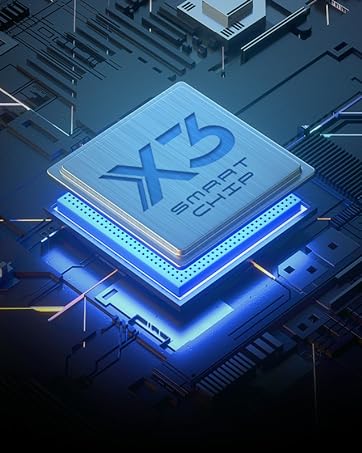
Draw with innovative Chip
Our first smart chip X3, create artistic digitizers that give you a feeling as real and natural as working with a traditional tool.
New Release
Deco Series
Artist Pro Series
Artist Drawing Monitor
XPPen Accessories
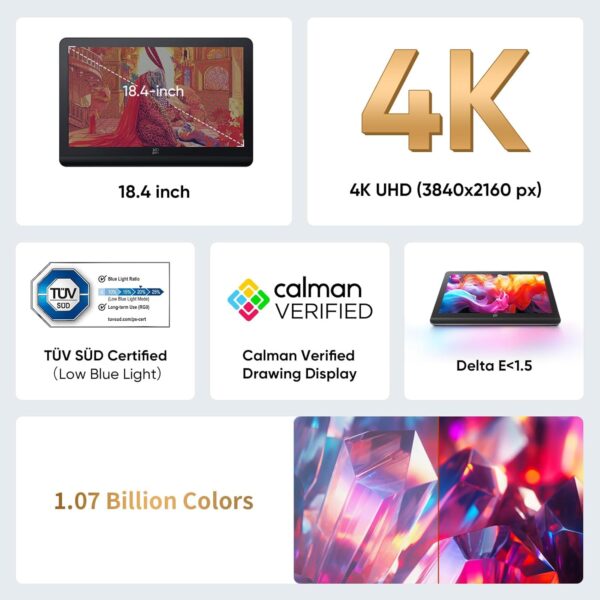
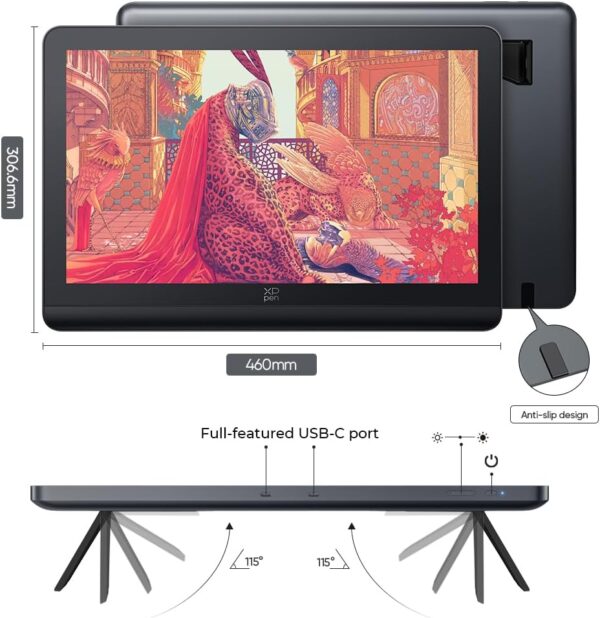
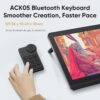
4K Ultravision Display: Experience stunning 4K UHD (3840×2160) resolution on an 18.4-inch screen. Designers can zoom in and out for editing without losing quality, ensuring that designs remain high-quality across various media, from large printed posters to HD screens. Artists can view multiple layers simultaneously, allowing for quick modifications, while illustrators can see every color detail in their work, refining characters and backgrounds for greater appeal Calman Verified Drawing Display: This drawing tablet is Calman-verified with a △E < 1.5 ,ensuring exceptional color accuracy. It covers multiple color gamuts, including 99.8% sRGB, 96% Adobe RGB, and 98% Display P3. 99.8% sRGB for web designers to ensure color consistency across browsers, 96% Adobe RGB for professional photographers to achieve accurate and vibrant prints during post-processing, and 98% Display P3 for film producers to enhancing color grading with richer hues and dynamic range in cinematic presentations. All while delivering 1.07 billion colors to elivering smooth gradients and more nuanced visual transitions to bring your creations to life One Paper Design Language: The full-laminated display eliminates visual gaps for a seamless drawing experience, closely mimicking actual paper. The AG etched glass offers excellent anti-glare properties, enhances clarity, and renders images with stunning precision. This design enables artists to sketch comfortably, whether in a café or at home. Additionally, the TÜV SÜD certified paper-like texture minimizes blue light exposure, reducing fatigue during long drawing sessions Dual Stylus, Double Smooth: Unleash your creativity with the X3 Pro Roller Stylus and lightweight X3 Pro Slim Stylus. The Slim Stylus features removable buttons to prevent accidental touches. With 16,384 pen pressure levels, 3g initial active force, and a 60° tilt function, enjoy a smooth drawing experience. You can turn off pen tilt in the driver settings, eliminating the need to adjust it for every brush. The pen case holds both styluses and includes 23 extra nibs—9 for the Slim Stylus, 7 standard, and 7 felt for the Roller Stylus ACK05 Wireless Shortcut Keyboard: Featuring a standout physical dial for comfortable rotation and precise feedback, this remote boasts ten customizable keys. Awarded the Good Design Award 2023, it supports Bluetooth 5.0, enhancing your workspace flexibility and efficiency Streamlined Setup and Flexibility: The dual reversible USB-C connections simplify installation and support HDMI input. This design allows professional artists to effortlessly switch between devices like MacBooks, Windows laptops, and tablets without compatibility issues. Both USB-C cables can connect your drawing display to your laptop or tablet, reducing the need for multiple cables and helping to keep your desktop organized. Additionally, the standard VESA adapter (75x75mm) offers versatile mounting options, while the wing-shaped stand ensures stable placement What You Get: H11 Pen Case *1(Built -in: X3 Pro Roller Stylus *1,X3 Pro Slim Stylus *1,Bluetooth Receiver for Wireless Shortcut Remote *1,Replaceable Button Cap for Slim Stylus *1 ,Standard Nib for Slim Stylus *4,Standard Nib for Roller Stylus *2,Felt Nib for Roller Stylus *2 ,Nib Extractor *1) ,3in1 Cable *1,USB-C to USB-C Cable *2,USB-C to USB-A Cable *1,PD Power Adapter *1,Wireless Shortcut Remote ACK05 *1 ,Drawing Glove*1 ,Cleaning Cloth *1,Pen Nibs Bag *1 (Built -in: Standard Nib for Slim Stylus *5,Standard Nib for Roller Stylus *5,Felt Nib for Roller Stylus *5) Exceptional Compatibility: The graphic tablet seamlessly works with a wide range of operating systems, including Windows 7 (or later), macOS 10.13 (or later), ChromeOS 88 (or later), Android (USB3.1 DP1.2), and Linux. It also supports a diverse array of popular digital art software, such as Adobe Photoshop, Illustrator, SAI, CorelDRAW, GIMP, Krita, MediBang, FireAlpaca, Toon Boom, Maya, and Blender 3D, ensuring that you can use it with the tools you prefer PLEASE NOTE: The 3 in 1 cable is included. It is NOT a standalone drawing tablet, you need to use it with your computer or laptop
Price: $899.99 (as of Apr 29, 2025 11:45:08 UTC – Details)
Customers say
Customers find the graphic tablet works well right out of the box and is easy to set up and use, with zero issues with installing drivers. They appreciate its build quality, with one customer noting its resilient and precise screen, and consider it a solid affordable option. The tablet receives positive feedback for its screen size, with one mentioning how it helps see minor details, and its drawing ability, particularly as a starter tablet for amateur artists. The color quality receives mixed reviews, with some praising the display while others find the color gamut not pro level.
9 reviews for XPPen 4K UHD Artist Pro 19 Gen2 Drawing Tablet with Screen, …
Cylla –
Impressive!
Off and on through out my years of using Huion, Wacom, and now XPpen. I have to say, I’m super impressed with XPpen!I recently bought a wacom one. Quickly regretted it. I had returned it. It’s response time was horrible, and wasn’t worth $300. I was about to buy a huion again (had one many years ago) and saw reviews that within 3 years, the display would stop working.Then I found x pen, and this model. The reviews seemed amazing but I didn’t get to hopeful.However, I’m glad I bought this!It’s response time is amazing. Easy to use. The size of the screen is perfect and the colors are beautiful. The pens are super comfortable to use.It came with a handful of nibs, and two pens that I flip between. I’m still getting used to the keypad as I never used one until I bought this.Software installation was easy! Wacom was a nightmare.Overall, I’m very happy with my purchase of this display. The price, seems fair. I bought it while on sale for black Friday.As a graphic editor, I appreciate this display and will stick with XPpen from now on. So long as they keep making quality products, I’ll keep coming back to buy from them.
Anthony –
Great tablet. Positive customer service experience.
1 week in review.I got this tablet last Friday and I’m rating it on the following Friday.Build quality – The tablet quality is acceptable for the price. The plastics used on the back may be cheap but are thick and feel sturdy and are functional. The same goes for the mount. The only complaint I have is that the main board/motherboard arrived slightly askew as the inputs such as the HDMI do not line up perfectly on the outside. The front has higher quality materials. The button actuation is good, the screen is resilient and precise.Driver – The driver is very lightweight which is a quality I usually prefer in my software. It isn’t boated with tons of options and distractions I’d never use. I can quickly use it how I want it. The ability to calibrate the pen position elimantes any paralax issues and allows you to adjust to your own preference.Customer Service – I had an issue 5 days in and was ready to be upset, but I got a valid solution soon after opening a ticket, and it was an issue on my end to boot.It comes with plenty of accesories. They didn’t skimp on the cables.I have tried Wacom’s intuos line and this feels far far better. I suppose its more comparible to an ipad pro and a samsung tab 3 which I’ve had both and returned as they were very underwhelming.At the end of the day, my expectastions were exceeded, and that is my metric for 5 stars. Its not perfect, but I didn’t expect it to be. I don’t rate 5 stars on expensive products lightly.I’d reccomend it to my friends.
Brandon –
Love This Thing
Wanted a new device to make my job easier. After many months and hesitation of taking the leap, I couldn’t be more happy with my choice/purchase. I spent months looking at reviews from different sites, not just Amazon. adding up to it in comparison to reviews that kept popping up on similar issues it came to my conclusion it was just people not taking the time to fix a simple issue. I had zero issues with installing drivers. I do have another big brand that I rarely used that I had to uninstall the drivers because it conflicted with the drivers of XP-pen, easy fix. You will need to calibrate it just like anything else. If your pointer is all over the place, its because you don’t have it set to just the monitor (XP-pen screen). You will need to get used to the setting and program the buttons to your liking. Just like anything you will need to learn it. It came well packaged and came with two pens, I feel like the pens are well built. I must note I was a little falsely disappointed cause the picture was dull, and was leaving pen marks on the surface, however, it was my own fault cause I failed to remove the screen film that was well placed, but after removing it, bright clean picture.Overall: Happy and loving the product and saving over 1k compared to other devices.Pros:AffordableWell PackagedComes with everything needed plus moreEasy to useNo Dead pixelsGood amount of sensitivity levelsBuilt well for the price tagDoes work with windows 10, I have windows 10 pro.Cons:Can’t think of any at the moment.Could have longer cables, had to move my computer from one side to the other cause it wouldn’t fit where I wanted to put it.Try it out.
Will D Ross –
Doubles as a monitor
This is a solid tablet that serves as a monitor for my Apple MacBook Air. By solid I mean that the frame is heavy and won’t wobble or shake when using it. The drawback to this is not as portable as a smaller version but I keep it on my desk most of the time. It works with my apps for photo editing and 3D printing right out of the box. And it can be used in place of a mouse or trackpad. It is much easier to use because I use the pen pen directly on the monitor as I would on a sheet of paper or canvas.. The quality is good for what I do, but a professional artist needs to become familiar with its limitations before making a decision.
Hasan –
Arrived quickly and also the packaging is great. First of all, I really recommend the Xp pen Artistic 22E Pro for all Drawing Artists & Animators.#The picture quality is really good.# Amazing Pen Pressure Sensitivity.# The large monitor gives a confident.# Shortcut Keys Help us to speed up our work.# Easy to Install.# Fast charging Pen & also the backup is great. I really wondered About the backup because I have charged my pen 20 days before but it’s still working. No words XP!!! U made it :)# Adjustable Stands makes me comfort but one & only issue is It’s not rotatable. For me I really need that.So totally the XP pen has fulfilled all of the promises.Feeling Happy!!!
Uri –
Llegó muy rápido, la caja estaba en perfectas condiciones y la tableta tiene un excelente tamaño. Ni tan grande como para no caber en el escritorio ni tan chica para batallar al dibujar.
Luxar –
Por el precio esta bien aunque hubiera preferido comprar la tablet 4k de 19 pulgadas que lanzaron 3 meses despues de mi compra. Cuesta casi lo mismo y tiene mas resolucion ):
Gisel Hernandez –
Cumple en precio calidadFácil de instalarLlegó en 1 semana en tiempo y formaEmpaquetado y protegidoBuena calidad de imagen y respuesta del lápizNo hubo errores ni fallas al instalar driversEstoy muy contenta con el producto, recomendadisimo 100/10UPDATED 2023Sigo CONTENTA con la compra. Jamás me a mostrado fallas. Los dos lapices aún funcionan.Mi único inconveniente es que el plástico protector de la pantalla ya está gastado y no encuentro repuestos. La verdad …mejor ni quitarselo hasta que se desintegre todito (igual sigo buscando repuestos) 🤭
Ernesto Arturo Gutiérrez González –
La combinación de ver y escribir le dan un gran peso y satisfacción al trabajo. Ya no hay restricciones por el tamaño de la pantalla te deja crear sin problema. Los programas de edicicón digital se ajustan perfectamente. Excelente experiencia en un gran lienzo.

















Cylla –
Impressive!
Off and on through out my years of using Huion, Wacom, and now XPpen. I have to say, I’m super impressed with XPpen!I recently bought a wacom one. Quickly regretted it. I had returned it. It’s response time was horrible, and wasn’t worth $300. I was about to buy a huion again (had one many years ago) and saw reviews that within 3 years, the display would stop working.Then I found x pen, and this model. The reviews seemed amazing but I didn’t get to hopeful.However, I’m glad I bought this!It’s response time is amazing. Easy to use. The size of the screen is perfect and the colors are beautiful. The pens are super comfortable to use.It came with a handful of nibs, and two pens that I flip between. I’m still getting used to the keypad as I never used one until I bought this.Software installation was easy! Wacom was a nightmare.Overall, I’m very happy with my purchase of this display. The price, seems fair. I bought it while on sale for black Friday.As a graphic editor, I appreciate this display and will stick with XPpen from now on. So long as they keep making quality products, I’ll keep coming back to buy from them.
Anthony –
Great tablet. Positive customer service experience.
1 week in review.I got this tablet last Friday and I’m rating it on the following Friday.Build quality – The tablet quality is acceptable for the price. The plastics used on the back may be cheap but are thick and feel sturdy and are functional. The same goes for the mount. The only complaint I have is that the main board/motherboard arrived slightly askew as the inputs such as the HDMI do not line up perfectly on the outside. The front has higher quality materials. The button actuation is good, the screen is resilient and precise.Driver – The driver is very lightweight which is a quality I usually prefer in my software. It isn’t boated with tons of options and distractions I’d never use. I can quickly use it how I want it. The ability to calibrate the pen position elimantes any paralax issues and allows you to adjust to your own preference.Customer Service – I had an issue 5 days in and was ready to be upset, but I got a valid solution soon after opening a ticket, and it was an issue on my end to boot.It comes with plenty of accesories. They didn’t skimp on the cables.I have tried Wacom’s intuos line and this feels far far better. I suppose its more comparible to an ipad pro and a samsung tab 3 which I’ve had both and returned as they were very underwhelming.At the end of the day, my expectastions were exceeded, and that is my metric for 5 stars. Its not perfect, but I didn’t expect it to be. I don’t rate 5 stars on expensive products lightly.I’d reccomend it to my friends.
Brandon –
Love This Thing
Wanted a new device to make my job easier. After many months and hesitation of taking the leap, I couldn’t be more happy with my choice/purchase. I spent months looking at reviews from different sites, not just Amazon. adding up to it in comparison to reviews that kept popping up on similar issues it came to my conclusion it was just people not taking the time to fix a simple issue. I had zero issues with installing drivers. I do have another big brand that I rarely used that I had to uninstall the drivers because it conflicted with the drivers of XP-pen, easy fix. You will need to calibrate it just like anything else. If your pointer is all over the place, its because you don’t have it set to just the monitor (XP-pen screen). You will need to get used to the setting and program the buttons to your liking. Just like anything you will need to learn it. It came well packaged and came with two pens, I feel like the pens are well built. I must note I was a little falsely disappointed cause the picture was dull, and was leaving pen marks on the surface, however, it was my own fault cause I failed to remove the screen film that was well placed, but after removing it, bright clean picture.Overall: Happy and loving the product and saving over 1k compared to other devices.Pros:AffordableWell PackagedComes with everything needed plus moreEasy to useNo Dead pixelsGood amount of sensitivity levelsBuilt well for the price tagDoes work with windows 10, I have windows 10 pro.Cons:Can’t think of any at the moment.Could have longer cables, had to move my computer from one side to the other cause it wouldn’t fit where I wanted to put it.Try it out.
Will D Ross –
Doubles as a monitor
This is a solid tablet that serves as a monitor for my Apple MacBook Air. By solid I mean that the frame is heavy and won’t wobble or shake when using it. The drawback to this is not as portable as a smaller version but I keep it on my desk most of the time. It works with my apps for photo editing and 3D printing right out of the box. And it can be used in place of a mouse or trackpad. It is much easier to use because I use the pen pen directly on the monitor as I would on a sheet of paper or canvas.. The quality is good for what I do, but a professional artist needs to become familiar with its limitations before making a decision.
Hasan –
Arrived quickly and also the packaging is great. First of all, I really recommend the Xp pen Artistic 22E Pro for all Drawing Artists & Animators.#The picture quality is really good.# Amazing Pen Pressure Sensitivity.# The large monitor gives a confident.# Shortcut Keys Help us to speed up our work.# Easy to Install.# Fast charging Pen & also the backup is great. I really wondered About the backup because I have charged my pen 20 days before but it’s still working. No words XP!!! U made it :)# Adjustable Stands makes me comfort but one & only issue is It’s not rotatable. For me I really need that.So totally the XP pen has fulfilled all of the promises.Feeling Happy!!!
Uri –
Llegó muy rápido, la caja estaba en perfectas condiciones y la tableta tiene un excelente tamaño. Ni tan grande como para no caber en el escritorio ni tan chica para batallar al dibujar.
Luxar –
Por el precio esta bien aunque hubiera preferido comprar la tablet 4k de 19 pulgadas que lanzaron 3 meses despues de mi compra. Cuesta casi lo mismo y tiene mas resolucion ):
Gisel Hernandez –
Cumple en precio calidadFácil de instalarLlegó en 1 semana en tiempo y formaEmpaquetado y protegidoBuena calidad de imagen y respuesta del lápizNo hubo errores ni fallas al instalar driversEstoy muy contenta con el producto, recomendadisimo 100/10UPDATED 2023Sigo CONTENTA con la compra. Jamás me a mostrado fallas. Los dos lapices aún funcionan.Mi único inconveniente es que el plástico protector de la pantalla ya está gastado y no encuentro repuestos. La verdad …mejor ni quitarselo hasta que se desintegre todito (igual sigo buscando repuestos) 🤭
Ernesto Arturo Gutiérrez González –
La combinación de ver y escribir le dan un gran peso y satisfacción al trabajo. Ya no hay restricciones por el tamaño de la pantalla te deja crear sin problema. Los programas de edicicón digital se ajustan perfectamente. Excelente experiencia en un gran lienzo.