TP-Link Tri-Band WiFi 7 BE10000 Whole Home Mesh System (Deco…
$599.99Original price was: $599.99.$449.99Current price is: $449.99.
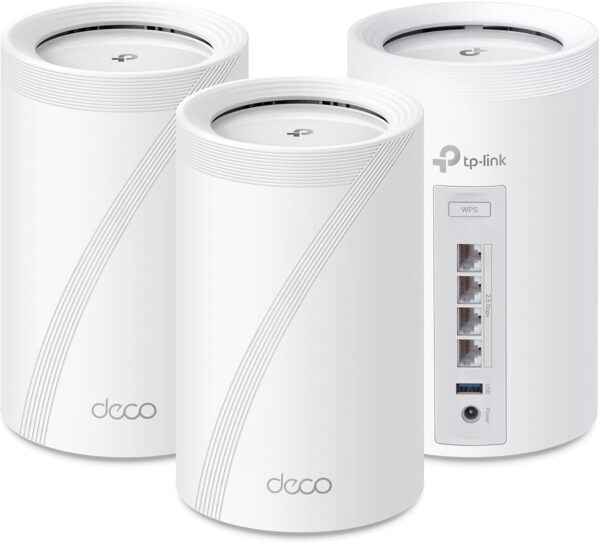
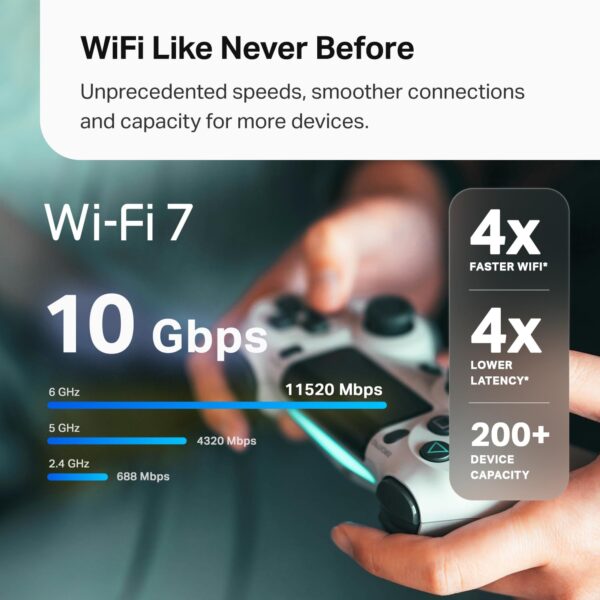
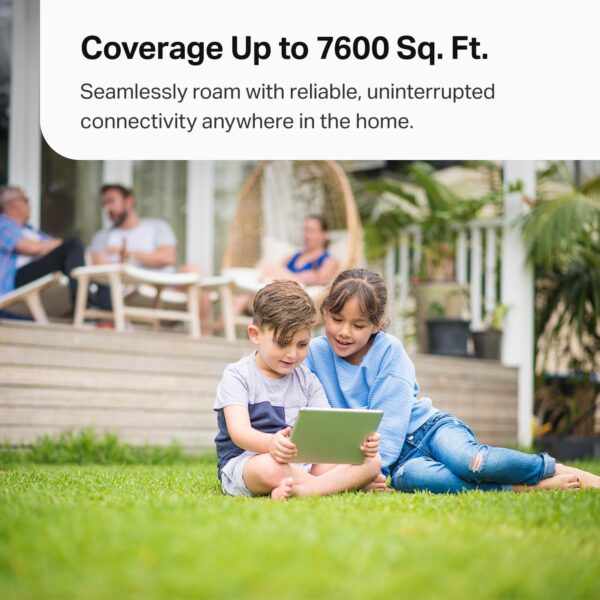
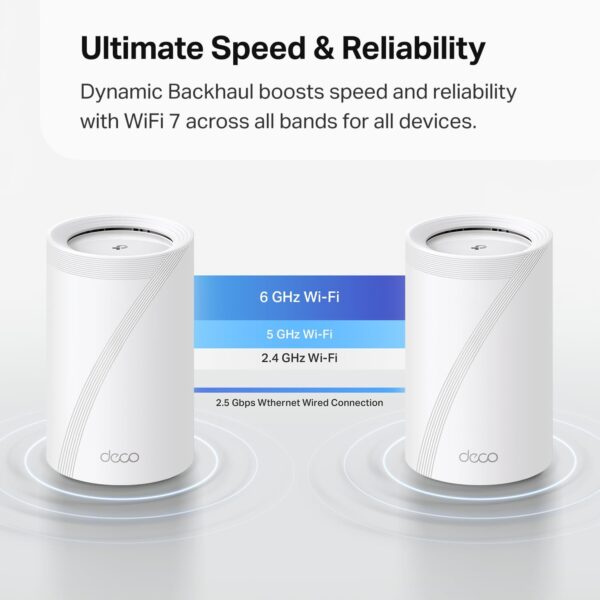
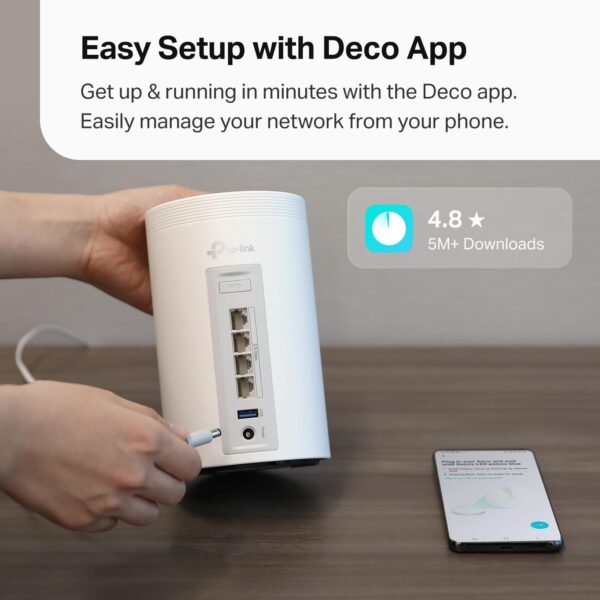
Upgrade your home Wi-Fi experience with the Deco BE10000 Whole-Home Mesh Router. This versatile device can extend the range of your existing mesh network or serve as a standalone router. It covers up to 7,600 sq. ft. with ultra-fast Wi-Fi 7, ensuring your entire home is blanketed under one optimized network. Say goodbye to frustrating dead zones and sluggish connections! †△ Perfect for 4K/8K streaming, lag-free gaming, and lightning-fast downloads, you’ll revel in speeds of up to 10 Gbps combined across the 6GHz, 5GHz, and 2.4GHz bands. What’s more, it effortlessly handles up to 200 connected devices, making it ideal for even the most demanding smart home setups. Additionally, the Deco BE10000 boosts multi-gig internet and wired connectivity options, featuring four 2.5 Gbps ports and one USB 3.0 port for unparalleled flexibility and blazing-fast data transfers. Setting up and managing your network is effortless with the TP-Link Deco app. Quickly establish your network, customize settings, and monitor network traffic metrics. Most importantly, keep your network and all connected devices safe with TP-Link’s premium network security service, HomeShield. Experience the future of home networking with Deco BE10000 – where speed, coverage, and security converge in one unbeatable package. 𝗦𝘂𝗽𝗲𝗿𝗰𝗵𝗮𝗿𝗴𝗲𝗱 𝗕𝗘𝟭𝟬𝟬𝟬𝟬 𝗧𝗿𝗶-𝗕𝗮𝗻𝗱 𝗪𝗶-𝗙𝗶 𝟳 𝗦𝗽𝗲𝗲𝗱𝘀: Features cutting-edge Wi-Fi 7 technology, including Multi-Link Operation, Multi-RUs, 4K-QAM, and 320 MHz channels. Delivers speeds of 5188 Mbps on 6GHz, 4324 Mbps on 5GHz, and 574 Mbps on 2.4GHz. 𝗩𝗮𝘀𝘁 𝗠𝗲𝘀𝗵 𝗖𝗼𝘃𝗲𝗿𝗮𝗴𝗲 & 𝗗𝗲𝘃𝗶𝗰𝗲 𝗖𝗮𝗽𝗮𝗰𝗶𝘁𝘆: The 3-pack mesh system covers up to a vast 7,600 sq.ft. and supports over 200 devices without compromising performance, ensuring seamless connectivity. 𝗙𝗼𝘂𝗿 𝟮.𝟱𝗚 𝗪𝗔𝗡/𝗟𝗔𝗡 𝗣𝗼𝗿𝘁𝘀: Includes four 2.5G WAN/LAN ports and a USB 3.0 port, making it an ideal choice for future-proofing your home network. 𝗗𝘂𝗮𝗹 𝗪𝗶𝗿𝗲𝗹𝗲𝘀𝘀 & 𝗪𝗶𝗿𝗲𝗱 𝗕𝗮𝗰𝗸𝗵𝗮𝘂𝗹: Leverages TP-Link’s self-developed technology to support simultaneous wireless and wired backhaul. Maximizes Wi-Fi 7 benefits for faster speeds and broader coverage. 𝗔𝗜-𝗗𝗿𝗶𝘃𝗲𝗻 𝗦𝗲𝗮𝗺𝗹𝗲𝘀𝘀 𝗥𝗼𝗮𝗺𝗶𝗻𝗴: The Deco Mesh creates a unified network with a single network name. Uses AI-Roaming technology for seamless streaming and optimal speeds, adapting through advanced algorithms and self-learning as you move throughout your home. 𝗧𝗣-𝗟𝗶𝗻𝗸 𝗛𝗼𝗺𝗲𝗦𝗵𝗶𝗲𝗹𝗱: Provides comprehensive network protection, robust parental controls, and real-time IoT security when you are at home or on the go. A safer internet experience enhances your smart living. 𝗩𝗣𝗡 𝗖𝗹𝗶𝗲𝗻𝘁 & 𝗦𝗲𝗿𝘃𝗲𝗿 𝗦𝘂𝗽𝗽𝗼𝗿𝘁: Enables home devices to access remote VPN servers without installing VPN software on each device. Supports simultaneous VPN and regular internet connections for enhanced security and flexibility. 𝗘𝗮𝘀𝘆 𝗦𝗲𝘁𝘂𝗽 & 𝗠𝗮𝗻𝗮𝗴𝗲𝗺𝗲𝗻𝘁: Quickly set up and manage your mesh router using the free Deco App, available for Android and iOS. 𝗩𝗼𝗶𝗰𝗲 𝗖𝗼𝗻𝘁𝗿𝗼𝗹: Control Deco BE63 using voice commands with Amazon Alexa or Google Assistant-enabled devices. 𝗘𝘅𝘁𝗲𝗻𝘀𝗶𝘃𝗲 𝗖𝗼𝗺𝗽𝗮𝘁𝗶𝗯𝗶𝗹𝗶𝘁𝘆: TP-Link Deco products seamlessly integrate to create a Mesh WiFi network. They are backward compatible with all WiFi generations and work with any internet service provider (modem required for most ISPs).
Price: $599.99 - $449.99 (as of Apr 30, 2025 20:12:45 UTC – Details)
Customers say
Customers find the WiFi mesh system easy to set up using the app directions and appreciate its high-speed capabilities and strong signal coverage throughout their homes. The system receives positive feedback for its mesh connectivity and app quality, with one customer noting seamless connectivity across three levels of their house. While customers consider it worth the price, connectivity experiences are mixed, with some reporting connection loss for no reason at all.
7 reviews for TP-Link Tri-Band WiFi 7 BE10000 Whole Home Mesh System (Deco…
Dazed & Confused –
Great Router & Mesh System So Far
Replaced an older ASUS mesh system that was a daily headache to deal with for a 4,500 sq ft house on 3 levels. Decided to give this TP-Link Tri-Band WiFi 7 BE10000 Whole Home Mesh System (Deco BE63) a go. Based on my constant problems with my ASUS mesh system, I was expecting this to be a pain from the start. I was dead wrong. This took about 30 minutes (if that) to set up and get going, start to finish, and it works flawlessly in this 3 level house. Whole house is covered, about 70 devices, and it hums right along with no issues. I’m very impressed (and relieved from not having to deal with that ASUS fiasco every day). I’ve only had this now for a couple of days, but everything is going well so far.PROS:1. Setup was simple and straightforward via the Deco app2. It worked perfectly out of the box – no hassles or hiccups3. Enough flexibility to set your router’s address and the DHCP range – if you have a lot of static IP addresses this makes transitioning to the TPLink much easier4. Speed is great – I haven’t benchmarked it, but it no one has noticed any lagging on any devices, multiple 4k TVs, etc.CONS:There are a couple of things -1. What idiot designed these power adapters? First, they’re HUGE. The way it has to be plugged in it takes up 3 outlets on a power strip. There’s no reason a power supply has to be that large. Second, the flimsy power cord is way, way too short. Someone really dropped the ball in design of the power supply and cord, particularly for a $450 router.2. The router has a USB port on it. (in fact each of the 3 units has the same 3 RJ45 and USB ports, but the USB for the main unit (the first one you set up and go through the installation) is the only one that you can hang an external drive off of and access it.)) I plugged an external hard drive into the USB port and was able to share it via the Deco app – the one catch is that you can’t just create a share name, such as “backup”. The router adds a “G” so that in order to use the share, it must be used as \your.router.ip.addressGbackup …not really a big deal, but I have many computers that run backups and I had to go reconfigure them to add the “G” to the network path.Other thoughts – You’re forced to use the Deco app on a phone or tablet to manage the network. There is a webpage interface, but it’s basic stuff only. That said, I’m pretty impressed with the Deco app itself – seems to have all of the needed features without a lot of stuff I don’t really use or need that I had in the ASUS and have seen in other router setups.There is a basic level of security included for free, but TP-Link offers additional tiers of security. I ended up adding the Security+ … but they also have a tier that includes advanced Parental Controls, VPN, Password Management, and several other things, for more money of course.So far so good on all of my IoT devices too.If you’re looking for a router system with great coverage and speed that you don’t have to muck around with daily, this appears to be a solid choice. I’ll update this review if anything changes.
Kenneth –
Finally! An amazing, hassle free mesh network!
After weeks of research, I settled on buying this TP-link mesh network wireless router dual pack after experiencing worsening connections with my existing ISP provided Plume pod mesh network, and boy could I have not made a better decision!Opening the box, I was presented with two nicely packaged and looking pods. The setup process of the device was a breeze thanks to the convenient companion app, and offered a lot of tech support through helpful walkthrough images and guides directly within the app itself!I originally intended to setup a wired Ethernet backhaul for both pods, but after rummaging around in my attic space I found out it would not be an easy task to run Ethernet cable from the second floor office space to the first floor living room or kitchen, so I ultimately opted to try out and stick with the WiFi 6Ghz Band backhaul the device allows to communicate between the two pods. Where our household does not have many 6Ghz capable devices yet, I opted to dedicate the 6Ghz band to be exclusive to backhaul communication only to keep that signal bandwidth free and unobstructed between the main node and mesh node which was easy to configure within the companion app. I also made sure to position both pods in such a way that they maintained a sort of ‘line of sight’ with one another through as little as possible walls/material as possible. The reason for this is that the 6Ghz band cannot penetrate or travel as far as 5Ghz or 2.4Ghz bands. Ultimately the devices only have two walls between them, and are only about 25-30 feet apart providing a full ‘strong’ network connection between the two devices as reflected through a status indicator within the app.So then I did what anyone else would and should do after setting up a new network and ran speed tests throughout my house. Now I have 1Gb cable internet through Armstrong, though usually would only pull 760-800Mb on a good day through Plum, and this was directly in the office by the main pod. Well with this new TP-Link system, I was pulling over 900Mb+ in my LIVING ROOM!! which completely blew my mind. I had never gotten maybe above 300Mb in my living room over the years I have lived in this house using Plume, and now I’m pulling more than I would in my office which is clear on the other side of my house. I’m just honestly shocked, and even more so where this is all being done through a wireless backhaul and I did verify my phone was communicating directly with the mesh node and not the main node at the time I ran the test. Not only this, but I’m consistently pulling less latency as well on my speed tests, I usually averaged around 22ms on ping, now I’m down to 17ms. Not a an huge or noticeable improvement obviously (22ms is already quite low for cable) but figured it should be communicated. Overall the quality and range of these devices are amazing!The app provides a lot of security and network configuration options for those who may be more of a power user as well. I was able to setup static IP addresses and forward needed ports to those addresses within minutes, and the settings were easy to navigate and access in logical locations on the companion app. The app also allows you to configure bandwidth priority in the event there is a certain device on your network that you want to have the most possible bandwidth available at any given time it asks for bandwidth over lesser priority devices.If you are in need of an affordable mesh network, especially one that is easy to setup and can be ran exclusively in wireless backhaul (within reasonable distance of spacing), then this is the router combo for you! I highly recommend the TP-Link!
MEF –
Buen producto pero les cuesta el manejo de dispositivos de domotica o IoT.los compré para manejar cerca de 120 equipos de iot (focos y luces), aunque la caja dice que puede con HASTA 200 dispositivos, la realidad es que con 2 de estos, no puedes conectarle más de 40 quizá 60.los devolví y compre el paquete de 3 y aún así sufren para poder conectar los 120. en terminos de navegación y distancia son buenos, si tienes mejor velocidad en cada rincón, pero la distancia a la que puedes conectar uno de otro, tampoco es tanta y menos, si hay paredes.
khaleifah –
Full hous coverage ,internet package full speed,good price.
Badr –
راوتر جميل ، اعطاني انتشار كويس وتغطية جيدة ، اذا فيه ملاحظة بعض الجوالات ما يتنقل بسهوله بين قطع الراوتر عند الذهاب من غرفة الى اخرى ، لا اعرف السبب هل من الراوتر او الجوالات ، اضافة ان الحماية المتطورة اصبحت باشتراك ؟
Carlos Jorge Cossío –
En verdad el Deco BE63 distribuye una velocidad igual a la contratada por tu proveedor de servicios de Internet, es un equipo increíble, la instalación muy fácil.
A. Sukru Mercan –
I have bought this router for my summer house to make the main router. My setup has 3 Deco M9 plus and 2 Deco P7. When I finished the setup I have noticed that it did not support internet speed feature on the router. Both M9plus and P7 were supporting this feature. It was essential for me to see the reliability of the internet provider. So I returned it back. Except from this problem its coverage area and the speed were perfect.













Dazed & Confused –
Great Router & Mesh System So Far
Replaced an older ASUS mesh system that was a daily headache to deal with for a 4,500 sq ft house on 3 levels. Decided to give this TP-Link Tri-Band WiFi 7 BE10000 Whole Home Mesh System (Deco BE63) a go. Based on my constant problems with my ASUS mesh system, I was expecting this to be a pain from the start. I was dead wrong. This took about 30 minutes (if that) to set up and get going, start to finish, and it works flawlessly in this 3 level house. Whole house is covered, about 70 devices, and it hums right along with no issues. I’m very impressed (and relieved from not having to deal with that ASUS fiasco every day). I’ve only had this now for a couple of days, but everything is going well so far.PROS:1. Setup was simple and straightforward via the Deco app2. It worked perfectly out of the box – no hassles or hiccups3. Enough flexibility to set your router’s address and the DHCP range – if you have a lot of static IP addresses this makes transitioning to the TPLink much easier4. Speed is great – I haven’t benchmarked it, but it no one has noticed any lagging on any devices, multiple 4k TVs, etc.CONS:There are a couple of things -1. What idiot designed these power adapters? First, they’re HUGE. The way it has to be plugged in it takes up 3 outlets on a power strip. There’s no reason a power supply has to be that large. Second, the flimsy power cord is way, way too short. Someone really dropped the ball in design of the power supply and cord, particularly for a $450 router.2. The router has a USB port on it. (in fact each of the 3 units has the same 3 RJ45 and USB ports, but the USB for the main unit (the first one you set up and go through the installation) is the only one that you can hang an external drive off of and access it.)) I plugged an external hard drive into the USB port and was able to share it via the Deco app – the one catch is that you can’t just create a share name, such as “backup”. The router adds a “G” so that in order to use the share, it must be used as \your.router.ip.addressGbackup …not really a big deal, but I have many computers that run backups and I had to go reconfigure them to add the “G” to the network path.Other thoughts – You’re forced to use the Deco app on a phone or tablet to manage the network. There is a webpage interface, but it’s basic stuff only. That said, I’m pretty impressed with the Deco app itself – seems to have all of the needed features without a lot of stuff I don’t really use or need that I had in the ASUS and have seen in other router setups.There is a basic level of security included for free, but TP-Link offers additional tiers of security. I ended up adding the Security+ … but they also have a tier that includes advanced Parental Controls, VPN, Password Management, and several other things, for more money of course.So far so good on all of my IoT devices too.If you’re looking for a router system with great coverage and speed that you don’t have to muck around with daily, this appears to be a solid choice. I’ll update this review if anything changes.
Kenneth –
Finally! An amazing, hassle free mesh network!
After weeks of research, I settled on buying this TP-link mesh network wireless router dual pack after experiencing worsening connections with my existing ISP provided Plume pod mesh network, and boy could I have not made a better decision!Opening the box, I was presented with two nicely packaged and looking pods. The setup process of the device was a breeze thanks to the convenient companion app, and offered a lot of tech support through helpful walkthrough images and guides directly within the app itself!I originally intended to setup a wired Ethernet backhaul for both pods, but after rummaging around in my attic space I found out it would not be an easy task to run Ethernet cable from the second floor office space to the first floor living room or kitchen, so I ultimately opted to try out and stick with the WiFi 6Ghz Band backhaul the device allows to communicate between the two pods. Where our household does not have many 6Ghz capable devices yet, I opted to dedicate the 6Ghz band to be exclusive to backhaul communication only to keep that signal bandwidth free and unobstructed between the main node and mesh node which was easy to configure within the companion app. I also made sure to position both pods in such a way that they maintained a sort of ‘line of sight’ with one another through as little as possible walls/material as possible. The reason for this is that the 6Ghz band cannot penetrate or travel as far as 5Ghz or 2.4Ghz bands. Ultimately the devices only have two walls between them, and are only about 25-30 feet apart providing a full ‘strong’ network connection between the two devices as reflected through a status indicator within the app.So then I did what anyone else would and should do after setting up a new network and ran speed tests throughout my house. Now I have 1Gb cable internet through Armstrong, though usually would only pull 760-800Mb on a good day through Plum, and this was directly in the office by the main pod. Well with this new TP-Link system, I was pulling over 900Mb+ in my LIVING ROOM!! which completely blew my mind. I had never gotten maybe above 300Mb in my living room over the years I have lived in this house using Plume, and now I’m pulling more than I would in my office which is clear on the other side of my house. I’m just honestly shocked, and even more so where this is all being done through a wireless backhaul and I did verify my phone was communicating directly with the mesh node and not the main node at the time I ran the test. Not only this, but I’m consistently pulling less latency as well on my speed tests, I usually averaged around 22ms on ping, now I’m down to 17ms. Not a an huge or noticeable improvement obviously (22ms is already quite low for cable) but figured it should be communicated. Overall the quality and range of these devices are amazing!The app provides a lot of security and network configuration options for those who may be more of a power user as well. I was able to setup static IP addresses and forward needed ports to those addresses within minutes, and the settings were easy to navigate and access in logical locations on the companion app. The app also allows you to configure bandwidth priority in the event there is a certain device on your network that you want to have the most possible bandwidth available at any given time it asks for bandwidth over lesser priority devices.If you are in need of an affordable mesh network, especially one that is easy to setup and can be ran exclusively in wireless backhaul (within reasonable distance of spacing), then this is the router combo for you! I highly recommend the TP-Link!
MEF –
Buen producto pero les cuesta el manejo de dispositivos de domotica o IoT.los compré para manejar cerca de 120 equipos de iot (focos y luces), aunque la caja dice que puede con HASTA 200 dispositivos, la realidad es que con 2 de estos, no puedes conectarle más de 40 quizá 60.los devolví y compre el paquete de 3 y aún así sufren para poder conectar los 120. en terminos de navegación y distancia son buenos, si tienes mejor velocidad en cada rincón, pero la distancia a la que puedes conectar uno de otro, tampoco es tanta y menos, si hay paredes.
khaleifah –
Full hous coverage ,internet package full speed,good price.
Badr –
راوتر جميل ، اعطاني انتشار كويس وتغطية جيدة ، اذا فيه ملاحظة بعض الجوالات ما يتنقل بسهوله بين قطع الراوتر عند الذهاب من غرفة الى اخرى ، لا اعرف السبب هل من الراوتر او الجوالات ، اضافة ان الحماية المتطورة اصبحت باشتراك ؟
Carlos Jorge Cossío –
En verdad el Deco BE63 distribuye una velocidad igual a la contratada por tu proveedor de servicios de Internet, es un equipo increíble, la instalación muy fácil.
A. Sukru Mercan –
I have bought this router for my summer house to make the main router. My setup has 3 Deco M9 plus and 2 Deco P7. When I finished the setup I have noticed that it did not support internet speed feature on the router. Both M9plus and P7 were supporting this feature. It was essential for me to see the reliability of the internet provider. So I returned it back. Except from this problem its coverage area and the speed were perfect.