Skylight Calendar: 15-inch Digital Calendar & Chore Chart, S…
$319.99
From the brand
Skylight
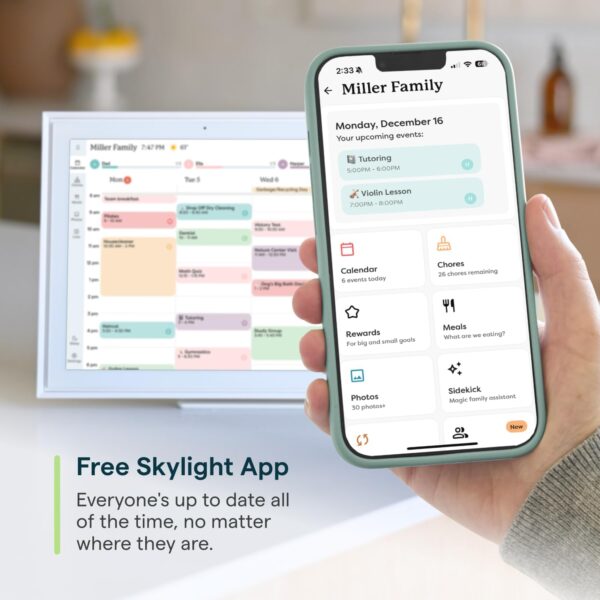
The All-In-One Smart Family Calendar: Finally, a WiFi-connected digital calendar + wall planner touchscreen display that will get the whole family organized and running smoothly. It’s never been easier to keep the whole family informed by assigning each member their own color and chores. Your go-to wall planner calendar 2023-2024 and beyond. Quick Set-Up: Simply plug it in, connect to Wi-Fi, and sync your calendars – all your events will automatically populate and sync. Add events or chores directly on the device or use the free to download mobile app. Compatible with Google Calendar, iCloud Calendar, Outlook Calendar, Cozi, and Yahoo. Beautiful and Intuitive HD Smart Display: 15” touchscreen can be mounted on the wall or displayed on its stand. The wall mount or tabletop option make this the perfect daily planner for the home or work planner to add to your office. Chore Chart and Meal Planning: Add, edit, and check off chores throughout the day. Encourage healthy habits and independence with the interactive Chore Chart, keeping routines in check for your 2025 calendar schedule. Display your family’s meal plan and avoid the daily “what’s for dinner?” question. Download the Free App to Stay Informed From Anywhere: Access and manage everything on your Skylight Calendar through the mobile app. The Basic Plan offers core features like Meal Plans, Sync Online Calendars, and a Chore Chart. For additional tools, the Plus Plan provides features such as Magic Import, Photo and Video Screensaver, and advanced Meal Planning, replacing the single-slot Dinner Plans for more flexible meal management.
Price: $299.99 - $319.99 (as of Apr 10, 2025 00:40:50 UTC – Details)
Customers say
Customers find the calendar easy to set up and use, connecting well with phones and integrating with Google Calendar. They appreciate its organization features for busy families and its ability to keep track of everyone’s plans, with the ability to view schedules for the entire week. The device is visually appealing, blending well with decor, and customers like that kids enjoy checking off chore tasks. They consider it worth the purchase and praise its functionality.
11 reviews for Skylight Calendar: 15-inch Digital Calendar & Chore Chart, S…
Brooklyn Doyle –
Amazing product 😁
The Skylight Calendar is a game-changer for busy households! This sleek, easy-to-use digital calendar keeps everyone organized with its simple touchscreen interface and instant updates. No more messy paper calendars or missed appointments—just clear, shared scheduling at a glance. The large display is perfect for kitchens or entryways, and the automatic syncing via email makes setup a breeze. A must-have for families and professionals alike. Also we upgraded our device to the Skylight Calendar Plus and it has the ability to display photos and videos which is a wonderful feature and it is really special seeing all the memories on display.
Crystal –
Skylight Calendar Review – A Real Win for Our Neurodivergent Household
Skylight Calendar Review – A Real Win for Our Neurodivergent HouseholdAs a mom managing a household of three, two dogs, and a neurodivergent daughter with a busy therapy schedule, the Skylight Calendar has become an essential part of our daily routine. It’s more than just a digital calendar—it’s a centralized, visual tool that keeps our whole family on track.What I love:• Syncs Seamlessly: It pulls from Google Calendar and allows color-coding by person, which is perfect for quickly seeing who’s doing what and when.• Visual Routine Support: Having the calendar on display helps Kaleigh stay grounded and understand what’s coming next in her day, which makes transitions smoother for everyone.• Caregiver Coordination: With two caregivers, it’s been a huge help in making sure we’re always on the same page. No more “Did you take her?” or “What time is therapy?” confusion.• Hour Tracking: It’s great for tracking all of Kaleigh’s allotted hours for services—something that used to slip through the cracks when life got hectic.Heads up:You do need the correct Skylight app for this calendar to work properly. The app is actually pretty cool—it lets you add and view events from anywhere—but it could definitely use a few more user-friendly features and smoother navigation.Bottom line:I’m really happy with it so far. It’s made a noticeable difference in how we manage time, routines, and responsibilities. If you’re caring for a child with special needs or just have a busy household, the Skylight Calendar is 100% worth the investment.
Viviana –
Love This Digital Calendar!
This digital calendar is simply wonderful! I absolutely loved it. Honestly, it’s incredibly practical and has so many features that I enjoy using every day. One of the best parts is how interactive it is—not just for me, but for the whole family. Even the kids love being involved and staying up to date with everything that’s happening. It keeps us all connected and organized in such a simple and fun way. Thank you for this amazing tool! I would 100% recommend it to anyone.
Joe Newberry –
Awesome Calendar for the Family
Title: Game-Changer for Family Organization!I can’t say enough about the Skylight Calendar—it has completely revolutionized how my family stays organized! The 15-inch touchscreen display is sleek and the perfect size to mount on our kitchen wall. It’s easy to read at a glance and blends beautifully with our decor.The interactive chore chart is a brilliant feature. My kids love tapping off their completed tasks, which has made them more engaged in household responsibilities (and saved me from constant reminders). It’s a win-win!Syncing family schedules is a breeze. The calendar seamlessly integrates with our existing apps, and the updates are instant. Everyone knows where they need to be and when—no more missed appointments or double bookings.The touchscreen interface is intuitive and super responsive. Even the not-so-tech-savvy members of my family picked it up quickly. And the customization options for colors and alerts let us tailor it exactly to our needs.Overall, this product is worth every penny. If you’re looking to bring order to the chaos of family life, the Skylight Calendar is the solution you’ve been waiting for. Highly recommend!
Elliott –
Good for Families, But Needs Improvement
I gave this digital calendar 4 stars because it works well for managing our busy family with four kids, making our lives more organized and convenient. However, it does have some drawbacks:Event Assignment Issue: When syncing Google and Outlook calendars, it treats them as separate calendars or users, instead of grouping events under one person, which makes organization more challenging.Unnecessary Subscription Icons: The calendar displays many subscription feature icons, which I don’t plan to use, and they clutter the interface.Multi-Day Event Display: Events spanning multiple days are split into separate daily entries instead of showing as one continuous event.Limited Value for Price: While it’s helpful, the features feel limited for the $300+ price tag.Overall, it’s a useful tool for family management, but it could be much better with some updates to functionality and design.
Amazon Customer –
Great Product
The Skylight calendar is a life changer. I am able to access my schedule from my phone, and it automatically syncs to my calendar. The calendar app is user-friendly and super easy to use. The app will also import your recipes (by just inserting the web link for the recipe) so I am able to see and plan my daily meals. I also find the list feature super helpful because me and any of my family members will put grocery items and I can now stop asking someone to send a picture of my grocery list because the list is always on my phone on the app. This device is well worth the money, and I can’t wait to continue to find ways to use it.
Magson –
Very goodBout extremely expensive
Sam Lloyd-Jones –
Got this to manage mine, my wife’s and my children’s rather hectic life atm. Managing work and school and clubs etc. It is fantastic, easy to use and even my wife who is terrible with technology really likes it. The kids are obsessed with the chores feature to get the rewards we set. Also being able to send it a screen shot of our work schedules and it automatically putting it on is brilliant. Haven’t tried the meal planning yet but something we’re going to look at next week. Also very very easy to wall mount and only needs 2 screws. So far 10/10 but it is early days
That Van Isle Life –
This thing is honestly great, and support is awesome.Previously, we’ve been using one of those parent calendars with the cute drawings on each month. Have been for years. It has sufficed, but things would get missed.Their mom would have things planned and we’d forget to add it to the calendar for her so that we didn’t accidentally plan something on her weekend.This has not only allowed me to share our calendar in a better way, their mom can add things as well, and see all the things that are going on in our children’s lives.I recently paid for Pro, which is honestly a fantastic price. Just enough to be able to justify buying as a single parent, and it’s awesome.My daughter went to town on her chores, and went above and beyond to earn extra stars to reach her goal for buying shiny rocks (Gorilla Tag – VR). I haven’t been able to get these kids to actually do their chores properly ever. Now, they’re all over making sure it’s good so they earn those rewards.It’s something they can see and work towards. Unlike just dumping some cash into a savings account for them that they’ll not ever see, nor know if it is their money our mine that’s getting used for a purchase.They redeem their stars, and get their selected reward.Honestly, this thing, even at the smaller size, is a game changer. Our calendars are all synced. My ex-wife can see anything I add to our “Family Calendar”, but not anything from my own. The kids love sending pictures they have to it, and watching them show up and scroll across, and are actually hitting their chores for the first time ever.Buy this. You will not be disappointed unless you don’t know how to work technology, and get mad that it didn’t just start adding your stuff when you turned it on… lol
Mei –
Sturdy design, looks sleek and love the functionality of it. I love that it automatically syncs the changes or additions from your phone. I have an iPhone and to add my iCal I needed to manually copy and paste the URL into the app after making the particular calendar “Public”. I’m sure that would make more sense if you had the item in front of you. It did not sync the way that was suggested in the app but the help centre suggested doing it the way that ended up working for me.We rely heavily on visual cues in our home so I am looking forward to less frustration from having an updated calendar literally in your face. You have the option of mounting it on a wall or on the frame.You can also make a shopping list or other lists that can be shared amongst the household. You can access the list on your phone through the app or on the device itself. Any additions or changes update on all synced devices. It has an option for meal prep and photo sharing at an extra cost. There is also a chores list but I’m not so sure how that will go in a practical sense because you either need to view the chores list or the calendar. It could be a huge hint for some people tho haha. There is an alarm function and you can change the text size etc.It needs wifi to work. It came with a selection of wall plugs which was good as I was concerned about a US based plug.The physical setup of the device was really easy with good instructions. Well worth every penny!
Sven –
Hilft uns sehr den familienalltag zu planen und organisieren. Eine noch nahtlosere google-integration wäre für die Zukunft wünschenswert












Brooklyn Doyle –
Amazing product 😁
The Skylight Calendar is a game-changer for busy households! This sleek, easy-to-use digital calendar keeps everyone organized with its simple touchscreen interface and instant updates. No more messy paper calendars or missed appointments—just clear, shared scheduling at a glance. The large display is perfect for kitchens or entryways, and the automatic syncing via email makes setup a breeze. A must-have for families and professionals alike. Also we upgraded our device to the Skylight Calendar Plus and it has the ability to display photos and videos which is a wonderful feature and it is really special seeing all the memories on display.
Crystal –
Skylight Calendar Review – A Real Win for Our Neurodivergent Household
Skylight Calendar Review – A Real Win for Our Neurodivergent HouseholdAs a mom managing a household of three, two dogs, and a neurodivergent daughter with a busy therapy schedule, the Skylight Calendar has become an essential part of our daily routine. It’s more than just a digital calendar—it’s a centralized, visual tool that keeps our whole family on track.What I love:• Syncs Seamlessly: It pulls from Google Calendar and allows color-coding by person, which is perfect for quickly seeing who’s doing what and when.• Visual Routine Support: Having the calendar on display helps Kaleigh stay grounded and understand what’s coming next in her day, which makes transitions smoother for everyone.• Caregiver Coordination: With two caregivers, it’s been a huge help in making sure we’re always on the same page. No more “Did you take her?” or “What time is therapy?” confusion.• Hour Tracking: It’s great for tracking all of Kaleigh’s allotted hours for services—something that used to slip through the cracks when life got hectic.Heads up:You do need the correct Skylight app for this calendar to work properly. The app is actually pretty cool—it lets you add and view events from anywhere—but it could definitely use a few more user-friendly features and smoother navigation.Bottom line:I’m really happy with it so far. It’s made a noticeable difference in how we manage time, routines, and responsibilities. If you’re caring for a child with special needs or just have a busy household, the Skylight Calendar is 100% worth the investment.
Viviana –
Love This Digital Calendar!
This digital calendar is simply wonderful! I absolutely loved it. Honestly, it’s incredibly practical and has so many features that I enjoy using every day. One of the best parts is how interactive it is—not just for me, but for the whole family. Even the kids love being involved and staying up to date with everything that’s happening. It keeps us all connected and organized in such a simple and fun way. Thank you for this amazing tool! I would 100% recommend it to anyone.
Joe Newberry –
Awesome Calendar for the Family
Title: Game-Changer for Family Organization!I can’t say enough about the Skylight Calendar—it has completely revolutionized how my family stays organized! The 15-inch touchscreen display is sleek and the perfect size to mount on our kitchen wall. It’s easy to read at a glance and blends beautifully with our decor.The interactive chore chart is a brilliant feature. My kids love tapping off their completed tasks, which has made them more engaged in household responsibilities (and saved me from constant reminders). It’s a win-win!Syncing family schedules is a breeze. The calendar seamlessly integrates with our existing apps, and the updates are instant. Everyone knows where they need to be and when—no more missed appointments or double bookings.The touchscreen interface is intuitive and super responsive. Even the not-so-tech-savvy members of my family picked it up quickly. And the customization options for colors and alerts let us tailor it exactly to our needs.Overall, this product is worth every penny. If you’re looking to bring order to the chaos of family life, the Skylight Calendar is the solution you’ve been waiting for. Highly recommend!
Elliott –
Good for Families, But Needs Improvement
I gave this digital calendar 4 stars because it works well for managing our busy family with four kids, making our lives more organized and convenient. However, it does have some drawbacks:Event Assignment Issue: When syncing Google and Outlook calendars, it treats them as separate calendars or users, instead of grouping events under one person, which makes organization more challenging.Unnecessary Subscription Icons: The calendar displays many subscription feature icons, which I don’t plan to use, and they clutter the interface.Multi-Day Event Display: Events spanning multiple days are split into separate daily entries instead of showing as one continuous event.Limited Value for Price: While it’s helpful, the features feel limited for the $300+ price tag.Overall, it’s a useful tool for family management, but it could be much better with some updates to functionality and design.
Amazon Customer –
Great Product
The Skylight calendar is a life changer. I am able to access my schedule from my phone, and it automatically syncs to my calendar. The calendar app is user-friendly and super easy to use. The app will also import your recipes (by just inserting the web link for the recipe) so I am able to see and plan my daily meals. I also find the list feature super helpful because me and any of my family members will put grocery items and I can now stop asking someone to send a picture of my grocery list because the list is always on my phone on the app. This device is well worth the money, and I can’t wait to continue to find ways to use it.
Magson –
Very goodBout extremely expensive
Sam Lloyd-Jones –
Got this to manage mine, my wife’s and my children’s rather hectic life atm. Managing work and school and clubs etc. It is fantastic, easy to use and even my wife who is terrible with technology really likes it. The kids are obsessed with the chores feature to get the rewards we set. Also being able to send it a screen shot of our work schedules and it automatically putting it on is brilliant. Haven’t tried the meal planning yet but something we’re going to look at next week. Also very very easy to wall mount and only needs 2 screws. So far 10/10 but it is early days
That Van Isle Life –
This thing is honestly great, and support is awesome.Previously, we’ve been using one of those parent calendars with the cute drawings on each month. Have been for years. It has sufficed, but things would get missed.Their mom would have things planned and we’d forget to add it to the calendar for her so that we didn’t accidentally plan something on her weekend.This has not only allowed me to share our calendar in a better way, their mom can add things as well, and see all the things that are going on in our children’s lives.I recently paid for Pro, which is honestly a fantastic price. Just enough to be able to justify buying as a single parent, and it’s awesome.My daughter went to town on her chores, and went above and beyond to earn extra stars to reach her goal for buying shiny rocks (Gorilla Tag – VR). I haven’t been able to get these kids to actually do their chores properly ever. Now, they’re all over making sure it’s good so they earn those rewards.It’s something they can see and work towards. Unlike just dumping some cash into a savings account for them that they’ll not ever see, nor know if it is their money our mine that’s getting used for a purchase.They redeem their stars, and get their selected reward.Honestly, this thing, even at the smaller size, is a game changer. Our calendars are all synced. My ex-wife can see anything I add to our “Family Calendar”, but not anything from my own. The kids love sending pictures they have to it, and watching them show up and scroll across, and are actually hitting their chores for the first time ever.Buy this. You will not be disappointed unless you don’t know how to work technology, and get mad that it didn’t just start adding your stuff when you turned it on… lol
Mei –
Sturdy design, looks sleek and love the functionality of it. I love that it automatically syncs the changes or additions from your phone. I have an iPhone and to add my iCal I needed to manually copy and paste the URL into the app after making the particular calendar “Public”. I’m sure that would make more sense if you had the item in front of you. It did not sync the way that was suggested in the app but the help centre suggested doing it the way that ended up working for me.We rely heavily on visual cues in our home so I am looking forward to less frustration from having an updated calendar literally in your face. You have the option of mounting it on a wall or on the frame.You can also make a shopping list or other lists that can be shared amongst the household. You can access the list on your phone through the app or on the device itself. Any additions or changes update on all synced devices. It has an option for meal prep and photo sharing at an extra cost. There is also a chores list but I’m not so sure how that will go in a practical sense because you either need to view the chores list or the calendar. It could be a huge hint for some people tho haha. There is an alarm function and you can change the text size etc.It needs wifi to work. It came with a selection of wall plugs which was good as I was concerned about a US based plug.The physical setup of the device was really easy with good instructions. Well worth every penny!
Sven –
Hilft uns sehr den familienalltag zu planen und organisieren. Eine noch nahtlosere google-integration wäre für die Zukunft wünschenswert