Plugable Thunderbolt 4 Dock with 100W Charging, Thunderbolt …
$299.95Original price was: $299.95.$199.95Current price is: $199.95.
Product Description
The video showcases the product in use.The video guides you through product setup.The video compares multiple products.The video shows the product being unpacked. hero-video Merchant Video
The Do It All Dock
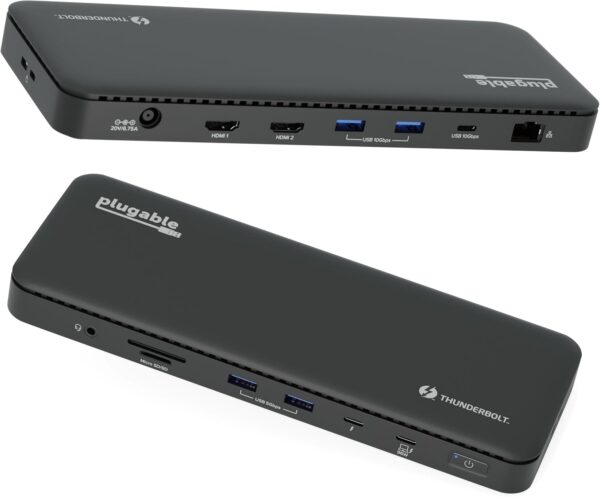
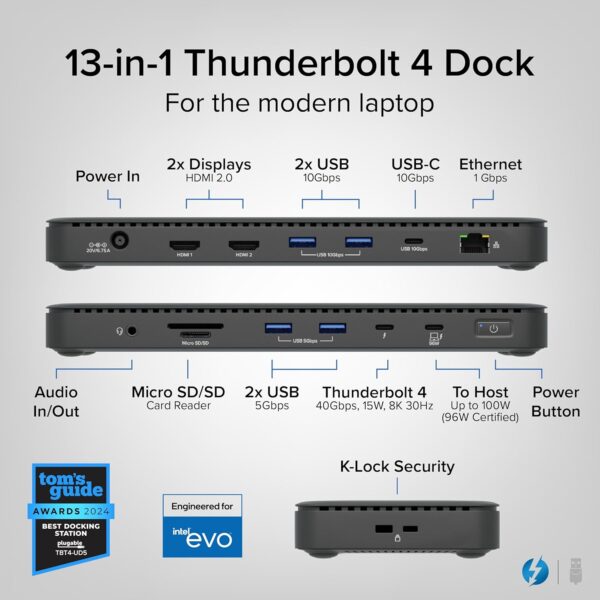
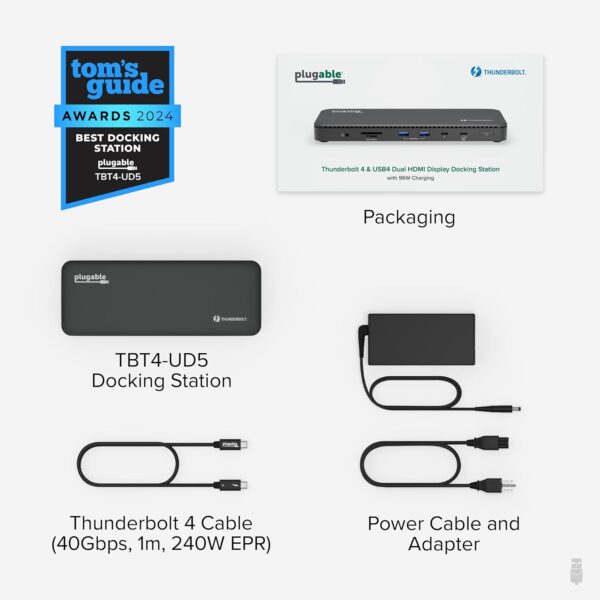
A “do-it-all” dock, the Thunderbolt Certified TBT4-UD5 Plugable Docking Station was awarded The Best Thunderbolt Docking Station by Tom’s Guide (Tom’s Guide, July 23rd, 2024), as well as verified for the Intel Engineered for Evo program. It stands out as a versatile and powerful hub for modern workspaces. Its robust design includes an array of 13 ports, catering to a wide range of connectivity needs.
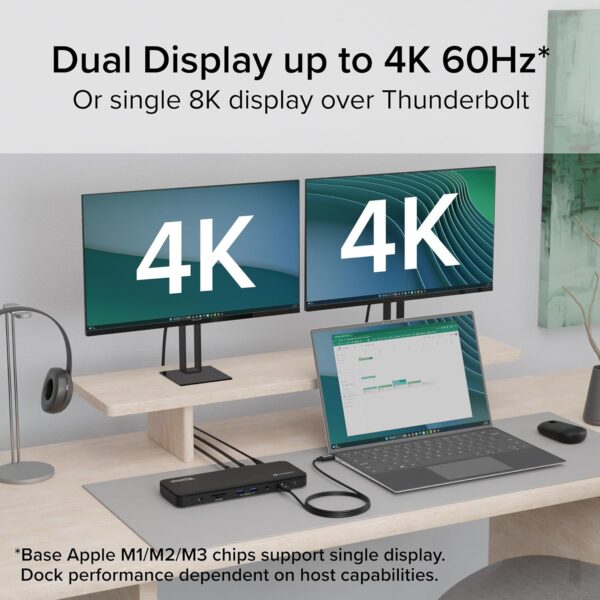
Starting with the 40Gbps Thunderbolt 4 host port, this HDMI docking station offers plenty of bandwidth to support two HDMI ports, each capable of driving dual 4K 60Hz displays. A downstream 40Gbps Thunderbolt 4 port is also included to provide high-speed connectivity for advanced Thunderbolt-based applications, such as fast storage devices. Use it to alternatively charge your phone or tablet with up to 15W of power or power an external display such as a USB-C monitor at up to 8K.
In addition to Thunderbolt 4 to HDMI display options, the TBT4-UD5 boasts a USB-C port with a 10Gbps transfer rate, ideal for quick file transfers and efficient data management. There are also 4x USB ports (2x 10Gbps, 2x 5Gbps), perfect for connecting a variety of peripherals like keyboards, mice, and external drives. Throw in SD and Micro SD slots, a combo audio jack, Gigabit Ethernet, and a slot for a K lock, and this setup ensures that users can create a powerful and integrated workstation.
Speaking of power, the TBT4-UD5 Thunderbolt and USB4 dock packs it in with up to 100W Power Delivery (96W certified) — more than enough for most power-hungry laptops. Especially useful in business and education environments, the Plugable TBT4-UD5 Docking Station delivers exceptional functionality and convenience.
It’s worth noting on Mac systems, dual display is only supported on M1 Pro/Max, M2 Pro/Max, M3 Pro/Max, base model M4/Pro/Max, and M4 Air systems. Base model M1, M2, and M3 systems will only support one extended display.
8K Ready
Dual HDMI
Crystal-clear, multitasking efficiency with dual 4K displays for enhanced productivity
96W Certified
Powerful Power Delivery
Charging rate adjusts for optimal rate to your laptop, up to 100W
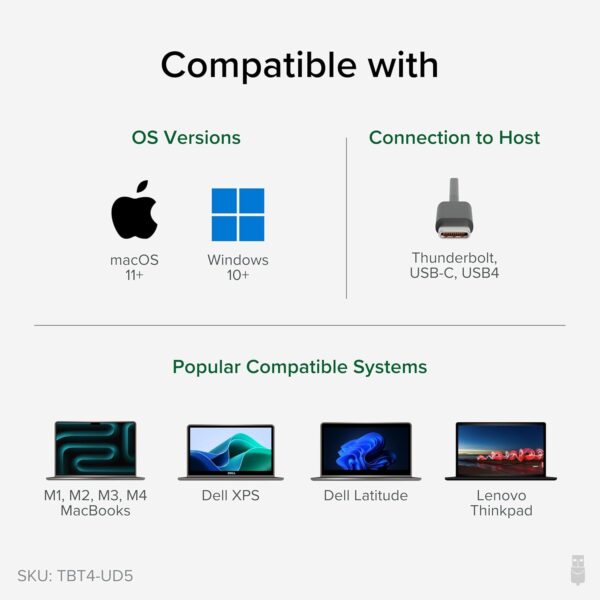
Windows 10+ Thunderbolt 4 or USB4 systems. On Mac, Pro, or Max CPU and all M4 supports dual display
1 Dual 4K
2 100W Charging
3 13 Ports
4 Compatibility
Compatibility
System Requirements Host computer with a built-in Thunderbolt 4 or USB4 port running Windows 10 and later or macOS 11 and later. Drivers Typically no driver installation is necessary on the host computer in order to use the TBT4-UD5. On Windows, it may be necessary to manually install an Ethernet adapter driver to ensure the best performance. Mac Configuration Apple Mac systems with an Apple processor must have an M1 Pro/M1 Max, M2 Pro/M2 Max, M3 Pro/M3 Max, Base M4, M4 Pro, M4 Max processor in order to use dual displays. Base M1, M2, or M3 Macs only support a single display. Display Capabilities The TBT4-UD5 has two built-in HDMI video outputs each supporting up to a maximum 4K resolution at up to a maximum 60Hz refresh rate. Dual display capability is dependent on the host system’s external display capability. Up to 8K video is supported via downstream front Thunderbolt port (total maximum of two displays possible).
Is this dock compatible with M1 / M2 / M3 / M4 Macs?
Yes, with important qualifications. Macs with ‘base’ M1, M2, or M3 processors will support only one external display. Macs with M1 Pro, M1 Max, M2 Pro, M2 Max, M3 Pro, and M3 Max, Base M4, M4 Pro, M4 Max processors will support two external displays.
Will this dock work with any laptop?
Hosts with a Thunderbolt 4 port or USB4 port on Windows 10 or later or macOS 11 or later can support up to 2 displays. Thunderbolt 3 and USB-C hosts can support up to 1 display. Computers that do not meet these requirements are not supported.
Why should I choose a dock with extra downstream Thunderbolt ports?
Downstream Thunderbolt ports provide maximum flexibility of the devices that can be used. If the host has a Thunderbolt 4 port, then the downstream Thunderbolt port will work as a Thunderbolt 4 port; allowing Thunderbolt 4, 3 and USB-C connections.
Do I need to install software or drivers in order to use the TBT4-UD5?
No software or driver installation is necessary in order to use the TBT4-UD5.
Are my monitors compatible with the TBT4-UD5 docking station?
HDMI monitors are supported at up to a maximum of 4K 60Hz. For monitors with USB-C ports, up to a single 8K display can be connected via the front Thunderbolt port. Note, a total maximum of two displays can only be connected at a single time.
Compare Plugable Products
Add to Cart
Add to Cart
Add to Cart
Add to Cart
Laptop Compatibility
USB4, Thunderbolt 4 / 3, USB-C
USB4, Thunderbolt 4 / 3, USB-C
USB4, Thunderbolt 4 / 3, USB-C
USB4, Thunderbolt 4 / 3, USB-C
Laptop Charging
100W (96W Certified)
100W (98W Certified)
100W (96W Certified)
100W (96W Certified)
Max # of Displays
Up to 2x
4x *Thunderbolt 4 Windows
Up to 2x
Up to 2x
Downstream Thunderbolt Ports
1
N/A
2
N/A
# of Ports
13
16
11
14
Ethernet
1.0 Gigabit
2.5 Gigabit
2.5 Gigabit
1.0 Gigabit
Media Card Reader
Full-size SD and microSD
Full-size SD and microSD
Full-size SD
Full-size SD and microSD
Orientation
Horizontal
Vertical or Horizontal
Horizontal
Vertical or Horizontal
Thunderbolt Certified: Awarded Best Thunderbolt Dock 2024 by Tom’s Guide and a part of the Intel Engineered for Evo program, this 13 port, dual 4K 60Hz HDMI, 8K-ready dock offers up to 100W Power Delivery (96W Certified), 40Gbps Thunderbolt 4 upstream and downstream ports Dual 4K Display: Boost productivity with dedicated screens for your current project and email; Enjoy crisp and clear visuals at up to 4K 60Hz via 2x HDMI ports or one screen up to 8K via 1x Thunderbolt port Thunderbolt 4 Dock: Experience the power of Thunderbolt 4 certification with downstream front Thunderbolt 4 port; Benefit from up to 40Gbps data transfer, 15W charging for devices, or drive a single 8K display Compatibility: Fully compatible with Windows 10 or later systems supporting Thunderbolt 4 or USB4; On Mac systems, dual display is only supported on M1 Pro/Max, M2 Pro/Max, M3 Pro/Max, and base model M4/Pro/Max systems Enhance Your Setup: Elevate your workspace with seamless connectivity and high-performance features; Transform your workflow with this Thunderbolt docking station
Price: $299.95 - $199.95 (as of Apr 28, 2025 08:30:44 UTC – Details)
Customers say
Customers find the docking station works well with Macs and appreciate its power delivery capabilities, with one customer specifically noting the 100W Power Delivery feature. Moreover, the device supports dual monitors and offers good value for money. However, the functionality and port connectivity receive mixed feedback – while some report it works correctly, others mention it stops working, and while it has all necessary ports, some report issues with HDMI functionality. Additionally, customers express concerns about power consumption, with reports of the device breaking within the first year of use.
9 reviews for Plugable Thunderbolt 4 Dock with 100W Charging, Thunderbolt …
whitefishblue –
Working well
Executive summary: I am a happy customer and I think this is a good product.Update to review: After I left the below review, Plugable’s support team reached out to me. We were in the process of doing some troubleshooting and my next task was to install and run a diagnostic tool. There is a sensitive data concern (work laptop) so I am hesitant to download the tool. The hub seemed to reset earlier this week (not sure if it was something the hub did or if Windows might have done an update that impacted it). Since then it has been working perfectly. Plugable’s support team was good to work with. I have never been certain whether this was a problem with the hub or the laptop. But since it is working now and I am confident in their support team, I am changing this to five stars.Original review: I am using this hub to run two monitors (while also using laptop display, so total of three screens) and a USB camera. Initially I was impressed – setup was easy and it somehow guessed the position of my monitors (one portrait and one landscape) so well that the mouse moved flawlessly from screen to screen. Since then…not so much. Every day it’s a gamble. It inconsistently assigns the ID, so most days I have to go into Display Settings, swap the positioning, redo the portrait/landscape settings, and adjust the layout. Today my USB camera won’t work. I have downloaded current drivers for the monitors and removed all old monitor settings, but cannot get the hub to consistently assign the monitor IDs. Sometimes I can cycle the power on it a couple times until it guesses the monitor assignments correctly. Sometimes after a sleep/wake on the laptop, the hub will only recognize one monitor. Rebooting the laptop solves that one. While I realize this could be a problem on the laptop end, it is a brand new Lenovo ThinkPad and I’ve had no other trouble with it. Two stars, since once the daily irritation is passed, it does work well for the rest of the day.
Chuck Ellis –
The Plugable Thunderbolt dock can handle ALOT.
I drive my entire Home Theater system from my Samsung Win11 laptop. It provides the freedom to have multiple windows open at one time, with for example TV (youtube.tv) open to a Celts game but muted, Apple Music playing atmos-level music thru the AVR in another window, and email and other apps open as well. The key to the setup is the Plugable Thumderbolt 4 dock, which means only 1 item even needs to be plugged into the laptop (the thunderbolt connector, which charges as well as data-distributes). The dock connects in the ethernet, HDMI 2.1 in via thunderbolt, HDMI 2.1 out to the AVR, USB-C to a 4 TB SSD (for media library), USB-A out for bluetooth mouse/keyboard, a DVD drive, and a 4K google cast box to xmit directly from my smartphone or tablet. Works very well.
Mike G. –
Works well, but requires large, heavy power adapter
I like the capabilities of this dock. It works well with the TB3 port on my MacBook Air M3. I only rated it 4 stars because of the very large, heavy power adapter, which prevents it from being travel-friendly. Plugable should be able to provide a much smaller, lighter power adapter for this dock using USB-C rather than a proprietary power connector (for example, something like the Plugable 140W USB C Charger).
BK –
It works, but make sure of your ports, if your having a problem,
About this dock,I find it a good value.No external dongles needed for HDMI connectivity.96/100w charging.Ethernet.Long story for those fighting with docks…So I’m up to 3 Docks I tried, and until this morning, none of them worked correctly.My the laptop maker tech support said, yup need to use the TB4 port for it to work.If not working, call the makers of the dock.I sent back the first one (from another company), factory tech support said, either not compatible, or broken, we aren’t sure.only 1 monitor, ethernet would constantly disconnect. No charging.So back it went.Others had the same complaints, so figure, get a refund and move on.So bought the TBT4-UD5 from Plugable from amazon.My laptop “maker” sent me the graphics of where the TB4 port was/which one, and no it didn’t work correctly.Only 1 monitor, but ethernet did, charging didn’t.Updating drivers, new cable, nothing worked.After sitting back, I finally tried the USB-C 3.2 port that is not s/b to work (according to my laptop “maker”).But it did. Called my Laptop “maker”, and finally the one tech support worker sent me the motherboard manual, and my laptop “maker’s” info of what port is which and what did what was WRONG!What they called TB4 port, was really the USB-C 3.2 for power and for 1 display.port.Which did gave me ethernet and 1 monitor via the dock.Plugged the TBT4-UD5 into the real TB4 port, what the laptop maker called the USB-C 3.2 for data use, no power… gave me the 2 displays the dock promised, ethernet and charging !.. I was happy about the 2 displays and ethernet… charging too was a bonus. (I was originally told by my maker, ok, so it’s not, to be expected with powerful laptops.)In the middle of banging my head against the desk, I bought a “lesser” model from plugable from amazon, USB4-HUB3A , it now works too.Plugable tried to help me, no one questioned the port, I shared the laptop company’s port designation.So not their fault. Plugable tried a few things, one reason I bought the lower cost dock of there, get another one of their OEM TB4 cables which was suspect.So lesson is, if its not working, really have to dive deep into the ports and what they do, and which one is which.
Martin –
The first unit I received had been previously opened had minor damage, most probably because I received a previously opened box from Amazon. I reported the issue to Plugable which responded within the hour saying that they would ship me a new unit to replace it. I received the unit on the next day.Installed the dock and it worked right away with two 4K monitors, a wired GigE connection, a streaming camera and many other USB connection, both USB 3.0 and USB2.0 with no issue at all. I use two different laptop with that dock, a MSI and a Lenovo device and they both work great. OS is Windows 11 and both Laptop have Intel CPU (Ultra core 7 and i7) with the integrated ARC GPU. I guess it probably helps to make sure the latest driver are installed (the one from Intel directly, not the one comming with a manufacturer/Windows install) and to make sure the laptop supports Thunderbolt 4.I previously had tried these setup with lower cost USB-C 2.0 dock devices but always had problem, especially trying to get two 4K display working. At best, I was only getting one display to work in 4K and the USB bandwidth was greatly affected (forget fluid video streaming from the webcam!). No an issue with this unit.As far as durability is concerned, it is hard to tell after only a couple of days of usage. I can say that it look sturdy and very well built. I don’t think there should be an issue on that side but only time will tell!Others reported the unit as becoming hot. On my side I can say that yes it heats up but nothing out of the ordinary, especially with a unit running at that speed and providing 96W.
Athira –
I had mouse stuttering problem on my external monitors connected with the xps-14-9440 Dell laptop. I tried many solutions like updating the device manager configuration, buying a wired mouse, new powered USB hub..etc to fix this but the annoying problem never went away. After researching a lot, finally invested in this Thunderbolt dock and it worked like a charm. This is an awesome docking station.
Simon-Pierre P. –
Everything works perfectly, I was able to get 144Hz on both of my 2k displays thanks to thunderbolt 4. The only reason I gave it 4 stars is because of the absolutely dumb front-port thunderbolt 4 on which you connect the notebook. Front ports should be for temporary devices like USB keys etc, rear ports are for permanent devices such as keyboard/mouse etc…Having the MAIN notebook port in the front, the ONLY port that will surely be plugged at all time, is an absolute shame. I don’t understand how a full team of people can agree on such a stupid design, instead of having all the permanent wires nicely hidding behind the dock and under your desk, you will have a dumb thunderbolt wire plugged at the very front of the dock and doing a 180 degrees to join the other cables behind the dock, this idiocy is beyond stupid. Otherwise the technology itself is awesome.
Jamie D –
This dock has plenty of ports and all the right features for a modern laptop + peripheral setup. The first unit had an issue but Plugable support sent a replacement with in a couple of days and everything has been working great since.
Sparky Steve –
Plugged into my Lenovo E16 – works flawlessly and really cleaned up my desktop! I have two monitors and all my peripherals plugged into this.









 Get Connected
  Works With



whitefishblue –
Working well
Executive summary: I am a happy customer and I think this is a good product.Update to review: After I left the below review, Plugable’s support team reached out to me. We were in the process of doing some troubleshooting and my next task was to install and run a diagnostic tool. There is a sensitive data concern (work laptop) so I am hesitant to download the tool. The hub seemed to reset earlier this week (not sure if it was something the hub did or if Windows might have done an update that impacted it). Since then it has been working perfectly. Plugable’s support team was good to work with. I have never been certain whether this was a problem with the hub or the laptop. But since it is working now and I am confident in their support team, I am changing this to five stars.Original review: I am using this hub to run two monitors (while also using laptop display, so total of three screens) and a USB camera. Initially I was impressed – setup was easy and it somehow guessed the position of my monitors (one portrait and one landscape) so well that the mouse moved flawlessly from screen to screen. Since then…not so much. Every day it’s a gamble. It inconsistently assigns the ID, so most days I have to go into Display Settings, swap the positioning, redo the portrait/landscape settings, and adjust the layout. Today my USB camera won’t work. I have downloaded current drivers for the monitors and removed all old monitor settings, but cannot get the hub to consistently assign the monitor IDs. Sometimes I can cycle the power on it a couple times until it guesses the monitor assignments correctly. Sometimes after a sleep/wake on the laptop, the hub will only recognize one monitor. Rebooting the laptop solves that one. While I realize this could be a problem on the laptop end, it is a brand new Lenovo ThinkPad and I’ve had no other trouble with it. Two stars, since once the daily irritation is passed, it does work well for the rest of the day.
Chuck Ellis –
The Plugable Thunderbolt dock can handle ALOT.
I drive my entire Home Theater system from my Samsung Win11 laptop. It provides the freedom to have multiple windows open at one time, with for example TV (youtube.tv) open to a Celts game but muted, Apple Music playing atmos-level music thru the AVR in another window, and email and other apps open as well. The key to the setup is the Plugable Thumderbolt 4 dock, which means only 1 item even needs to be plugged into the laptop (the thunderbolt connector, which charges as well as data-distributes). The dock connects in the ethernet, HDMI 2.1 in via thunderbolt, HDMI 2.1 out to the AVR, USB-C to a 4 TB SSD (for media library), USB-A out for bluetooth mouse/keyboard, a DVD drive, and a 4K google cast box to xmit directly from my smartphone or tablet. Works very well.
Mike G. –
Works well, but requires large, heavy power adapter
I like the capabilities of this dock. It works well with the TB3 port on my MacBook Air M3. I only rated it 4 stars because of the very large, heavy power adapter, which prevents it from being travel-friendly. Plugable should be able to provide a much smaller, lighter power adapter for this dock using USB-C rather than a proprietary power connector (for example, something like the Plugable 140W USB C Charger).
BK –
It works, but make sure of your ports, if your having a problem,
About this dock,I find it a good value.No external dongles needed for HDMI connectivity.96/100w charging.Ethernet.Long story for those fighting with docks…So I’m up to 3 Docks I tried, and until this morning, none of them worked correctly.My the laptop maker tech support said, yup need to use the TB4 port for it to work.If not working, call the makers of the dock.I sent back the first one (from another company), factory tech support said, either not compatible, or broken, we aren’t sure.only 1 monitor, ethernet would constantly disconnect. No charging.So back it went.Others had the same complaints, so figure, get a refund and move on.So bought the TBT4-UD5 from Plugable from amazon.My laptop “maker” sent me the graphics of where the TB4 port was/which one, and no it didn’t work correctly.Only 1 monitor, but ethernet did, charging didn’t.Updating drivers, new cable, nothing worked.After sitting back, I finally tried the USB-C 3.2 port that is not s/b to work (according to my laptop “maker”).But it did. Called my Laptop “maker”, and finally the one tech support worker sent me the motherboard manual, and my laptop “maker’s” info of what port is which and what did what was WRONG!What they called TB4 port, was really the USB-C 3.2 for power and for 1 display.port.Which did gave me ethernet and 1 monitor via the dock.Plugged the TBT4-UD5 into the real TB4 port, what the laptop maker called the USB-C 3.2 for data use, no power… gave me the 2 displays the dock promised, ethernet and charging !.. I was happy about the 2 displays and ethernet… charging too was a bonus. (I was originally told by my maker, ok, so it’s not, to be expected with powerful laptops.)In the middle of banging my head against the desk, I bought a “lesser” model from plugable from amazon, USB4-HUB3A , it now works too.Plugable tried to help me, no one questioned the port, I shared the laptop company’s port designation.So not their fault. Plugable tried a few things, one reason I bought the lower cost dock of there, get another one of their OEM TB4 cables which was suspect.So lesson is, if its not working, really have to dive deep into the ports and what they do, and which one is which.
Martin –
The first unit I received had been previously opened had minor damage, most probably because I received a previously opened box from Amazon. I reported the issue to Plugable which responded within the hour saying that they would ship me a new unit to replace it. I received the unit on the next day.Installed the dock and it worked right away with two 4K monitors, a wired GigE connection, a streaming camera and many other USB connection, both USB 3.0 and USB2.0 with no issue at all. I use two different laptop with that dock, a MSI and a Lenovo device and they both work great. OS is Windows 11 and both Laptop have Intel CPU (Ultra core 7 and i7) with the integrated ARC GPU. I guess it probably helps to make sure the latest driver are installed (the one from Intel directly, not the one comming with a manufacturer/Windows install) and to make sure the laptop supports Thunderbolt 4.I previously had tried these setup with lower cost USB-C 2.0 dock devices but always had problem, especially trying to get two 4K display working. At best, I was only getting one display to work in 4K and the USB bandwidth was greatly affected (forget fluid video streaming from the webcam!). No an issue with this unit.As far as durability is concerned, it is hard to tell after only a couple of days of usage. I can say that it look sturdy and very well built. I don’t think there should be an issue on that side but only time will tell!Others reported the unit as becoming hot. On my side I can say that yes it heats up but nothing out of the ordinary, especially with a unit running at that speed and providing 96W.
Athira –
I had mouse stuttering problem on my external monitors connected with the xps-14-9440 Dell laptop. I tried many solutions like updating the device manager configuration, buying a wired mouse, new powered USB hub..etc to fix this but the annoying problem never went away. After researching a lot, finally invested in this Thunderbolt dock and it worked like a charm. This is an awesome docking station.
Simon-Pierre P. –
Everything works perfectly, I was able to get 144Hz on both of my 2k displays thanks to thunderbolt 4. The only reason I gave it 4 stars is because of the absolutely dumb front-port thunderbolt 4 on which you connect the notebook. Front ports should be for temporary devices like USB keys etc, rear ports are for permanent devices such as keyboard/mouse etc…Having the MAIN notebook port in the front, the ONLY port that will surely be plugged at all time, is an absolute shame. I don’t understand how a full team of people can agree on such a stupid design, instead of having all the permanent wires nicely hidding behind the dock and under your desk, you will have a dumb thunderbolt wire plugged at the very front of the dock and doing a 180 degrees to join the other cables behind the dock, this idiocy is beyond stupid. Otherwise the technology itself is awesome.
Jamie D –
This dock has plenty of ports and all the right features for a modern laptop + peripheral setup. The first unit had an issue but Plugable support sent a replacement with in a couple of days and everything has been working great since.
Sparky Steve –
Plugged into my Lenovo E16 – works flawlessly and really cleaned up my desktop! I have two monitors and all my peripherals plugged into this.