PicassoTab X Drawing Tablet • No Computer Needed • Drawing A…
$199.95Original price was: $199.95.$179.95Current price is: $179.95.
From the brand
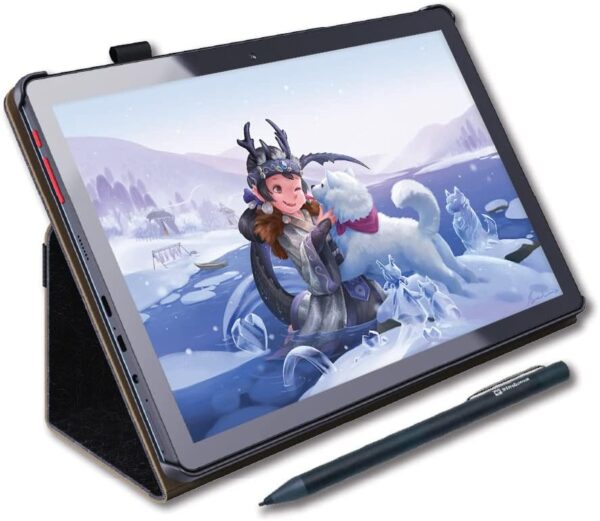
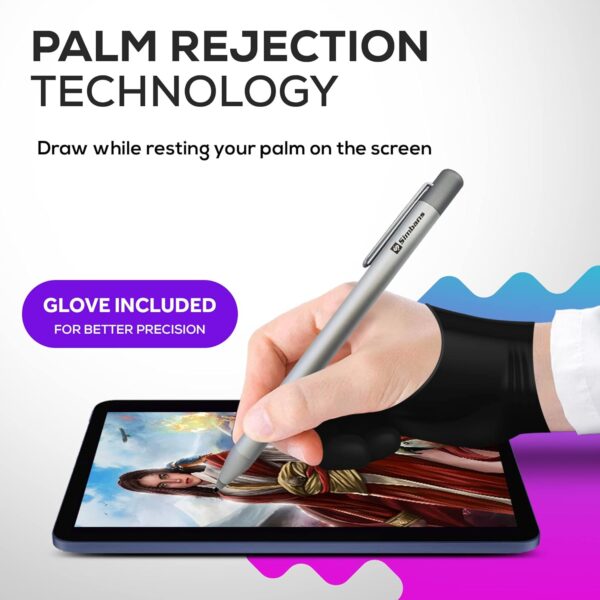
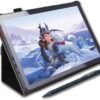
DRAW or TAKE NOTES: The most affordable Art tablet that comes with a pen and a pre-installed Drawing and Animation apps for those who want to draw, make animations or take notes in the classroom. 4 FREE BONUS ITEMS inside the box: a high-quality tablet case, Drawing Glove, universal power adaptor and pre-installed screen protector; a total value of $50 inside the box along with 10-inch tablet and an active Pen. CLEAR SCREEN, LARGE DISK and a SUPERIOR CPU: The High power MediaTek Quad-core processor boosts the multitasking abilities of the tablet. The IPS HD screen resolution makes crystal clear pictures and the 64GB disk allows you to download thousands of free apps from the play store. CONNECTIVITY: Connect your tablet to your home WIFI network and you can take this tablet wherever you are; your entertainment always goes with you. Link your tablet to the TV via the micro HDMI port and view your movies on the large screen. One of the best tablets for watching movies on Netflix, playing games and browsing the internet. GPS and the USB type-c port provides all the connectivity options you want. CERTIFIED QUALITY and WORRY-FREE PURCHASE: Certification by GMS, FCC and CE standards provides you the peace of mind for safety as well as quality. Comes with 1-year warranty, along with best customer service our support staff can provide. You can contact us for any questions that you may have.
Price: $199.95 - $179.95 (as of May 06, 2025 09:45:52 UTC – Details)
Customers say
Customers find the tablet to be a powerful drawing device that’s easy to use and set up, particularly suitable for beginners, and consider it an affordable option for young artists. The device comes with a protective case and glove, and customers appreciate its quality and value for money. However, the functionality receives mixed feedback – while the pen works well, some report it stops working after a few months. Moreover, the battery life is concerning, with customers reporting it takes forever to charge, and the screen durability is poor, with multiple customers noting it breaks easily.
8 reviews for PicassoTab X Drawing Tablet • No Computer Needed • Drawing A…
KittenBitten –
Awesome Tablet, Good Service!
When I received the tablet I immediately had a problem with the stylus / pen. It would work fine but stop a few seconds after using it. I contacted the seller and they walked me through troubleshooting. After that did not work, they had me send them a picture of the stylus I received and issued me a replacement which I received in a few days. The replacement stylus works great!Really Happy with Included:- Leather Case- Adaptors & C cable for charging- Screen protector installed- Pressure sensitivity is great- Three drawing apps included, one more for graphics, another for art/painting; and one for animation is a free version, it requires an upgrade to remove ads but I love how simple it is!It is a little slow to get started but is a standalone (no computer needed) once in the drawing apps it works great, I could not believe the level of detail the pressure produces and I’m super excited to start using this regularly, plus it is an Android device so if I wanted to I could use it for a lot more than just drawing!Will update if necessary but all is well for now!
Crystal (^.^)/ –
It’s better than I thought it would be!
I love everything about it so far. I didn’t realize that it essentially is like an android phone (with the app layout etc). This made the transition super smooth. Everything was very easy to find and navigate. It booted up very quickly. Screen protector already installed. There is a pretty little case that comes with it. There was a AAAA (heck I never knew there was such a thing) battery already in the pen with an extra one. Not sure how long the battery life lasts but I will update as I’ll be using it a lot. Will see how long the tablet batter lasts after constant usage. I believe it turns off after a few minutes of no usage. I’m sure that can be adjusted. I only purchased it for the drawing. I will upgrade the sketchbook software that was installed but will also add ArtRage.Pros* It comes with a charger (US as well as UK/Europe included) with usb cord (to use in outlet or charge by computer).* If I wanted to, there is a HDMI port to connect to a computer or tv* You can add additional memory.*Pen sensitivityCons/Other Thoughts* Technically I don’t have any or have not found anything yet. It doesn’t seem to get too hot when on for a very long time.*This is my first tablet so I can’t say if it is heavy? I have arthritis and carpal tunnel so I wouldn’t be the best judge of it anyway. But it doesn’t seem too bulky or ridiculous.*Compared to a wacom pen, the included pen certainly has some weight to it. I do not believe it is plastic, it is perhaps metal or something similar (from unscrewing the cap) when taking a look at the battery.*The pen is not thick in width but it’s not super skinny either. I honestly do not know what to compare it too. Umm…..If you need specifics feel free to ask and I’ll try and get more information. It seems larger (in width) than a regular pen or pencil (is round/no edges). So maybe the size of a normal pen + maybe another 15%? Again I may just be way off but the weight and size does not mess with it’s balance or my accuracy drawing. ***edit I don’t know what I was thinking. It is the same size as a default wacom pen. Sorry. :D*The tip/nib seems similar to the default one that comes with a Wacom. I will update later to see how long it takes me to wear it down. To my knowledge there were no extras but I’m sure the universal default ones will fit. I will say that I will order more of the flex tip nibs.Edit 3/3/18I’ve been playing with it everyday. Again I only use it for the drawing/reference photo capability and not for internet browsing etc. Revisited the default art program (with the 99 cent upgrade) so am still learning about the different tools/features. I did figure out ow to change the background color. I haven’t quite found a way of adding color/painting that I like yet though. I now switch between it and ArtRage. The little daily challenges are also fun (can upload to deviantart).I tried replacing the default pen nib with one of the other ones I am more familiar with (fits wacom pens). Nope. It did not work. I am still researching if you can only use the default pen/nib or if there is a way to make any styluses work. I feel that the default is too hard. I like the smoother/felt type ones. Even with the screen protector on the tablet as well as drawing lightly, a person will scratch the crap out of the thing. I’m sure it would be easy just to put another screen protector on but hopefully you catch my drift.I did go ahead and purchase rechargeable AAAA batteries and an adapter as I use it for drawing a lot. Battery power overall? I can’t gauge yet. I have ot remember to pay attention. I charge it all the way and also turn the screen off if I’m not drawing (ie sneaking in some drawing at work but a call comes in). I have noticed after disabling or force stopping programs the battery power is better. I also have wifi off because again, I’m just using it strictly for drawing purposes.
Jan Fosse –
Great product, amazing service!!!!
This tablet is fantastic! Exactly what you’re looking for in a first drawing tablet. Great functionality, responsive screen, accurate colors. It comes with everything you need to get started in digital art – actually considering buying a second one for another family member so they stop stealing mine lol!!More importantly, their customer service is top notch! Had an issue with a component that stopped working, and I was quite surprised to find the customer service/tech support to be patient and friendly!! I ended up sending the tablet in for replacement parts, and when they discovered supply chain issues would delay my particular repair, they immediately sent out a replacement tablet that is in perfect order. Would recommend this product as much for the customer service as for the product itself!
Lisa –
Unfortunately the tablet had an error, but the customer support helped out on short notice and the problem was solved.
Andrea Doney –
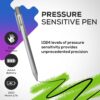
I absolutely love this tab, both as a casual user and as an artist too. If you’re a beginner in digital arts, or just want to have a multipurpose tab to make your studies, work and daily life easier, I can only recommend it and let’s be honest, it’s has a really good price too. Just think about how the price of the pen for a Surface of an Ipad costs you half of the price of this tab and pen together. Not to mention the cool free faux-leather case, what’s a nice extra.The tab and the pen are very responsive, I did intensive testing and there was no lag issue at all – except for the one time when the battery died, but that’s the case when you have a pen with battery after all.The pen is very similar to a Surface pen, has a nice heavy and solid feeling. There are no express keys on the pen, but for me, that’s a plus, as I always ended up hitting them accidentally on a Surface Pen. The pressure sensitivity (1048) is also pretty nice for an affordable price range, although in some apps you have to set it first, after you’ve done that, it’s doing a great job.I really enjoyed sketching on it, as the pinch zoom and rotation by using two fingers are making drafting so much easier and faster. The surface feels glassy though, so it doesn’t feel like working on a paper or other drawing monitors with an applied papery surface, but that’s something you can get used to – digital art will always feel differently than traditional, so getting used to it is a given, to begin with. There’s also a screen protector already applied to the screen, that can get a little scratchy, but no worries, if you remove it, the real surface of the tab is scratch-safe.Another pro that it has a long battery life, and there was no overheating issue (I had this problem with the Windows Surface) so working with it feels really reliable.All in all, as an artist who travels a lot, but still has to focus on work on the road, this tablet will be a very useful companion.
Angel –
We had this about two years now. Superb. Thank you.
Angela Best –
I bought this tablet well in advance of Christmas and wrapped it up for my son.About two months after I purchased it on Christmas Day he opened it and was over the moon excited!It worked great! Easy set up and (so parent win!) great battery life.Until early March when all of a sudden it wouldn’t charge. Life was busy, as it tends to be, and we just kid of put it to the side for another my month. At this point in mid March my son expressed that he missed his drawing tablet and it occurred to me…crap I bought it what 5 months ago…..I am going to have to beg and fight and I will be lucky if this company I haven’t ever heard of will even consider fixing it.Well boy was I wrong. I sent an email with basically the story above, bought early used for a couple months and now we can get it to turn on or charge.The customer service was above and beyond amazing. I son was sent a new tablet and he is as happy as can be!The customer service was not just fast and efficient it was pleasant!I will not hesitate to buy any other product they sell and I have already shared this same tablet link with a mom friend who purchased for her daughter.So all in all great product but things can happen, rest assured these guys stand behind their products and super easy to work with.
Me gustaria que me devolvieran mi dinero. No es un medicasp, es un Folcres lo que me llegó. No es lo que pedí –
Con esta tableta he hecho la mayoría de mis dibujos. Me encanta. Yo la uso con El Ibispaint con todas las herramientas desbloqueadas. Si quieren que les pase la App, me pueden escribir por Instagram estoy como @el.kampa
















KittenBitten –
Awesome Tablet, Good Service!
When I received the tablet I immediately had a problem with the stylus / pen. It would work fine but stop a few seconds after using it. I contacted the seller and they walked me through troubleshooting. After that did not work, they had me send them a picture of the stylus I received and issued me a replacement which I received in a few days. The replacement stylus works great!Really Happy with Included:- Leather Case- Adaptors & C cable for charging- Screen protector installed- Pressure sensitivity is great- Three drawing apps included, one more for graphics, another for art/painting; and one for animation is a free version, it requires an upgrade to remove ads but I love how simple it is!It is a little slow to get started but is a standalone (no computer needed) once in the drawing apps it works great, I could not believe the level of detail the pressure produces and I’m super excited to start using this regularly, plus it is an Android device so if I wanted to I could use it for a lot more than just drawing!Will update if necessary but all is well for now!
Crystal (^.^)/ –
It’s better than I thought it would be!
I love everything about it so far. I didn’t realize that it essentially is like an android phone (with the app layout etc). This made the transition super smooth. Everything was very easy to find and navigate. It booted up very quickly. Screen protector already installed. There is a pretty little case that comes with it. There was a AAAA (heck I never knew there was such a thing) battery already in the pen with an extra one. Not sure how long the battery life lasts but I will update as I’ll be using it a lot. Will see how long the tablet batter lasts after constant usage. I believe it turns off after a few minutes of no usage. I’m sure that can be adjusted. I only purchased it for the drawing. I will upgrade the sketchbook software that was installed but will also add ArtRage.Pros* It comes with a charger (US as well as UK/Europe included) with usb cord (to use in outlet or charge by computer).* If I wanted to, there is a HDMI port to connect to a computer or tv* You can add additional memory.*Pen sensitivityCons/Other Thoughts* Technically I don’t have any or have not found anything yet. It doesn’t seem to get too hot when on for a very long time.*This is my first tablet so I can’t say if it is heavy? I have arthritis and carpal tunnel so I wouldn’t be the best judge of it anyway. But it doesn’t seem too bulky or ridiculous.*Compared to a wacom pen, the included pen certainly has some weight to it. I do not believe it is plastic, it is perhaps metal or something similar (from unscrewing the cap) when taking a look at the battery.*The pen is not thick in width but it’s not super skinny either. I honestly do not know what to compare it too. Umm…..If you need specifics feel free to ask and I’ll try and get more information. It seems larger (in width) than a regular pen or pencil (is round/no edges). So maybe the size of a normal pen + maybe another 15%? Again I may just be way off but the weight and size does not mess with it’s balance or my accuracy drawing. ***edit I don’t know what I was thinking. It is the same size as a default wacom pen. Sorry. :D*The tip/nib seems similar to the default one that comes with a Wacom. I will update later to see how long it takes me to wear it down. To my knowledge there were no extras but I’m sure the universal default ones will fit. I will say that I will order more of the flex tip nibs.Edit 3/3/18I’ve been playing with it everyday. Again I only use it for the drawing/reference photo capability and not for internet browsing etc. Revisited the default art program (with the 99 cent upgrade) so am still learning about the different tools/features. I did figure out ow to change the background color. I haven’t quite found a way of adding color/painting that I like yet though. I now switch between it and ArtRage. The little daily challenges are also fun (can upload to deviantart).I tried replacing the default pen nib with one of the other ones I am more familiar with (fits wacom pens). Nope. It did not work. I am still researching if you can only use the default pen/nib or if there is a way to make any styluses work. I feel that the default is too hard. I like the smoother/felt type ones. Even with the screen protector on the tablet as well as drawing lightly, a person will scratch the crap out of the thing. I’m sure it would be easy just to put another screen protector on but hopefully you catch my drift.I did go ahead and purchase rechargeable AAAA batteries and an adapter as I use it for drawing a lot. Battery power overall? I can’t gauge yet. I have ot remember to pay attention. I charge it all the way and also turn the screen off if I’m not drawing (ie sneaking in some drawing at work but a call comes in). I have noticed after disabling or force stopping programs the battery power is better. I also have wifi off because again, I’m just using it strictly for drawing purposes.
Jan Fosse –
Great product, amazing service!!!!
This tablet is fantastic! Exactly what you’re looking for in a first drawing tablet. Great functionality, responsive screen, accurate colors. It comes with everything you need to get started in digital art – actually considering buying a second one for another family member so they stop stealing mine lol!!More importantly, their customer service is top notch! Had an issue with a component that stopped working, and I was quite surprised to find the customer service/tech support to be patient and friendly!! I ended up sending the tablet in for replacement parts, and when they discovered supply chain issues would delay my particular repair, they immediately sent out a replacement tablet that is in perfect order. Would recommend this product as much for the customer service as for the product itself!
Lisa –
Unfortunately the tablet had an error, but the customer support helped out on short notice and the problem was solved.
Andrea Doney –
I absolutely love this tab, both as a casual user and as an artist too. If you’re a beginner in digital arts, or just want to have a multipurpose tab to make your studies, work and daily life easier, I can only recommend it and let’s be honest, it’s has a really good price too. Just think about how the price of the pen for a Surface of an Ipad costs you half of the price of this tab and pen together. Not to mention the cool free faux-leather case, what’s a nice extra.The tab and the pen are very responsive, I did intensive testing and there was no lag issue at all – except for the one time when the battery died, but that’s the case when you have a pen with battery after all.The pen is very similar to a Surface pen, has a nice heavy and solid feeling. There are no express keys on the pen, but for me, that’s a plus, as I always ended up hitting them accidentally on a Surface Pen. The pressure sensitivity (1048) is also pretty nice for an affordable price range, although in some apps you have to set it first, after you’ve done that, it’s doing a great job.I really enjoyed sketching on it, as the pinch zoom and rotation by using two fingers are making drafting so much easier and faster. The surface feels glassy though, so it doesn’t feel like working on a paper or other drawing monitors with an applied papery surface, but that’s something you can get used to – digital art will always feel differently than traditional, so getting used to it is a given, to begin with. There’s also a screen protector already applied to the screen, that can get a little scratchy, but no worries, if you remove it, the real surface of the tab is scratch-safe.Another pro that it has a long battery life, and there was no overheating issue (I had this problem with the Windows Surface) so working with it feels really reliable.All in all, as an artist who travels a lot, but still has to focus on work on the road, this tablet will be a very useful companion.
Angel –
We had this about two years now. Superb. Thank you.
Angela Best –
I bought this tablet well in advance of Christmas and wrapped it up for my son.About two months after I purchased it on Christmas Day he opened it and was over the moon excited!It worked great! Easy set up and (so parent win!) great battery life.Until early March when all of a sudden it wouldn’t charge. Life was busy, as it tends to be, and we just kid of put it to the side for another my month. At this point in mid March my son expressed that he missed his drawing tablet and it occurred to me…crap I bought it what 5 months ago…..I am going to have to beg and fight and I will be lucky if this company I haven’t ever heard of will even consider fixing it.Well boy was I wrong. I sent an email with basically the story above, bought early used for a couple months and now we can get it to turn on or charge.The customer service was above and beyond amazing. I son was sent a new tablet and he is as happy as can be!The customer service was not just fast and efficient it was pleasant!I will not hesitate to buy any other product they sell and I have already shared this same tablet link with a mom friend who purchased for her daughter.So all in all great product but things can happen, rest assured these guys stand behind their products and super easy to work with.
Me gustaria que me devolvieran mi dinero. No es un medicasp, es un Folcres lo que me llegó. No es lo que pedí –
Con esta tableta he hecho la mayoría de mis dibujos. Me encanta. Yo la uso con El Ibispaint con todas las herramientas desbloqueadas. Si quieren que les pase la App, me pueden escribir por Instagram estoy como @el.kampa