NETGEAR WiFi 6 Mesh Range Extender (EAX17) – Add up to 1,500…
$129.99
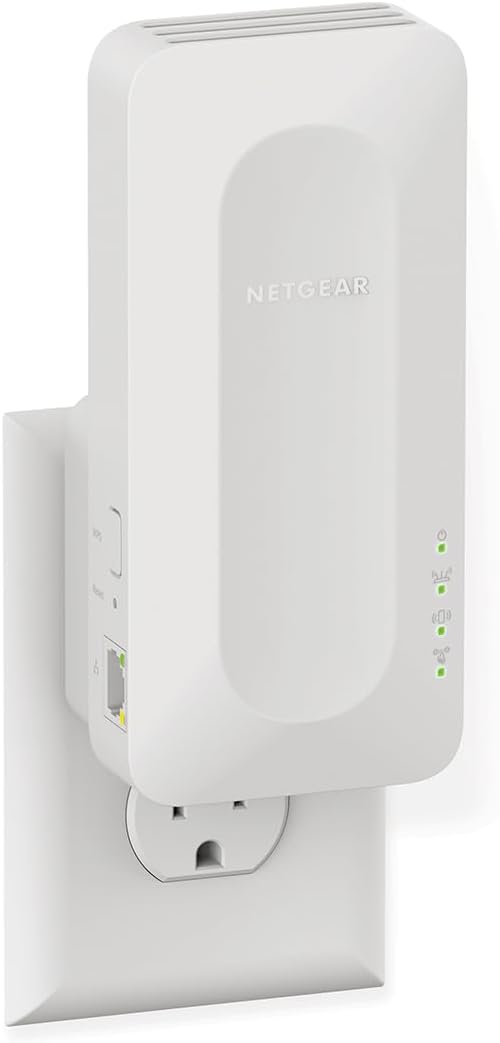
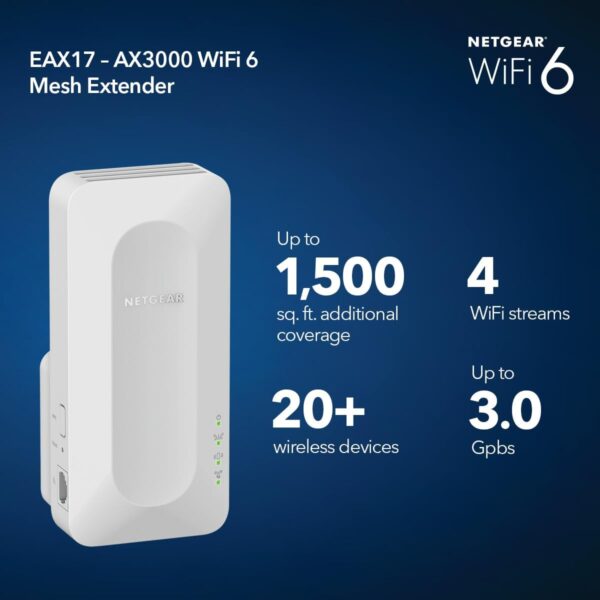
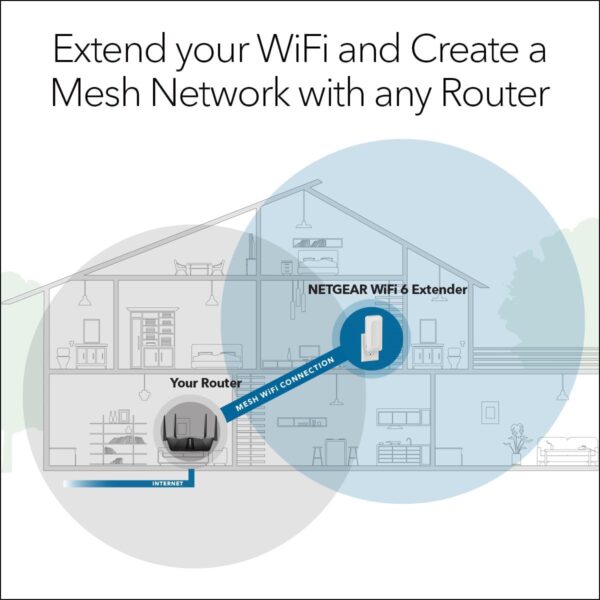
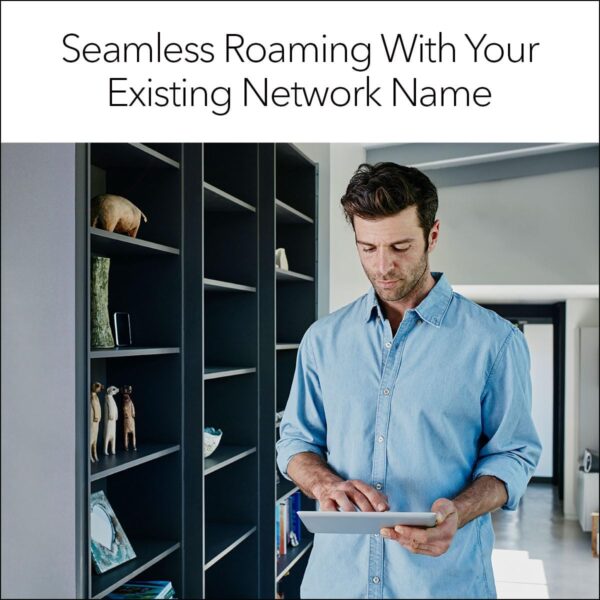
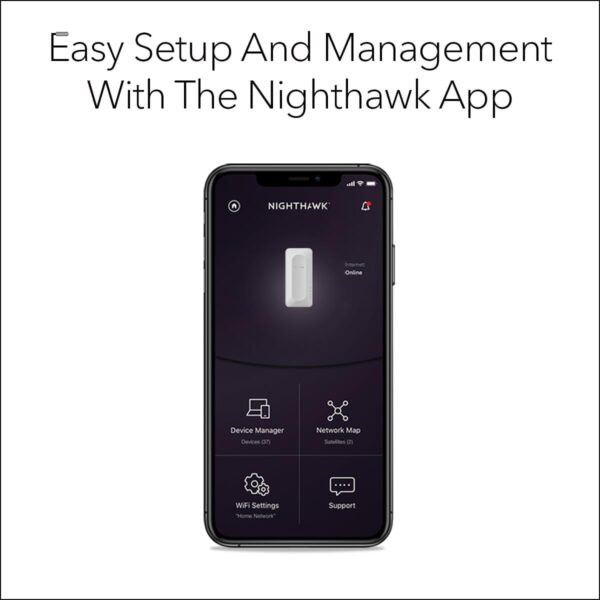
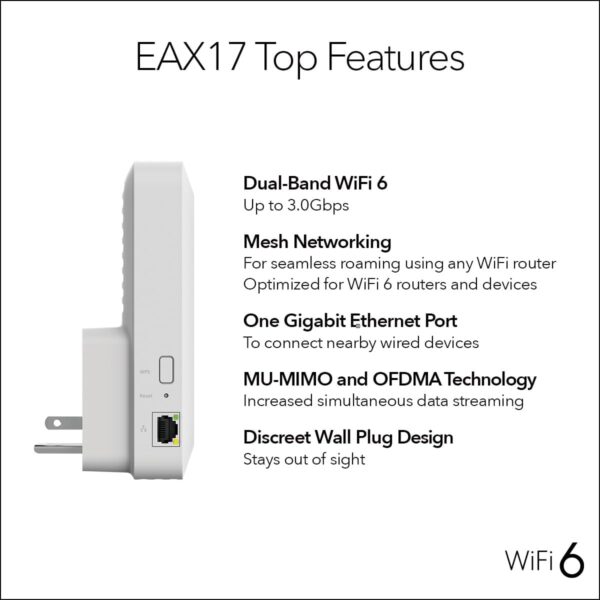
Extends WiFi coverage by 1,500 sq. ft., creating a mesh network; connects up to 20+ devices Plug into any wall outlet and use your existing network SSID name so you never get disconnected as you move around your home or office AX3000 speed WiFi 6 powers up to 3.0Gbps speed for uninterrupted streaming, HD video gaming, and web conferencing Compatible with any wireless router or cable modem router; optimized for WiFi 6 routers and devices Plug in a computer, game console, streaming player, or other wired device into the 1 Gigabit Ethernet port for maximum speed Sets up easily with the Nighthawk app or press the WPS button to connect to your router Made for use in the US only
Price: $129.99 (as of Apr 14, 2025 10:18:12 UTC – Details)
Customers say
Customers find the WiFi extender easy to set up and appreciate its functionality, with one customer noting it works perfectly with TVs and computers. The device provides good coverage, with one customer mentioning it covers 1400 sqft homes, and customers consider it a fantastic mesh extender. While some customers report improved signal strength and faster speeds, others experience connection issues and slower performance than expected. The app quality receives mixed feedback, with several customers noting issues with the Nighthawk app implementation, and opinions on value are divided between those who find it worth the price and those who consider it a waste of money.
13 reviews for NETGEAR WiFi 6 Mesh Range Extender (EAX17) – Add up to 1,500…
Jerry Torrez –
Amazing product!
NETGEAR’s AX1600 is an amazing extender. I have no blind wifi spots in my home now. The range is awesome! Easy to setup.
Chris –
Extender for Clickshare to our Network
In conjunction with our Network tech team, we needed to have the IP address of our Leasing Office Clickshare be found on our network, and integrate into our wifi network. The NETGAER AX1600 was the perfect solution for us and the connectivity is strong a seamless.
Jonathan B. –
If you are a parent using controls on Comcast xFI , dont buy this
I bought this device hoping it would fix coverage issues in the house and also so i could use 1 SSID throughout the home.I Configured the unit to work with my Arris xFI gateway, and the setup was pretty easy.I found out the hard way the unit however does not work with xFIs parental controls.Devices which connect to this extender do not register with the xFI app and so cant be controlled.Accordingly you cannot set limits or pause the internet for any devices connected to the netgear extender,.Whats worse, the device just stops working from time to time,Devices connected to the extender just stop working randomly, and then start work after some time.To get devices working immediately, a reboot of the unit was required, or i would have to move to the gateways wifi converageI figured it was due to the single SSID between two gateways not working so changed it, but ran into the same problemGiven this unit is the newer Wifi6 – 802.11AX standard, I figure it was rushed out the door and not fully tested.I feel like a sucker having bought it.I did try connecting with the Netgear support team, however, they seem to speed read the support ticket and answer questions not asked,Trying to clarify later, the support team again, seem not to understand and incapable of answering questions or giving concise answersI did mention that I was looking at DNS and IPV6 responses using wireshark, which seemed to be corrupt. but I dont think the support person knew what I was saying.I will be sticking this unit in the goodwill pile and maybe by the time someone else picks it up, these basic connection problems will be fixed,It is a bit sad as you would think they would want their box working with the largest cable provider in the USA.I feel sad for this once great company.
Big Sky Dreams –
Worthy upgrade for better & faster signal
We updated our modem and needed an Extender for our second floor that supported Wi-Fi 6 so we could take advantage of our faster internet. I replaced a good, but outdated TP-Link that was dropping the signal more frequently. I also needed an extender that could plug directly into an outlet due to the most optimal location that it needs to be positioned. I researched the best extenders on Consumer Reports and this Netgear got top marks and was reasonably priced on Amazon.Setup was fairly smooth using their ‘Nighthawk’ app. I like that you can configure the Extender to match your own network for seamless connection. I’ve noticed that I’m consistently getting a better signal (5ghz), with no dropouts. So far my experience has been very positive and I’m hopeful this was the right choice.
Amazon Customer –
Works
Works. Bulky a bit tho.
Linda –
Effortless Setup, Stellar WiFi Boost
WiFi 6 Mesh Extender (EAX15) is a fantastic addition to any home network. Setup was a breeze—super straightforward and quick. The performance is top-notch, delivering efficient and reliable WiFi coverage. Highly recommend!
T. COTON –
Buggy app and admin interface but works well
Despite having a Netgear Nighthawk RAX45 and no close neighbors, some of my wifi cameras kept loosing signal from time to time so I had to choose whether to replace it with a complete mesh system in the $500 upwards or find a cheaper solution by just extending the wifi where it needed. Given the fact that my current router was only 8 months old, I chose the cheapest way and so far so good, only time will tell if it was the solution. Setup was way more confusing than advertised mostly because of bugs in the Nighthawk app, it was not difficult but tricky. At some point in the process, you are asked questions you should not be asked with no option out like when the 2.4 and 5 Ghz bands are shared, the 5 Ghz is not visible to repeat (for some reason) and the app asks which 5Ghz you want to extend with 0 choice… All in all, it does the job but the admin app and the web interface are seriously lacking features. The app is sluggish for no reason and does not see the extender all the time especially you switch from the router to the extender more than twice. Fixed IP address devices are not shown properly by the extender, only MAC addresses are displayed and all devices connected to the extender disappear from the list of connected devices on the router (???). I had to run a IP scanner to know which devices where connected to the extender and I discovered that the extender substitutes the MAC addresses of connected devices with a fixed IP to its own MAC address, HOW SO? Please Netgear, fix your apps, look at what Ubiquity does!!Update 20 Mar. 2024: After a year or so of use, I confirm the buggy web admin interface that cannot display properly which device is actually attached to it, not even an IP address. What kind of router is this? The network extension seems to be random, I get a lot of disconnect alerts from my wifi cameras that are not that far from it. I think Netgear is overselling their products and does not really care about the firmware of its devices.
Alexander –
Best decision!
Like the title! Once its done, the connection s nothing but amazing. Very reliable. I live in two story house and my office is upstair while my main router is downstairs. The coverage was very good. Very easy to setup! Highly recommended!
Peter Dunev –
Lo compré pensando que funcionaria bien con mi router RAXE500. La verdad es que me desconecto el router y cambio mi contraseña cada vez que lo intenté. Cuando llame a Servicio de Clientes tuve que esperar una hora, por fin colgué. Probablemente es muy bueno, pero sumamente difícil de conectar y Servicio a Cliente es pésimo.Lo voy a devolver.
Wilfred Krasin –
Easy setup. Product highly recommended by Consumer Reports.Rated best overall out of 13 tested models.
Carmel –
so quick and easy to set up via the app – simple to install, my Foxtel box did not pick it up, so rebooted Foxtel and it picked it up instantly 🙂 the household was good to go in about 10 minutes.
T.27#0#$@! –
Disconnect always, unreliable
Beau Williams –
So easy to set up this product. We use it for our security cameras that are a bit too far away from the main router. The cameras work great now with better live stream picture.








Jerry Torrez –
Amazing product!
NETGEAR’s AX1600 is an amazing extender. I have no blind wifi spots in my home now. The range is awesome! Easy to setup.
Chris –
Extender for Clickshare to our Network
In conjunction with our Network tech team, we needed to have the IP address of our Leasing Office Clickshare be found on our network, and integrate into our wifi network. The NETGAER AX1600 was the perfect solution for us and the connectivity is strong a seamless.
Jonathan B. –
If you are a parent using controls on Comcast xFI , dont buy this
I bought this device hoping it would fix coverage issues in the house and also so i could use 1 SSID throughout the home.I Configured the unit to work with my Arris xFI gateway, and the setup was pretty easy.I found out the hard way the unit however does not work with xFIs parental controls.Devices which connect to this extender do not register with the xFI app and so cant be controlled.Accordingly you cannot set limits or pause the internet for any devices connected to the netgear extender,.Whats worse, the device just stops working from time to time,Devices connected to the extender just stop working randomly, and then start work after some time.To get devices working immediately, a reboot of the unit was required, or i would have to move to the gateways wifi converageI figured it was due to the single SSID between two gateways not working so changed it, but ran into the same problemGiven this unit is the newer Wifi6 – 802.11AX standard, I figure it was rushed out the door and not fully tested.I feel like a sucker having bought it.I did try connecting with the Netgear support team, however, they seem to speed read the support ticket and answer questions not asked,Trying to clarify later, the support team again, seem not to understand and incapable of answering questions or giving concise answersI did mention that I was looking at DNS and IPV6 responses using wireshark, which seemed to be corrupt. but I dont think the support person knew what I was saying.I will be sticking this unit in the goodwill pile and maybe by the time someone else picks it up, these basic connection problems will be fixed,It is a bit sad as you would think they would want their box working with the largest cable provider in the USA.I feel sad for this once great company.
Big Sky Dreams –
Worthy upgrade for better & faster signal
We updated our modem and needed an Extender for our second floor that supported Wi-Fi 6 so we could take advantage of our faster internet. I replaced a good, but outdated TP-Link that was dropping the signal more frequently. I also needed an extender that could plug directly into an outlet due to the most optimal location that it needs to be positioned. I researched the best extenders on Consumer Reports and this Netgear got top marks and was reasonably priced on Amazon.Setup was fairly smooth using their ‘Nighthawk’ app. I like that you can configure the Extender to match your own network for seamless connection. I’ve noticed that I’m consistently getting a better signal (5ghz), with no dropouts. So far my experience has been very positive and I’m hopeful this was the right choice.
Amazon Customer –
Works
Works. Bulky a bit tho.
Linda –
Effortless Setup, Stellar WiFi Boost
WiFi 6 Mesh Extender (EAX15) is a fantastic addition to any home network. Setup was a breeze—super straightforward and quick. The performance is top-notch, delivering efficient and reliable WiFi coverage. Highly recommend!
T. COTON –
Buggy app and admin interface but works well
Despite having a Netgear Nighthawk RAX45 and no close neighbors, some of my wifi cameras kept loosing signal from time to time so I had to choose whether to replace it with a complete mesh system in the $500 upwards or find a cheaper solution by just extending the wifi where it needed. Given the fact that my current router was only 8 months old, I chose the cheapest way and so far so good, only time will tell if it was the solution. Setup was way more confusing than advertised mostly because of bugs in the Nighthawk app, it was not difficult but tricky. At some point in the process, you are asked questions you should not be asked with no option out like when the 2.4 and 5 Ghz bands are shared, the 5 Ghz is not visible to repeat (for some reason) and the app asks which 5Ghz you want to extend with 0 choice… All in all, it does the job but the admin app and the web interface are seriously lacking features. The app is sluggish for no reason and does not see the extender all the time especially you switch from the router to the extender more than twice. Fixed IP address devices are not shown properly by the extender, only MAC addresses are displayed and all devices connected to the extender disappear from the list of connected devices on the router (???). I had to run a IP scanner to know which devices where connected to the extender and I discovered that the extender substitutes the MAC addresses of connected devices with a fixed IP to its own MAC address, HOW SO? Please Netgear, fix your apps, look at what Ubiquity does!!Update 20 Mar. 2024: After a year or so of use, I confirm the buggy web admin interface that cannot display properly which device is actually attached to it, not even an IP address. What kind of router is this? The network extension seems to be random, I get a lot of disconnect alerts from my wifi cameras that are not that far from it. I think Netgear is overselling their products and does not really care about the firmware of its devices.
Alexander –
Best decision!
Like the title! Once its done, the connection s nothing but amazing. Very reliable. I live in two story house and my office is upstair while my main router is downstairs. The coverage was very good. Very easy to setup! Highly recommended!
Peter Dunev –
Lo compré pensando que funcionaria bien con mi router RAXE500. La verdad es que me desconecto el router y cambio mi contraseña cada vez que lo intenté. Cuando llame a Servicio de Clientes tuve que esperar una hora, por fin colgué. Probablemente es muy bueno, pero sumamente difícil de conectar y Servicio a Cliente es pésimo.Lo voy a devolver.
Wilfred Krasin –
Easy setup. Product highly recommended by Consumer Reports.Rated best overall out of 13 tested models.
Carmel –
so quick and easy to set up via the app – simple to install, my Foxtel box did not pick it up, so rebooted Foxtel and it picked it up instantly 🙂 the household was good to go in about 10 minutes.
T.27#0#$@! –
Disconnect always, unreliable
Beau Williams –
So easy to set up this product. We use it for our security cameras that are a bit too far away from the main router. The cameras work great now with better live stream picture.