Microsoft Surface Pro 2-in-1 Laptop/Tablet (2024), Windows 1…
$1,199.99Original price was: $1,199.99.$949.99Current price is: $949.99.
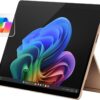
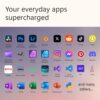
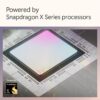
* Some Copilot+ PCs require download of free updates to run Copilot+ PC experiences, available starting late 2024 – 2025. See aka.ms/copilotpluspcs ** Pre-release screen shown; subject to change. *** Availability of Copilot+ PC features varies by device and market. [1] Based on Cinebench 2024 Multi-threaded conducted by Microsoft in April 2024 comparing pre-release build of Surface Laptop 13.8″ and 15” with Snapdragon X Elite running pre-release Windows 11 26100 and Apple MacBook Air 13.6″ and 15” with M3 running macOS 14 Sonoma. [2] Optimized for select languages (English, Chinese (simplified), French, German, Japanese, and Spanish. Content-based and storage limitations apply. Recall is coming soon through a post-launch Windows Update. See https://aka.ms/copilotpluspcs. [3] Colors available on selected models only. Available colors, sizes, finishes, and processors may vary by store, market, and configuration. [4] Surface Laptop, excluding power supply, contains a minimum of 25% recycled content. Based on validation performed by Underwriter Laboratories, Inc. using Environmental Claim Validation Procedure for Recycled Content, UL 2809-2, Second Edition, November 7, 2023. [5] Currently supports translation for video and audio subtitles into English from 40+ languages. See https://aka.ms/copilotpluspcs. [6] Battery life varies significantly based on device configuration, usage, network and feature configuration, signal strength, settings and other factors. See aka.ms/SurfaceBatteryPerformance for details. [7] 13.8″ Surface Laptop comes with 39 W Surface power supply. Fast charging (from 5% to 80%) is supported with minimum 65W Surface power supply or USB-C® PD charger, sold separately. Testing was conducted at Microsoft in February 2024, using pre-production devices, software, and minimum of 65W USB-C® charger under controlled conditions. The device was powered on to the desktop screen with default display brightness settings. Actual charge time will vary based on operating conditions. Measured at typical office ambient temperature of 23C. [8] Enclosure includes A Cover, C Bucket and D Cover. 100% recycled aluminum alloy in A Cover and C Bucket. 100% recycled rare earth metals in magnets. Based on validation performed by Underwriter Laboratories, Inc. using Environmental Claim Validation Procedure (ECVP) for Recycled Content, UL 2809-2, Second Edition, November 7, 2023. [9] Enclosure includes A Cover, C Bucket and D Cover. Based on validation performed by Underwriter Laboratories, Inc. using Environmental Claim Validation Procedure for Recycled Content, UL 2809-2, Second Edition, November 7, 2023. [10] Available colors may vary by market. [11] USB-C® port does not charge your Surface device or any device that requires more than 15W [12] Requires device with USB-C® USB4®/Thunderbolt™ 4 port and when supported by device and display. *Screens simulated; subject to change *Recall: Optimized for select languages (English, Chinese (simplified), French, German, Japanese, and Spanish.) Content-based and storage limitations apply. See [https://aka.ms/copilotpluspcs]. *Cocreator: Optimized for English text prompts See [https://aka.ms/copilotpluspcs] [This is a Copilot+ PC] — A new AI era begins. Experience enhanced performance and AI capabilities with Copilot+ PC, boosting productivity with security and privacy in mind. [Introducing Surface Pro 13” Touchscreen Display] — The most flexible, powerful 2-in-1 laptop and tablet with AI-accelerated Copilot+ experiences. Surface Pro 11th Edition reimagines the laptop. [Flexibility at Any Angle] — Use with the detachable Surface Pro Flex Keyboard (sold separately). Shift from tablet to laptop to sketchbook with its unique kickstand. [Outstanding Performance] — Snapdragon X Plus (10 core) or Elite (12 core) with powerful NPU, faster than MacBook Air M3[1]. [All day battery life] — 14 hours of battery life[5], fast charging with 65W PSU via Surface Connect or USB-C. [Recall with Copilot+]: Easily retrieve documents, emails, or web pages with an explorable timeline of your PC’s history[2] (coming soon). [Enhance Calls with Copilot+] — Improve lighting, cancel noise, and blur distractions with Windows Studio Effects for video calls. Prerelease product shown, subject to change. [Translate with Copilot+] — Real-time subtitles for 44 languages during video calls or streaming. [Cocreate with Copilot+] — Generate art from text or image prompts. [Stunning Colors] — Black, Platinum, Sapphire, and brand-new Dune and matching keyboards in premium Alcantara fabric6 (sold separately)
Price: $1,199.99 - $949.99 (as of Apr 28, 2025 10:43:03 UTC – Details)
Customers say
Customers find the tablet incredibly fast, with a beautiful home screen that perfectly displays artwork, and appreciate its portability and lightweight design. The display quality, battery life, and ease of use receive positive feedback, with one customer noting it works all day on a single charge. The functionality and quality receive mixed reviews, with some finding it a nice solid computer while others report it doesn’t work properly, and opinions on value for money are divided between those who consider it a good price and those who find it not worth the cost.
9 reviews for Microsoft Surface Pro 2-in-1 Laptop/Tablet (2024), Windows 1…
Amazon Customer –
Great battery life, easy to use
This product has now become my go-to device for work- its versatile, light, and has a battery life that (so far) means I never have to worry about charging it if I leave the house with the battery mostly full and forget the charger! I’ve had it for several months now, and I use it almost daily for several hours, outside of holidays.Some of its best uses, especially given its not a bigger laptop, are that it functions very well when you do a split screen display. I was using an hp laptop last year that, although usually very good, would sometimes black out and get confused when I tried to split screen, so the fact that this is marketed as a laptop/tablet and it can handle split screens is very impressive.I also bought the pen, which I was worried I wouldnt use much, but which I’ve actually found to be really useful. You can use it to take notes in the journal app, but it can also be used to highlight, copy, paste. You can also use it to write things that are then transcribed to the typeface of whatever document you’re typing, which is very useful if you need a break from typing. Sometimes I’ve found that the writing/pen capability will get confused with the screen keyboard capability, but that’s usually only happened when I’ve needed to switch between the two services.
Paul Desharnais –
Great computer/tablet
Surface Pro 11 is perfect for what I needed it for. I really needed a computer/tablet for my designs. The only thing I am not happy with is that I purchased a Meta pen stylus for the program I use and it does not work very good. I can’t do anything with the stylist,but from what I read before purchasing the stylist is that it works for surface Pro 11, but it doesn’t really,so I have to use a mouse which is fine if I am sitting at my desk. Other than that the surface Pro has been quick and the colors on the screen are sharp and clean. It only has 2 usb-c ports which is fine for me. I might get a dongle later if I need more ports. I recommend this for anyone who wants this for using it as a computer or tablet. I don’t recommend heavy gaming though.
Heath Howe –
It’s my new everything laptop and tablet
I’ve traveled for years with a laptop for work and a second tablet for airplanes (and occasional other times). Since I’m retiring in a couple of months, I wanted to pare down what I carry and decided to commit to trying the Surface Pro 11. I’ve been extremely pleased. It’s quick and very capable, and works so well with the Surface Pro keyboard and pen. It is a solid PC with that keyboard and a responsive, capable tablet without it. Battery life is also excellent compared to other PCs or Windows-based tablets I’ve used.I had concerns about some of the software I use not working with the Snapdragon X processor but I’ve had no issues, and more and more apps are being adapted to it every month. Several reviewers commented that Google Drive didn’t work on it, but that was addressed by Google in early Dec 2024 and it works flawlessly. I also use Quicken, WhatsApp, Davinci Resolve, and Firefox without issues.I did order an anti-glare screen protector (https://www.amazon.com/dp/B0CYGYVFVW) because the glare can be significant in certain lighting situations. I also ordered some small USB-A to USB-C adapters (https://www.amazon.com/dp/B07PDLQ555) so that I have the option to connect USB-A devices (a docking station/adapter is overkill for my needs).Overall, I’m quite happy with this PC/Tablet combo. I’ve been using it as my primary (non-work) computer for almost 2 weeks now and am very satisfied.
wakraft –
Good device, but beware of ARM architecture on this generation
There is a lot to like about a Surface. The form factor is terrific and I find both the keyboard and charger excellent. Battery life is good. My uses are primarily email, documents, and web. (no heavy CPU or RAM utilizers). BUT with the ARM based Snapdragon architecture, there are applications and drivers which are not supported. Google drive for desktop is not, and Google does not plan on supporting. This has really impacted the usability of the device for me in places without wifi or poor wifi. Had I known this I probably would have gone with a Chromebook 2 in 1, as these have really come a long way and it would have been much cheaper. The second issue is that I have had reliability issues with prior Surface devices. So I would consider the extended service plan. For this reason alone, it is better to purchase the device at Amazon rather than from Microsoft directly. The third party insurance is MUCH cheaper and seems comparable. One would think Microsoft support would be better and the customer experience on the Microsoft store to be good, but this has not been my experience. So outside of these, I do love this device so far and have found the functionality good.UPDATE after 6 weeks of use.I still like the device quite a bit, and a key advantage of the Snapdragon set up is the long battery life. However, a few other issues have arisen. This is mostly minor stuff, BUT Microsoft has not provided much in the way of support on the forums and despite a large number of other users with the same issue. For example, on start up, the keyboard is not recognized by the device until the keyboard is dethatched and reattached. An external screen does not allow night light even though it is present on the main device screen. Neither of these were issues with my Surface 8. The boot up on this device is MUCH longer on this device than my old Surface 8 (and yes, I minimized start up apps and all the other things to address this). Things should get better with next generations, not worse.
Walter R. –
Ótima portabilidade e desempenho.
Brenda Rodricks –
Sleek and powerful. I chose for retirement and it is powerful enough to use for business should I do consulting!
Jo –
This is my 8th, or 9th Surface tablet – so I clearly like the product. However, I hate Windows 11.
Mike Station –
Have been researching and coveting for a while. And I can say that even as an Apple fanboy, this machine runs wonderfully and is a joy to play/work with.
Harry S-L –
I had so many problems/bugs/lags with this device. I was expecting a smoother and easier ride with this device viven it’s the new SNAPDRAGON X chip. It was just laggy and felt like an usual intel laptop is tons better than this. I am convinced that it was just this specific laptop I got which had the problems, hopefully others are not facing this issue as well. Maybe with time whenthese issues are fixed or worked upon, I will consider buying.









Amazon Customer –
Great battery life, easy to use
This product has now become my go-to device for work- its versatile, light, and has a battery life that (so far) means I never have to worry about charging it if I leave the house with the battery mostly full and forget the charger! I’ve had it for several months now, and I use it almost daily for several hours, outside of holidays.Some of its best uses, especially given its not a bigger laptop, are that it functions very well when you do a split screen display. I was using an hp laptop last year that, although usually very good, would sometimes black out and get confused when I tried to split screen, so the fact that this is marketed as a laptop/tablet and it can handle split screens is very impressive.I also bought the pen, which I was worried I wouldnt use much, but which I’ve actually found to be really useful. You can use it to take notes in the journal app, but it can also be used to highlight, copy, paste. You can also use it to write things that are then transcribed to the typeface of whatever document you’re typing, which is very useful if you need a break from typing. Sometimes I’ve found that the writing/pen capability will get confused with the screen keyboard capability, but that’s usually only happened when I’ve needed to switch between the two services.
Paul Desharnais –
Great computer/tablet
Surface Pro 11 is perfect for what I needed it for. I really needed a computer/tablet for my designs. The only thing I am not happy with is that I purchased a Meta pen stylus for the program I use and it does not work very good. I can’t do anything with the stylist,but from what I read before purchasing the stylist is that it works for surface Pro 11, but it doesn’t really,so I have to use a mouse which is fine if I am sitting at my desk. Other than that the surface Pro has been quick and the colors on the screen are sharp and clean. It only has 2 usb-c ports which is fine for me. I might get a dongle later if I need more ports. I recommend this for anyone who wants this for using it as a computer or tablet. I don’t recommend heavy gaming though.
Heath Howe –
It’s my new everything laptop and tablet
I’ve traveled for years with a laptop for work and a second tablet for airplanes (and occasional other times). Since I’m retiring in a couple of months, I wanted to pare down what I carry and decided to commit to trying the Surface Pro 11. I’ve been extremely pleased. It’s quick and very capable, and works so well with the Surface Pro keyboard and pen. It is a solid PC with that keyboard and a responsive, capable tablet without it. Battery life is also excellent compared to other PCs or Windows-based tablets I’ve used.I had concerns about some of the software I use not working with the Snapdragon X processor but I’ve had no issues, and more and more apps are being adapted to it every month. Several reviewers commented that Google Drive didn’t work on it, but that was addressed by Google in early Dec 2024 and it works flawlessly. I also use Quicken, WhatsApp, Davinci Resolve, and Firefox without issues.I did order an anti-glare screen protector (https://www.amazon.com/dp/B0CYGYVFVW) because the glare can be significant in certain lighting situations. I also ordered some small USB-A to USB-C adapters (https://www.amazon.com/dp/B07PDLQ555) so that I have the option to connect USB-A devices (a docking station/adapter is overkill for my needs).Overall, I’m quite happy with this PC/Tablet combo. I’ve been using it as my primary (non-work) computer for almost 2 weeks now and am very satisfied.
wakraft –
Good device, but beware of ARM architecture on this generation
There is a lot to like about a Surface. The form factor is terrific and I find both the keyboard and charger excellent. Battery life is good. My uses are primarily email, documents, and web. (no heavy CPU or RAM utilizers). BUT with the ARM based Snapdragon architecture, there are applications and drivers which are not supported. Google drive for desktop is not, and Google does not plan on supporting. This has really impacted the usability of the device for me in places without wifi or poor wifi. Had I known this I probably would have gone with a Chromebook 2 in 1, as these have really come a long way and it would have been much cheaper. The second issue is that I have had reliability issues with prior Surface devices. So I would consider the extended service plan. For this reason alone, it is better to purchase the device at Amazon rather than from Microsoft directly. The third party insurance is MUCH cheaper and seems comparable. One would think Microsoft support would be better and the customer experience on the Microsoft store to be good, but this has not been my experience. So outside of these, I do love this device so far and have found the functionality good.UPDATE after 6 weeks of use.I still like the device quite a bit, and a key advantage of the Snapdragon set up is the long battery life. However, a few other issues have arisen. This is mostly minor stuff, BUT Microsoft has not provided much in the way of support on the forums and despite a large number of other users with the same issue. For example, on start up, the keyboard is not recognized by the device until the keyboard is dethatched and reattached. An external screen does not allow night light even though it is present on the main device screen. Neither of these were issues with my Surface 8. The boot up on this device is MUCH longer on this device than my old Surface 8 (and yes, I minimized start up apps and all the other things to address this). Things should get better with next generations, not worse.
Walter R. –
Ótima portabilidade e desempenho.
Brenda Rodricks –
Sleek and powerful. I chose for retirement and it is powerful enough to use for business should I do consulting!
Jo –
This is my 8th, or 9th Surface tablet – so I clearly like the product. However, I hate Windows 11.
Mike Station –
Have been researching and coveting for a while. And I can say that even as an Apple fanboy, this machine runs wonderfully and is a joy to play/work with.
Harry S-L –
I had so many problems/bugs/lags with this device. I was expecting a smoother and easier ride with this device viven it’s the new SNAPDRAGON X chip. It was just laggy and felt like an usual intel laptop is tons better than this. I am convinced that it was just this specific laptop I got which had the problems, hopefully others are not facing this issue as well. Maybe with time whenthese issues are fixed or worked upon, I will consider buying.