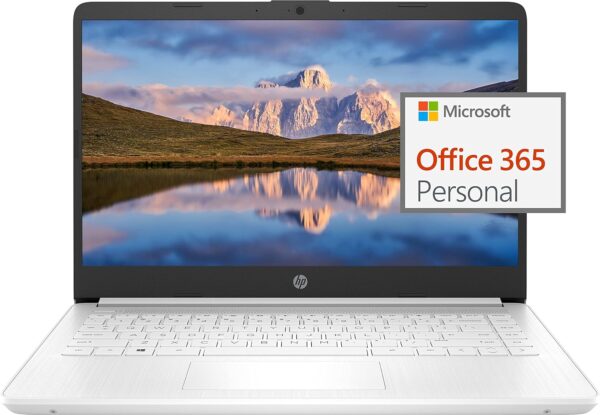
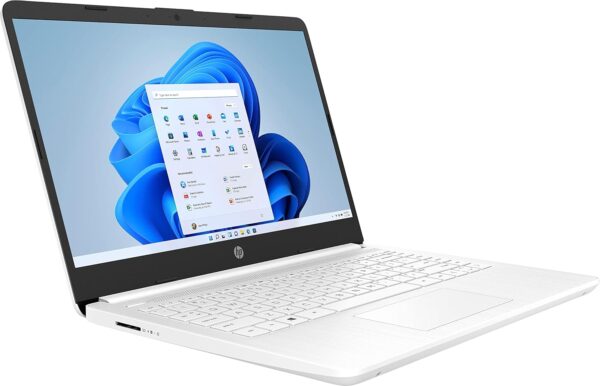
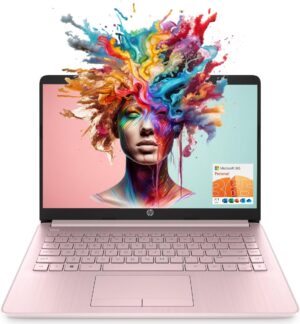
HP 14″ Ultral Light Laptop for Students and Business, Intel …
$399.00Original price was: $399.00.$265.99Current price is: $265.99.
Switching out of S mode in Windows 11 Windows 11 in S mode is designed for security and performance, exclusively running apps from the Microsoft Store. If you want to install an app that isn’t available in the Microsoft Store, you’ll need to switch out of S mode
1. On your PC running Windows 11 in S mode, open Settings > System > Activation.
2. In the Switch to Windows 11 Pro section, select Go to the Store. (If you also see an “Upgrade your edition of Windows” section, be careful not to click the “Go to the Store” link that appears there.)
3. On the Switch out of S mode (or similar) page that appears in the Microsoft Store, select the Get button. After you see a confirmation message on the page, you’ll be able to install apps from outside of the Microsoft Store.
HP 14 inch Laptop for Business and Student:
Sleek design: Easily take this thin and light PC from room to room or on the road
Dual array microphones: With two microphones and advanced noise reduction software, you’ll always sound crystal clear when you video chat or record
Display: 14.0-inch diagonal, HD (1366 x 768), micro-edge, BrightView
HP Fast Charge: Go from 0 to 50% charge in approximately 45 minutes
Battery Life: Up to 11 hours and 30 minutes (video playback); Up to 9 hours (wireless streaming)
Webcam: HP True Vision 720p HD camera with integrated dual array digital microphones
Connectivity: 802.11a/b/g/n/ac (2×2)(19a) Wi-Fi and Bluetooth combo
Dimensions: 12.76 x 8.86 x 0.71 inches
Weight: 3.24 lbs
【14″ HD Display】14.0-inch diagonal, HD (1366 x 768), micro-edge, BrightView. With virtually no bezel encircling the display, an ultra-wide viewing experience provides for seamless multi-monitor set-ups 【Processor & Graphics】Intel Celeron N4120, 4 Cores & 4 Threads, 1.10 GHz Base Frequency, Up to 2.60 GHz Burst Frequency, 4 MB Cahce, Intel UHD Graphics 600, Handle multitasking reliably with the perfect combination of performance, power consumption, and value 【RAM & Storage】8GB high-bandwidth DDR4 Memory (2400 MHz), Adequate high-bandwidth RAM to smoothly run multiple applications and browser tabs all at once. 64GB high-speed eMMC Storage for your office and webinar needs 【Ports】1 x USB 3.1 Type-C ports, 2 x USB 3.1 Type-A ports, 1 x HDMI, 1 x Headphone/Microphone Combo Jack, and there’s a microSD slot 【Windows 11 Home in S mode】You may switch to regular windows 11: Press “Start button” bottom left of the screen; Select “Settings” icon above “power” icon;Select “Activation”, then Go to Store; Select Get option under “Switch out of S mode”; Hit Install. (If you also see an “Upgrade your edition of Windows” section, be careful not to click the “Go to the Store” link that appears there.)
Price: $399.00 - $265.99 (as of Apr 09, 2025 18:46:55 UTC – Details)
Customers say
Customers find the laptop lightweight and portable, with easy setup and good college performance. The functionality and speed receive mixed feedback – while some say it works great and starts up fast, others report it stops working unexpectedly and is terribly slow. Battery life and build quality also get mixed reviews, with some praising the exceptional battery life while others report charging issues, and some finding it reliable while others describe it as flimsy. Value for money opinions are divided between those who find it good for the price and those who consider it not worth the cost.
4 reviews for HP 14″ Ultral Light Laptop for Students and Business, Intel …
ben –
Great value, love the simplistic design
Very simple and functional yet it has all of the essentials without any of the gimmicky frills. Maybe it takes a $300 laptop so I don’t have to deal with built in Alexa-enabled something, HP-specific ports, fingerprint scanner, and other stuff I don’t want or need. They don’t try anything fancy with this one which for me is a positive. Plus it’s TKL keyboard which really should be the new norm. Does not have a backlit keyboard which is a slight miss but for the price it’s not a huge deal.You can take it out of S-mode easily and remove a lot of the addons and you have yourself a perfectly functional Windows machine. Despite the lower-tier hardware it still starts up very quickly if you make sure you don’t have too much bloatware. Sure it’s a little slow at times but if you’re using it for day to day tasks it should be fine. Battery life seems very good, the laptop is also fairly lightweight as well. What more could you ask for at this price point.
chloe t. –
Great for the Price !
I’ve only been using it for a few days and it’s not slow, works great and the price is great. cones with a micro SD card and a sleeve for the card in a regular sd card. I like that it has USB and type c . it’s worth it for the cost.
an –
Keep getting pop up message that is totally distracting
I keep getting this pop up message: Because you’re accessing sensitive info, you need to verify your password. And it’s greatly interfering with my work. If this isn’t fixed by tomorrow, I am returning this laptop. I am not contacting customer support wasting my time. The sellers should be monitoring the reviews and they should be fixing this issue on their end which I know they are very aware of it because the issue has been reported all over the internet in various forums. I am very upset they sold me a computer with this horrible glitch.Update*** still have the same problem, along with other problems as well. This laptop is a nightmare to do my work and school work on. I am going to list problems as I go along. One of many major problems I have is that you can barely find a black space to let the mouse rest while you work without it pulling down a drop down menu. I am so sick of these menus appearing any and everywhere.Next major problem is, if you go back to delete something you’ve written, which is what humas do many times, the backspace and cursor jump somewhere else which makes you have to wase time, your blood pressure rises because it makes no sense of why this happens. Every single time I have to delete something I’ve written it becomes a major problem.Another major problem, when you are sitting down and the laptop is resting on your lap, EVERY SINGLE TIME you get up from a seated position, moving your laptop, the mouse mechanism clicks itself so your browser closes out or your mouse clicks on something and you lose where your at or wind up sending something you didn’t mean to which is A BIG NO NO.I REALLY, REALLY, REALLY DISKLIKE THIS LAPTOP. HORRIBLE!I feel very badly for kids whose parents make them use this laptop. I can only imagine the poor kids losing their work or their work getting messed up through NO fault of their own but they don’t know how to convey that to the parents so it winds up being the kids fault according to the parents. I already know how many arguments this laptop has caused families.There is NO reason in this day in age for a laptop to be this horrible. As I am typing now, my cursor jumps everywhere and I had to restart what I’m writing 10 different times already in the last 5 minutes. I wish I could give this laptop negative stars!!!! I wouldn’t take this laptop if it were for free!
Dennis Sandberg –
locked into MS S mode, be careful of the bait-n-switch
5/31/2024Update: Revised review to 4 stars from 1. If you’re lured to these by an Amazon flash offer, and begin to compare other options/offers, be sure to throughly compare the descriptions. Or you’ll purchase something you didn’t want. If you find this out after you set everything up and there is no problem with the computer itself, you’re stuck with it. The other issue I had was the inability to exit Win 11 S mode. After hours of trying the standard method and several youtube videos with complex work arounds, I gave up. Today I decided to express my feelings in the MS Edge search window and I received this response from Copilot. (posted in the picture above). I post because subsequent requests produced different results. This work around worked quickly and was a three step fix. Have exited S mode and am happily running Google Chrome. Plus all my Google info and files from my broken laptop ported over. One last note: this is definitely a computer for students. It is priced reasonably considering post Covid greedflation prices. It is comparetively slow and not for use use for gamers. I will keep it as I need a computer for research and writing papers.5/30/2024-My laptop broke. Needed to complete paperwork for a project with tight time lured by “Deal” for laptop with 4GB ram 64 storage Bluetooth, Wi-Fi. $169, 12hr delivery. I figure it was good enough to get my work done. At the site several other options were available with the same features and more memory. All had delivery dates of 1=2 days except 1 with 8GB ram, 192GB storage for $259 w/ $40 coupon, Thought extra memory and storage was worth extra $90. Computer arrived. It took an 1-1/2 hr to do updates. When I tried to download Chrome to work in Google docs {state recommended for changes}. This computer is locked into MS S mode blocking download of apps not in MS store. After spending 2hrs trying different S mode exit directions is was resolved to doing the work on my Samsung S20 which took 3 hours to do 1 hr of work. This computer doesn’t have Bluetooth, is extremely slow. MS locks y into using Edge in a worse case scenario than they did with Explorer 25 yrs ago. Don’t be lured by the free1yr of Home 365. Cannot return because I used it and is technically not broken. HP is obviously returning to the days of cheap low-grade Compaq. Clearest example of Greedflation. It also moved data from broken laptop creating what will be hours of scrubbing to sell at 1/2 price on Ebay.







ben –
Great value, love the simplistic design
Very simple and functional yet it has all of the essentials without any of the gimmicky frills. Maybe it takes a $300 laptop so I don’t have to deal with built in Alexa-enabled something, HP-specific ports, fingerprint scanner, and other stuff I don’t want or need. They don’t try anything fancy with this one which for me is a positive. Plus it’s TKL keyboard which really should be the new norm. Does not have a backlit keyboard which is a slight miss but for the price it’s not a huge deal.You can take it out of S-mode easily and remove a lot of the addons and you have yourself a perfectly functional Windows machine. Despite the lower-tier hardware it still starts up very quickly if you make sure you don’t have too much bloatware. Sure it’s a little slow at times but if you’re using it for day to day tasks it should be fine. Battery life seems very good, the laptop is also fairly lightweight as well. What more could you ask for at this price point.
chloe t. –
Great for the Price !
I’ve only been using it for a few days and it’s not slow, works great and the price is great. cones with a micro SD card and a sleeve for the card in a regular sd card. I like that it has USB and type c . it’s worth it for the cost.
an –
Keep getting pop up message that is totally distracting
I keep getting this pop up message: Because you’re accessing sensitive info, you need to verify your password. And it’s greatly interfering with my work. If this isn’t fixed by tomorrow, I am returning this laptop. I am not contacting customer support wasting my time. The sellers should be monitoring the reviews and they should be fixing this issue on their end which I know they are very aware of it because the issue has been reported all over the internet in various forums. I am very upset they sold me a computer with this horrible glitch.Update*** still have the same problem, along with other problems as well. This laptop is a nightmare to do my work and school work on. I am going to list problems as I go along. One of many major problems I have is that you can barely find a black space to let the mouse rest while you work without it pulling down a drop down menu. I am so sick of these menus appearing any and everywhere.Next major problem is, if you go back to delete something you’ve written, which is what humas do many times, the backspace and cursor jump somewhere else which makes you have to wase time, your blood pressure rises because it makes no sense of why this happens. Every single time I have to delete something I’ve written it becomes a major problem.Another major problem, when you are sitting down and the laptop is resting on your lap, EVERY SINGLE TIME you get up from a seated position, moving your laptop, the mouse mechanism clicks itself so your browser closes out or your mouse clicks on something and you lose where your at or wind up sending something you didn’t mean to which is A BIG NO NO.I REALLY, REALLY, REALLY DISKLIKE THIS LAPTOP. HORRIBLE!I feel very badly for kids whose parents make them use this laptop. I can only imagine the poor kids losing their work or their work getting messed up through NO fault of their own but they don’t know how to convey that to the parents so it winds up being the kids fault according to the parents. I already know how many arguments this laptop has caused families.There is NO reason in this day in age for a laptop to be this horrible. As I am typing now, my cursor jumps everywhere and I had to restart what I’m writing 10 different times already in the last 5 minutes. I wish I could give this laptop negative stars!!!! I wouldn’t take this laptop if it were for free!
Dennis Sandberg –
locked into MS S mode, be careful of the bait-n-switch
5/31/2024Update: Revised review to 4 stars from 1. If you’re lured to these by an Amazon flash offer, and begin to compare other options/offers, be sure to throughly compare the descriptions. Or you’ll purchase something you didn’t want. If you find this out after you set everything up and there is no problem with the computer itself, you’re stuck with it. The other issue I had was the inability to exit Win 11 S mode. After hours of trying the standard method and several youtube videos with complex work arounds, I gave up. Today I decided to express my feelings in the MS Edge search window and I received this response from Copilot. (posted in the picture above). I post because subsequent requests produced different results. This work around worked quickly and was a three step fix. Have exited S mode and am happily running Google Chrome. Plus all my Google info and files from my broken laptop ported over. One last note: this is definitely a computer for students. It is priced reasonably considering post Covid greedflation prices. It is comparetively slow and not for use use for gamers. I will keep it as I need a computer for research and writing papers.5/30/2024-My laptop broke. Needed to complete paperwork for a project with tight time lured by “Deal” for laptop with 4GB ram 64 storage Bluetooth, Wi-Fi. $169, 12hr delivery. I figure it was good enough to get my work done. At the site several other options were available with the same features and more memory. All had delivery dates of 1=2 days except 1 with 8GB ram, 192GB storage for $259 w/ $40 coupon, Thought extra memory and storage was worth extra $90. Computer arrived. It took an 1-1/2 hr to do updates. When I tried to download Chrome to work in Google docs {state recommended for changes}. This computer is locked into MS S mode blocking download of apps not in MS store. After spending 2hrs trying different S mode exit directions is was resolved to doing the work on my Samsung S20 which took 3 hours to do 1 hr of work. This computer doesn’t have Bluetooth, is extremely slow. MS locks y into using Edge in a worse case scenario than they did with Explorer 25 yrs ago. Don’t be lured by the free1yr of Home 365. Cannot return because I used it and is technically not broken. HP is obviously returning to the days of cheap low-grade Compaq. Clearest example of Greedflation. It also moved data from broken laptop creating what will be hours of scrubbing to sell at 1/2 price on Ebay.