ASUS ROG MAXIMUS Z890 EXTREME Intel® Z890 LGA 1851 E-ATX mot…
$999.99Original price was: $999.99.$799.99Current price is: $799.99.
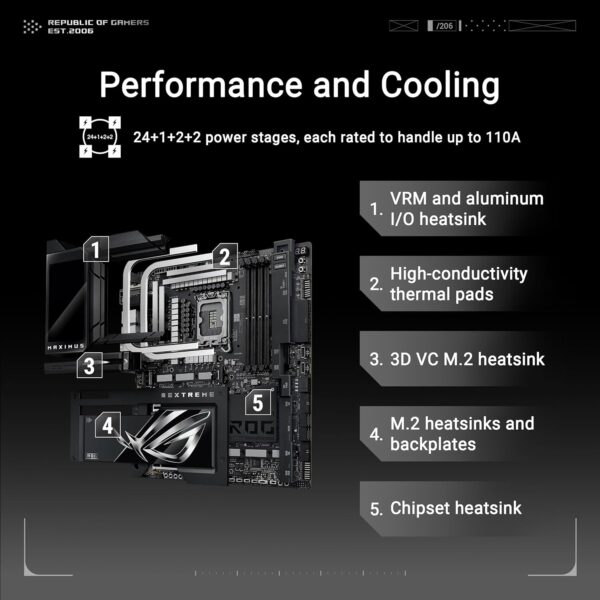
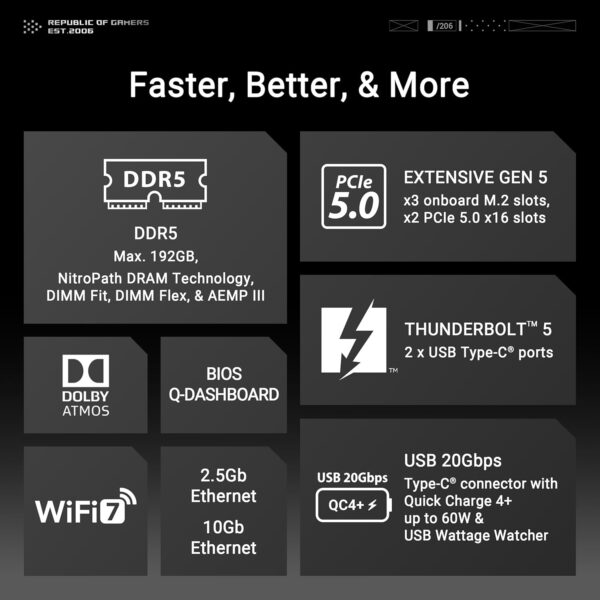
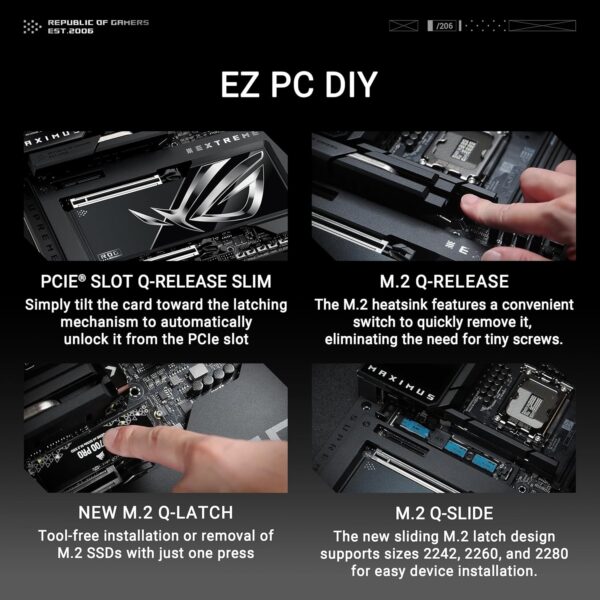
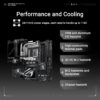
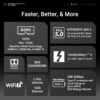
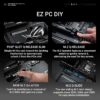
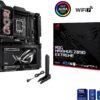
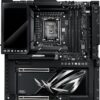
ASUS ROG MAXIMUS Z890 EXTREME Intel® Z890 LGA 1851 E-ATX motherboard, Advanced AI PC-ready, 24+2+1+2 power stages, DDR5 NitroPath, AEMP III, WiFi 7 Q-Antenna, three PCIe® 5.0 M.2, ROG Q-DIMM.2 card, PCIe Slot Q-Release Slim, Thunderbolt™ 5, USB Type-C®, AI Overclocking, AI Cooling II, AI Networking II, 5” LCD Display Ready for Advanced AI PCs: Designed for the future of AI computing, with the power and connectivity needed for demanding AI applications Intel LGA 1851 Socket: Supports Intel Core Ultra Processors (series 2) Exclusive AI Technologies: ASUS AI Advisor, ASUS-exclusive AI Overclocking, AI Cooling II, and AI Networking II to simplify setup and improve performance Exclusive Overclocking & Memory Technologies: NitroPath DRAM Technology, NPU Boost, DIMM Fit, DIMM Flex and AEMP III to simplify setup and improve performance Robust Power Solution: 24(110A)+2(90A)+1(90A)+2(80A) power stages with ProCool II power connectors, MicroFine alloy chokes and premium metallic capacitors Optimized Thermal Design: Massive heatsinks integrated with the I/O cover, joined by an U-shaped heatpipe and connected to the power stages with high-conductivity thermal pads, and 3D VC M.2 Heatsink for a PCIe 5.0 M.2 slot Latest M.2 Support: Three PCIe 5.0 M.2 slots and one PCIe 4.0 M.2 slot onboard with ROG M.2 PowerBoost, two PCIe 4.0 M.2 slots on ROG Q-DIMM.2 card, all with substantial cooling solutions Abundant Connectivity: Dual Thunderbolt 5 USB Type-C ports, USB 20Gbps Type-C front-panel connector with Quick Charge 4+ up to 60W and USB Wattage Watcher, USB 10Gbps Type-C front-panel connector, eight additional USB 10Gbps ports, two PCIe 5.0 x16 SafeSlots, HDMI 2.1 High-Performance Networking: On-board Wi-Fi 7 (802.11be) with ASUS WiFi Q-Antenna, Marvell 10 Gb Ethernet and Intel 2.5 Gb Ethernet DIY Friendly Design: PCIe Slot Q-Release Slim, new M.2 Q-Latch, M.2 Q-Release, M.2 Q-Slide, Q-Antenna, BIOS Q-Dashboard, Q-Code, Q-LED, FlexKey button, Start button, BIOS FlashBack button, Clear CMOS button and pre-mounted I/O shield
Price: $999.99 - $799.99 (as of May 03, 2025 17:28:50 UTC – Details)
Customers say
Customers find this motherboard to be an absolute beast with excellent build quality and performance. They appreciate its ease of installation and top-notch speed, with one customer noting its fast boot-up time. They like its cooling capacity, with one mentioning it stays cool even at max voltage.
8 reviews for ASUS ROG MAXIMUS Z890 EXTREME Intel® Z890 LGA 1851 E-ATX mot…
M –
Buy this motherboard it is worth it!!
This motherboard stopped the madness that I was encountering with other motherboards (Gigibyte X870E Aorus Master AM5, ASUS ROG Strix X870E E Gaming Wifi, ASRock X870E Taichi, Gigabyte Z890 Aorus Master). Windows 11 Pro would not update on these motherboards and as you can tell either AMD (X870E) or Intel (Z890).The ASUS ROG Maximus Hero is a few dollars more (listed on ASUS’s site $699.99 versus average of $500.00 for the other motherboards) than these other motherboards although the price I paid was not that much more $571.00 less tax and shipping. The difference was night and day, Windows 11 Pro installed (I bypassed windows download and update on the installation process and updated windows once it was loaded on the machine) and updated without issue.No problems with adding (and getting it to work) a Gigabyte RX 7800 XT graphics card. Also, 2 SSDs that I added: Crucial T705 4 TB and a T-Force GE Pro 2 TB worked fine. The only issue with the M.2 slots is that I could only use the SSD stick and not the heat sink that came with the stick either the Crucial or T-Force as they would not fit in the first M.2 slot so had to use just the stick with the heat sink that came with the motherboard. Also, the graphics card covered the 2nd and 3rd M.2 slot so put the Crucial in the 4 spot which means the graphics card runs at x8 and not x16, for me not a big deal but others it may be something to consider. The Intel Core Ultra 9 285K installed easily and runs like a champ!!The ATX motherboard was easy to install although had to get some longer screws for the motherboard anchoring (I have a little bit old box so maybe that was the issue). The way the board is designed it had a backplate to it with holes for where the screws go which elevates the board about 5 mm which called for longer mounting screws (easy to get at a hardware store). UEFI came up just fine and is easy to use although for most of my stuff a little over the top but so be it. LAN connection works fine as does the Wifi. Everything runs cool thanks to the Noctua NH-D9L CPU cooler which was easy to mount as was the 3 Noctua NF-A12x25 PWM chromax.Black.swap fans. (very quiet) This machine is way fast boots up quick and shuts down fast and is just fast in operation. It has been a long couple of months to get this new machine up and running and thank dog for RMA. If I cannot get it to work in 2 weeks it goes back.It has been up and running for about a week and I have loaded everything successfully I will need on the machine.Fortunately, prices have remained constant the past few months but possibly they will rise and stuff may become scarcer as we get closer to October 2025 and Windows 10 sunset date. This was worth the purchase, bigtime!!
Jared –
The Best! ⭐️⭐️⭐️⭐️⭐️
While the”You get what you pay for” saying may not always be true it certainly is when it comes to the ASUS ROG MAXIMUS Z890 Extreme Motherboard. This motherboard is simply amazing in every way. After opening the Amazon packaging, I thought the motherboard seemed extremely heavy. And it is. ASUS went above and beyond with even how they packaged the board. You’re given everything you need and many miscellaneous items. From ARGB splitter cables, thermal pads, ROG USB drive that contains drivers and utilities, to even a bottle opener.The ROG Maximus Z890 Extreme is a motherboard designed for gamers looking for the ultimate in performance and features. Built on the Intel Z890 chipset, it supports the latest Intel processors, delivering top-notch speed. Connectivity is top-tier, with multiple PCIe slots, USB 4.0 ports, and Wi-Fi 6E for fast, reliable networking. I did not need to perform a BIOS update out of the box like others claim but, overall, I’m very happy with this purchase and it’s an excellent choice for those seeking a high-end, feature-rich motherboard that will last for many years to come.
Joseph Braley –
Failed after 1 month
The motherboard failed after one month in use. It started shutting down programs randomly then, blue screen whenever any program is opened. It has 192 GB of Ram, I9 processor, 8G RTX 4060 video card. It will not stay on more than 5 minutes without going to blue screen. This is the first PC in 20 years that has a failed motherboard. Do not buy this motherboard it is very low quality it is a ticking time bomb.I sent in a RMA to ASUS because it is under warranty. They circled an area on the CPU pins and said it was the problem. Then they shipped it back with completely different pin damage intentionally. Whatever you do don’t buy ASUS ever or send into their repair via RMA they will destroy your product.Amazon should cancel all ongoing business with this fraudulent company.
Sivakumar –
High-Performance Motherboard with Premium Features!
The ASUS ROG Maximus Z890 Hero is an absolute beast of a motherboard! If you’re building a high-end gaming PC or workstation with an Intel 14th Gen processor, this board has everything you need—top-tier power delivery, high-speed connectivity, and great overclocking potentia
Zeph Blake –
Delivered on time
Item was delivered on time which is very pleasing. However, it was just left on the door steps without ringing the bell. Fortunately no passersby picked it up. This beast of a mobo is a $1000.00!!!!
المنتج جاء لي غير عن الي طلبته مغير من الداخل بمنتج قديم ومستعمل
Nerdciso –
Siempre ensamblo mis PCs usando motherboards buque insignia de ROG, porque si bien existen muchas con las mismas prestaciones, me gustan los productos de esta marca, ya que están extensivamente equipadas para realizar overclock y funcionan de maravilla.En cuanto a esta tarjeta madre en particular, hay que “tweakear” mucho en el UEFI para sacarle partido a todos los componentes, principalmente al CPU, dado que sí requiere ajustes de relojes y voltajes para dejar la PC al gusto.Mis componentes principales son:Placa: Maximus Z890 Extreme (este producto)CPU: Core Ultra 9 285K (el indicado para esta placa)RAM: Corsair Vengeance CUDIMM @ 8400 MT/sSSD principal: Intel D7-P5510 grado empresarial PCIe 4.0 de 3.84TB, interfaz U.2 con adaptador M.2 original de IntelSSD secundario: Samsung 990 Pro 2TBTarjeta gráfica: Strix RTX 4090Fuente de poder: ROG-THOR-1600T-GAMINGCooler: CORSAIR iCUE H170i ELITE CAPELLIX, 420mm











M –
Buy this motherboard it is worth it!!
This motherboard stopped the madness that I was encountering with other motherboards (Gigibyte X870E Aorus Master AM5, ASUS ROG Strix X870E E Gaming Wifi, ASRock X870E Taichi, Gigabyte Z890 Aorus Master). Windows 11 Pro would not update on these motherboards and as you can tell either AMD (X870E) or Intel (Z890).The ASUS ROG Maximus Hero is a few dollars more (listed on ASUS’s site $699.99 versus average of $500.00 for the other motherboards) than these other motherboards although the price I paid was not that much more $571.00 less tax and shipping. The difference was night and day, Windows 11 Pro installed (I bypassed windows download and update on the installation process and updated windows once it was loaded on the machine) and updated without issue.No problems with adding (and getting it to work) a Gigabyte RX 7800 XT graphics card. Also, 2 SSDs that I added: Crucial T705 4 TB and a T-Force GE Pro 2 TB worked fine. The only issue with the M.2 slots is that I could only use the SSD stick and not the heat sink that came with the stick either the Crucial or T-Force as they would not fit in the first M.2 slot so had to use just the stick with the heat sink that came with the motherboard. Also, the graphics card covered the 2nd and 3rd M.2 slot so put the Crucial in the 4 spot which means the graphics card runs at x8 and not x16, for me not a big deal but others it may be something to consider. The Intel Core Ultra 9 285K installed easily and runs like a champ!!The ATX motherboard was easy to install although had to get some longer screws for the motherboard anchoring (I have a little bit old box so maybe that was the issue). The way the board is designed it had a backplate to it with holes for where the screws go which elevates the board about 5 mm which called for longer mounting screws (easy to get at a hardware store). UEFI came up just fine and is easy to use although for most of my stuff a little over the top but so be it. LAN connection works fine as does the Wifi. Everything runs cool thanks to the Noctua NH-D9L CPU cooler which was easy to mount as was the 3 Noctua NF-A12x25 PWM chromax.Black.swap fans. (very quiet) This machine is way fast boots up quick and shuts down fast and is just fast in operation. It has been a long couple of months to get this new machine up and running and thank dog for RMA. If I cannot get it to work in 2 weeks it goes back.It has been up and running for about a week and I have loaded everything successfully I will need on the machine.Fortunately, prices have remained constant the past few months but possibly they will rise and stuff may become scarcer as we get closer to October 2025 and Windows 10 sunset date. This was worth the purchase, bigtime!!
Jared –
The Best! ⭐️⭐️⭐️⭐️⭐️
While the”You get what you pay for” saying may not always be true it certainly is when it comes to the ASUS ROG MAXIMUS Z890 Extreme Motherboard. This motherboard is simply amazing in every way. After opening the Amazon packaging, I thought the motherboard seemed extremely heavy. And it is. ASUS went above and beyond with even how they packaged the board. You’re given everything you need and many miscellaneous items. From ARGB splitter cables, thermal pads, ROG USB drive that contains drivers and utilities, to even a bottle opener.The ROG Maximus Z890 Extreme is a motherboard designed for gamers looking for the ultimate in performance and features. Built on the Intel Z890 chipset, it supports the latest Intel processors, delivering top-notch speed. Connectivity is top-tier, with multiple PCIe slots, USB 4.0 ports, and Wi-Fi 6E for fast, reliable networking. I did not need to perform a BIOS update out of the box like others claim but, overall, I’m very happy with this purchase and it’s an excellent choice for those seeking a high-end, feature-rich motherboard that will last for many years to come.
Joseph Braley –
Failed after 1 month
The motherboard failed after one month in use. It started shutting down programs randomly then, blue screen whenever any program is opened. It has 192 GB of Ram, I9 processor, 8G RTX 4060 video card. It will not stay on more than 5 minutes without going to blue screen. This is the first PC in 20 years that has a failed motherboard. Do not buy this motherboard it is very low quality it is a ticking time bomb.I sent in a RMA to ASUS because it is under warranty. They circled an area on the CPU pins and said it was the problem. Then they shipped it back with completely different pin damage intentionally. Whatever you do don’t buy ASUS ever or send into their repair via RMA they will destroy your product.Amazon should cancel all ongoing business with this fraudulent company.
Sivakumar –
High-Performance Motherboard with Premium Features!
The ASUS ROG Maximus Z890 Hero is an absolute beast of a motherboard! If you’re building a high-end gaming PC or workstation with an Intel 14th Gen processor, this board has everything you need—top-tier power delivery, high-speed connectivity, and great overclocking potentia
Zeph Blake –
Delivered on time
Item was delivered on time which is very pleasing. However, it was just left on the door steps without ringing the bell. Fortunately no passersby picked it up. This beast of a mobo is a $1000.00!!!!
さき –
Core Ultra 7 265Kにて使用中正直265Kにはオーバースペックのマザーボードです。m.2SSDを4枚挿して使用中。取り付けが驚くほど簡単になっております。また、1枚はgen5対応のt705で、ほぼほぼスペック通りの性能が引き出せており満足です。ASUS製のマザーボードではハイエンド品ほどPCIEスロットが減少している印象ですが、こちらの製品は×16スロットが2つと×1スロットが1つの合計3スロットあります。ただ、欲を言えば×1では無く×4であれば嬉しかった。今はキャプボなども×4が多いと思いますので。あまり期待はしていなかったのですが、I/OゾーンのLEDがとても綺麗です。EXTREMEのようなディスプレイではありませんが、かなり高級感のある見た目で予想外のところでも満足しています。あ、なぜか栓抜きが付属します。こちらも無駄にかっこいいです。
abdulla mr. –
المنتج جاء لي غير عن الي طلبته مغير من الداخل بمنتج قديم ومستعمل
Nerdciso –
Siempre ensamblo mis PCs usando motherboards buque insignia de ROG, porque si bien existen muchas con las mismas prestaciones, me gustan los productos de esta marca, ya que están extensivamente equipadas para realizar overclock y funcionan de maravilla.En cuanto a esta tarjeta madre en particular, hay que “tweakear” mucho en el UEFI para sacarle partido a todos los componentes, principalmente al CPU, dado que sí requiere ajustes de relojes y voltajes para dejar la PC al gusto.Mis componentes principales son:Placa: Maximus Z890 Extreme (este producto)CPU: Core Ultra 9 285K (el indicado para esta placa)RAM: Corsair Vengeance CUDIMM @ 8400 MT/sSSD principal: Intel D7-P5510 grado empresarial PCIe 4.0 de 3.84TB, interfaz U.2 con adaptador M.2 original de IntelSSD secundario: Samsung 990 Pro 2TBTarjeta gráfica: Strix RTX 4090Fuente de poder: ROG-THOR-1600T-GAMINGCooler: CORSAIR iCUE H170i ELITE CAPELLIX, 420mm