$279.99Original price was: $279.99.$265.99Current price is: $265.99.
From the brand
Xencelabs Pen Displays
Xencelabs Pen Tablets
Xencelabs Accessories
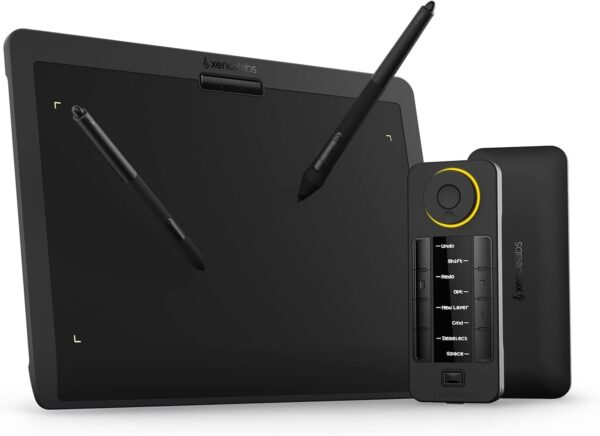
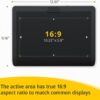
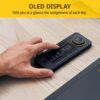
Best In Class Drawing Performance:The inclusion of a 3G initial activation force and studio-grade levels of pressure sensitivity ensures a smooth and uniform variation in stroke thickness, resulting in a delicate and refined drawing experience no matter how light or heavy your touch.Besides,thoughtfully selected materials on the pen tablet surface give creatives the right amount of friction, delivering fluid, accurate pen strokes that feel like drawing on traditional pen and paper. Professional Drawing Tablet: Our Pen Tablet was co-designed with the input of industry leading creatives. The active area (10.3”x5.75”) has true 16:9 aspect ratio to match industry standard displays. A minimal design that prioritizes comfort and functionality with features for faster workflows, and a great drawing experience. Curved Gentle Slope: The Xencelabs Pen Tablet is designed with a curved slope, which reduces potential tension and stress to create a comfortable, natural drawing experience. Its front edge is narrowed to only 5 mm thin and features a curved slope to form a seamless palm rest. Two Battery-free Pens: Two different sized pens come standard with our drawing tablet, both fully customizable to your workflow. The wider barreled, 3 Button Pen has three programmable buttons + eraser to transform this pen into your fully customized tool. The smaller barreled, Thin Pen handles like your favorite pen or pencil and has two assignable buttons + eraser. 8192 levels of pressure sensitivity, 5080LPI pen resolution, tilt recognition, and virtually no lag. Quick Keys: Working in unison with the pen tablet, the shortcut keys gives you 5 sets of 8 keys – a total of 40 programmable functions per application. Includes a physical dial with 4 settings that perform two functions. There is also an OLED display that shows you each key assignment at a glance. This enables you to make logical key groupings for specific steps in the workflow. Easy Installation and User Interface: You can quickly access the settings from the buttons at the top of the pen tablet. The driver settings also make it easy to customize the included Quick Keys. You can easily change, rename sets, keys and device orientation as you need.
Price: $279.99 - $265.99 (as of May 07, 2025 20:28:00 UTC – Details)
Customers say
Customers find the graphics tablet works better than Wacom and is easy to use, with nearly zero lag. They appreciate its build quality, appearance, and value for money. The software receives positive feedback, with one customer noting its fantastic Windows app. They like the control panel features, with one mentioning the programmable LCD and clear interface.
Best Pen Tablet I’ve Ever Used
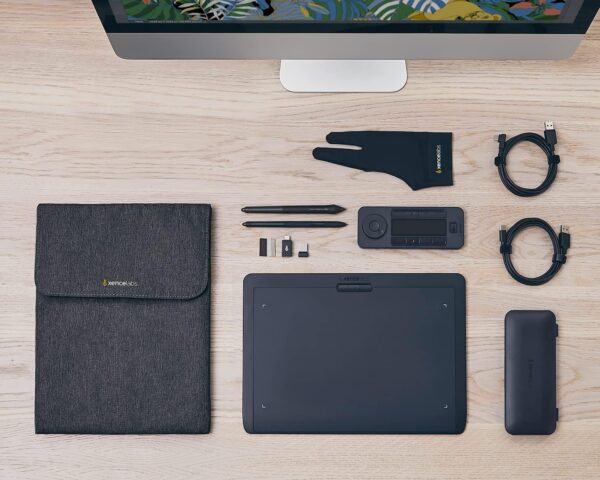
I am a professional artist and have been working in the industry for over 30 years. This is the best pen display I have seen. The instructions were so easy. Nice and big unlike other instructions were you need a microscope to read them. The website is super easy to navigate. And the pen? Zero Lag. Zero Paralax. Excellent overall. I purchased the medium screen bundle. Great value for your money. It came with so many great accessories. What I really appreciate is the two pens, one regular sized and a slim pen which I use all the time. The pens themselves are top of the line. Lots and lots of extra nibs even the felt tip ones. Really nice storage case. Two cords that are actually very long which I love. Most of the time when a company includes a cord it’s so darn short you really can not use it. Not these cords! Nice and long perfect especially if you have a pc. A nice glove is also included and a great shortcut key device. The tablet came already charged and ready to go. The shortcut key you do have to charge first but once charged it holds a charge for 25 hours. All the devices are nice and sturdy with slide resistance on the back. All in all this is the best purchase I’ve made in years. It’s way better than I imagined. Wonderful product. Highly recommend. Thank you Xcencelabs!
Amazon Customer –
Just Simply Works
I don’t usually write reviews but this product deserves it. It has left it’s impression on me mostly because of how much it just works compared to the previous product I suffered with for years. My VV@c0m Intuos Pro just didn’t really work consistently. Bluetooth was laggy, if it connected at all, the buttons were clunky, and the driver was ancient and difficult to work with.The Xencelabs tablet just works! I work in Photoshop a lot. With this tablet the wireless connection is solid with no detectable lag. The driver is modern, intuitive, crammed with functionality, and again, just simply works. With the added Quick Keys accessory, the combination has opened a ton of options. Working with brushes is effortless, multi key combinations have become a single button push (which don’t need to be memorized because they are labeled in plain language on the screen). Editing has become fun again.This product far outperforms my previous tablet and I can’t recommend it enough if you have been struggling with other brands.
Neil B. –
Far Better Bang for the Buck Compared to Wacom
Wacom collected revenue without any meaningful innovation for far too long. Xencelabs came along and provides more features, similar build quality, and better software at a lower price point.
Shawn B –
Better than Wacom, but the software for macOS is still not quite there
Hardware is great, no complaints there. The software for macOS gets a B- at best. Xencelabs is pretty good with support but the software still isn’t compatible with every aspect of the operating system. There are times when a simple click doesn’t work and I have to use my Touchpad. But then my experience with the Wacom tablet was worse, so this is at least better than that.
Jacob –
Amazing!
Using it for college, coming from a tablet. Works great, just takes some adjustment to get used to the coordination. The app on Windows is fantastic.
Jamaal Malik –
Working good so far
works good so far, just wish it had a pen stand but cant complain, I did ample research into what was on the market and this was one of the best, I paid for quality. Software runs smooth, no issues. Large and responsive, good resolution.
Camino –
ambidextrous
Really enjoying Photoshop with this tablet. It’s expecially useful for left hand use as the shortcut controls are in a separate unit, which can be placed on either side of the tablet. The control interface is very clear and easily navigated.
Cole Thomas –
Awesome piece of kit
I ordered this for my girlfriend to do sculpting/drawing and it’s really neat. I like to hop on her computer when I’m having trouble laying out a program so I can visualize how the program needs to run and draw it out in MSpaint. I’m thinking about ordering a second for myself so I can do those cool tutorial videos where the instructor starts writing on the displayed material. High quality pad, pens feel slightly cheap but work good.
Paula M –
I initially brought a Wacom tablet because it was supposed to be the best. Big mistake. I continually had trouble with the drivers on the Wacom and it was pretty disappointing. So far the xcenlab tablet out performs the wacom tablet in everyway. It is brilliant. I love using it.
I was imppressed with the packaging and everything you get In the bundle. Sadly I did not see $48 coupon that could have been applied to my purchase so be mindful of anything like that when you go through checkout. After one week I am certainly happy with the pen tablet and the 2 pens that came with it.The express keys are a bit of a learning curve deciding the shortcuts macros and actions I will assign to the buttons and sets. Over all I am very happy with my purchase and I would highly recommend this product. Check out The Review by Glen Dewis on YouTube it is bang on.
sergej –
Acquistato per mio figlio che ne è entusiasta per la semplicità dell’uso , delle applicazioni fornite e dal software applicato . TOP
Tokyo mum A –
I am total beginner. First time to buy and use graphics tablet.Instructions are easy and simple to follow. It feels and looks high end. Comes with all the necessary accessories. I use Rebelle 6 to draw. Feels so amazing to draw with the pen.Love the hover function. It is hard to explain but drawing with the pen feels so buttery and smooth. Invites me to use the tablet. I have no regrets. Love it.











T –
Best Pen Tablet I’ve Ever Used
I am a professional artist and have been working in the industry for over 30 years. This is the best pen display I have seen. The instructions were so easy. Nice and big unlike other instructions were you need a microscope to read them. The website is super easy to navigate. And the pen? Zero Lag. Zero Paralax. Excellent overall. I purchased the medium screen bundle. Great value for your money. It came with so many great accessories. What I really appreciate is the two pens, one regular sized and a slim pen which I use all the time. The pens themselves are top of the line. Lots and lots of extra nibs even the felt tip ones. Really nice storage case. Two cords that are actually very long which I love. Most of the time when a company includes a cord it’s so darn short you really can not use it. Not these cords! Nice and long perfect especially if you have a pc. A nice glove is also included and a great shortcut key device. The tablet came already charged and ready to go. The shortcut key you do have to charge first but once charged it holds a charge for 25 hours. All the devices are nice and sturdy with slide resistance on the back. All in all this is the best purchase I’ve made in years. It’s way better than I imagined. Wonderful product. Highly recommend. Thank you Xcencelabs!
Amazon Customer –
Just Simply Works
I don’t usually write reviews but this product deserves it. It has left it’s impression on me mostly because of how much it just works compared to the previous product I suffered with for years. My VV@c0m Intuos Pro just didn’t really work consistently. Bluetooth was laggy, if it connected at all, the buttons were clunky, and the driver was ancient and difficult to work with.The Xencelabs tablet just works! I work in Photoshop a lot. With this tablet the wireless connection is solid with no detectable lag. The driver is modern, intuitive, crammed with functionality, and again, just simply works. With the added Quick Keys accessory, the combination has opened a ton of options. Working with brushes is effortless, multi key combinations have become a single button push (which don’t need to be memorized because they are labeled in plain language on the screen). Editing has become fun again.This product far outperforms my previous tablet and I can’t recommend it enough if you have been struggling with other brands.
Neil B. –
Far Better Bang for the Buck Compared to Wacom
Wacom collected revenue without any meaningful innovation for far too long. Xencelabs came along and provides more features, similar build quality, and better software at a lower price point.
Shawn B –
Better than Wacom, but the software for macOS is still not quite there
Hardware is great, no complaints there. The software for macOS gets a B- at best. Xencelabs is pretty good with support but the software still isn’t compatible with every aspect of the operating system. There are times when a simple click doesn’t work and I have to use my Touchpad. But then my experience with the Wacom tablet was worse, so this is at least better than that.
Jacob –
Amazing!
Using it for college, coming from a tablet. Works great, just takes some adjustment to get used to the coordination. The app on Windows is fantastic.
Jamaal Malik –
Working good so far
works good so far, just wish it had a pen stand but cant complain, I did ample research into what was on the market and this was one of the best, I paid for quality. Software runs smooth, no issues. Large and responsive, good resolution.
Camino –
ambidextrous
Really enjoying Photoshop with this tablet. It’s expecially useful for left hand use as the shortcut controls are in a separate unit, which can be placed on either side of the tablet. The control interface is very clear and easily navigated.
Cole Thomas –
Awesome piece of kit
I ordered this for my girlfriend to do sculpting/drawing and it’s really neat. I like to hop on her computer when I’m having trouble laying out a program so I can visualize how the program needs to run and draw it out in MSpaint. I’m thinking about ordering a second for myself so I can do those cool tutorial videos where the instructor starts writing on the displayed material. High quality pad, pens feel slightly cheap but work good.
Paula M –
I initially brought a Wacom tablet because it was supposed to be the best. Big mistake. I continually had trouble with the drivers on the Wacom and it was pretty disappointing. So far the xcenlab tablet out performs the wacom tablet in everyway. It is brilliant. I love using it.
まるさんかく –
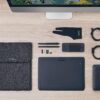
4台目のペンタブとなります。ペンタブは仕事でマウス代わりとして使用しています。(手書き資料作成、リモート会議でのホワイトボード機能で使用。イラストは会議中の補足説明用落書きレベル。)イラスト作成目線でのレビューはできませんのでご了承ください。使い始めて思った印象は、とにかく描き心地が良いです。板の表面はツルツルではなく、サラサラという表現が一番しっくりきます。ペンで描いているときは、紙に鉛筆で描いている時の感覚に近く、程よい抵抗があってとても描きやすいと感じました。今までずっとXP-PENさんの板タブ・液タブを使ってきていますが、表面がツルツルなのでシートや紙を貼らないと少し描きにくかったです。それと比べても本体そのままで描き心地が良いので、このペンタブには何も貼らずにそのまま使用しています。板表面も硬そうな素材なので描いていても簡単には傷はつきそうにないです。XP-PENさんのDeco LW(シート貼ってます)との比較写真を載せました。本体の横サイズはさほどDeco LWとは変わりませんが、縦サイズがやや大きいです。重量はこのペンタブの方が重いです。デザインはスマートですが意外とガチっとしているので作業時に机上で動いてしまうことがないです。また本体の下側が緩やかなカーブになっています。この造りのおかげで作業時に服の袖を引っ掛ける事故が起きにくく嬉しいです。無線使用時、Deco LWと比べて長い時間、バッテリーにて稼働してくれます。2日間充電しなくても仕事し続けられました。操作時の遅延も特に感じませんでした。きびきび動いてくれます。また、2種類のペンが付属していますが、2本ともグリップがしっかりしていてすべらないので指が疲れにくいです。今まではプラスチックのすべすべのペンで、100均で購入したグリップをつけて対処していましたが、このペンはそのまま使っても描きやすいです。替え芯もPOMとフェルトの2種類入ってますが、これは試したうえで好みのを使うのが良さそうですね。ペンが2種類入っているのでそれぞれ芯を変えて準備してても面白いかもしれません。なお、これくらいの価格帯のペンタブだと普通なのかもしれませんが、ペン先の沈みはありませんでした。板本体にカスタマイズ可能な3つのボタンがついていますが、これが本体の上側についているのがとても助かっています。今まで使用していたペンタブのボタンは、本体の左側についていましたが、これがペンタブの奥にキーボードを配置して使用する私にとっては手首や腕に当たって誤操作してしまう原因になっておりストレスになっていました。上部配置のボタンはキーボードを操作していても手の平の下の浮いた部分にくるので手に当たることがなく誤操作は無くなりました。ボタンが3つと少な目なことも誤操作防止につながっているのかと思います。本体のボタンが少ないから不便かといえば、クイッキーズがあるおかげでまったく不便はしていません。アクティブになっているアプリケーションにより自動で切り換わるボタンが8個ついてます。この8個のボタンにショートカットを自由に登録できますが、1つのアプリケーションに対して5セットのショートカットを登録できます。(1アプリに対し8ボタン×5セット=合計40 登録可能)このショートカットのセット切り替えはクイッキーズ本体についているボタンで手動切替可能です。ダイヤルもカスタマイズ可能で、こちらにはアプリケーション毎に4セット登録可能になっています。これもダイヤル真ん中のボタンを押すことでセット切り替えが可能です。ダイヤルはショートカットだけでなく、回転方向や回転の感度も調整できるのがありがたいです。ペンにもカスタマイズ可能なボタンがついているので、キーボードを触る機会が減りました。クイッキーズは向きを自由に変えられるのも嬉しい機能でした。ダイヤルを上下左右好きな方向に置けるのは助かります。(ディスプレイの文字もクイッキーズの向きに合わせて変更されます)また、板本体に設計されているボタンとは違い、本体から離して好きなところに置けるのも良いですね。キーボード操作時の邪魔にならない場所に置いて使用できるので誤操作がありません。クイッキーズ本体はスマホくらいの重さで、本体裏は全面滑り止めがついているので、操作時に動いてしまうことも無くとても快適です。こちらも無線で動きます。前回はいつ充電したか忘れるくらい長時間稼働します。セット内容にはペンタブ収納用のケースがついてきます。かなりしっかりした造りで良いケースだと思います。蓋はマジックテープで閉じるタイプです。ジッパーだと金具で本体に傷が入る時があるのでこの方が余計な心配をせず使えます。ポケットは2個ついていて、メインのポケット内側はふわふわの柔らかい生地が使用されているのでしっかりと傷から守ってくれそうです。(エレコムのマイクロファイバーのクリーニングクロスみたいなふわふわ生地)サブのポケットにはペンケースやクイッキーズを入れても余裕で蓋ができます。気になるのはサブのポケット内側は硬い生地なので、移動中に擦れてクイッキーズの画面に傷が入りそうなところです。ペンケースのようにクイッキーズ用のケースがあっても嬉しかったですね。あったら買います…笑クイッキーズのサイズはモバイルバッテリーくらいになりますので、今はモバイルバッテリー用の袋に入れたうえでケースに収納しています。USBのType-c変換アダプタが付属しています。XP-PENさんのDeco LWのようにスマホにつなげられるのかな?と思い試してみましたが無理でした。(一瞬だけカーソル出たのですが数秒後に消えました)あくまでPC専用なのかもしれません。2本指のグローブもついてきます。このセットの専用でしょうか、カラーはグレーです。ペンタブをマウス代わりで使う私にとってはグローブはキーボード操作時に邪魔になるので使っていませんが、このグローブにしても接続用のUSBケーブルにしてもテーマカラーを崩さない所にこだわりが感じられます。長々と書きましたが、ひとつひとつが丁寧なつくりになっていて好印象です。安っぽさがなくインテリアにしても良いんじゃないかと感じてしまうくらいです。まだまだ続きそうなテレワークの環境をワンランク上げてくれました。これからの新製品、ドライバの強化にも期待しています。
Ken –
I was imppressed with the packaging and everything you get In the bundle. Sadly I did not see $48 coupon that could have been applied to my purchase so be mindful of anything like that when you go through checkout. After one week I am certainly happy with the pen tablet and the 2 pens that came with it.The express keys are a bit of a learning curve deciding the shortcuts macros and actions I will assign to the buttons and sets. Over all I am very happy with my purchase and I would highly recommend this product. Check out The Review by Glen Dewis on YouTube it is bang on.
sergej –
Acquistato per mio figlio che ne è entusiasta per la semplicità dell’uso , delle applicazioni fornite e dal software applicato . TOP
Tokyo mum A –
I am total beginner. First time to buy and use graphics tablet.Instructions are easy and simple to follow. It feels and looks high end. Comes with all the necessary accessories. I use Rebelle 6 to draw. Feels so amazing to draw with the pen.Love the hover function. It is hard to explain but drawing with the pen feels so buttery and smooth. Invites me to use the tablet. I have no regrets. Love it.