$179.00Original price was: $179.00.$170.04Current price is: $170.04.
Product Description
A new Type of life in your hands
1 Split Design
2 Integrated Tenting
3 Palm Rest
1 True Wireless
2 60% Layout
3 Portability
1 Hot-Swappable
2 Switch Options
3 Fully-Programmable
1 Multi-OS
2 Long Battery Life
3 PBT Keycaps
Pick Your NocFree
Add to Cart
Price
$170.04$170.04
$170.04$170.04
$229.00$229.00
$217.54$217.54
$217.54$217.54
Palm Rest
✘
✘
✔
✔
✔
RGB Lighting
✘
✘
✔
✔
✔
Sound-absorbing Foam
✘
✘
✔
✔
✔
Key Sound
Smooth Strokes
Soft Bumps
Smooth Strokes
Soft Bumps
Quiet Press
Key Feel
Smooth Glide
Subtle Bump
Smooth Glide
Subtle Bump
Soft Resistance
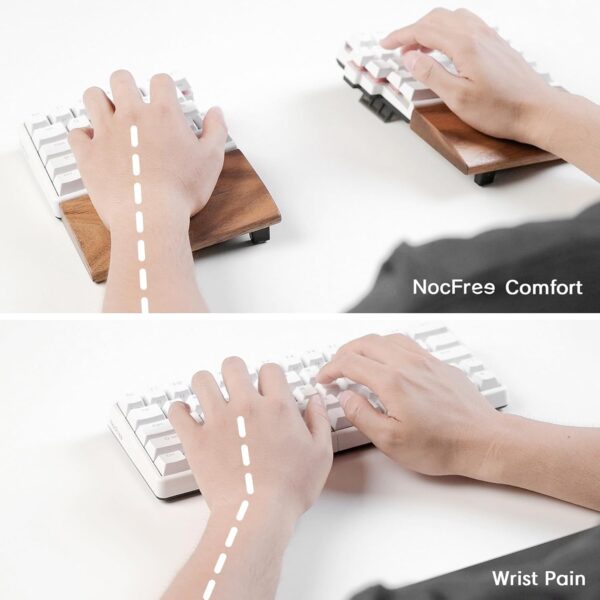
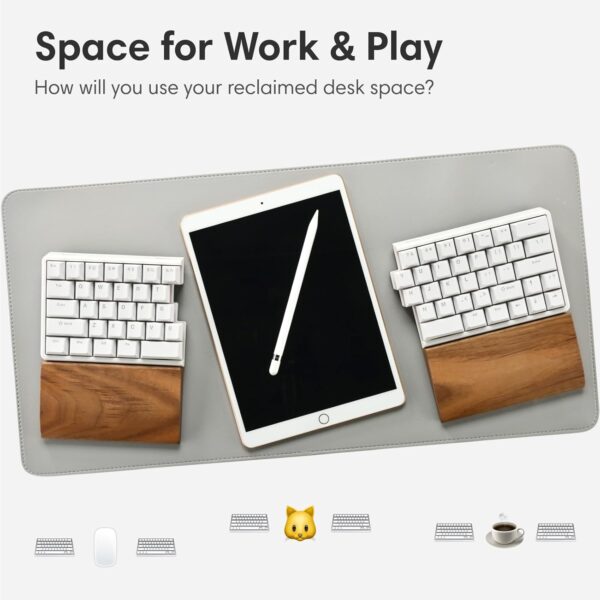
True Wireless or Wired Connection: Enjoy a seamless 2.5GHz wireless experience with zero cables, making this split keyboard truly unique. Experience perfect synchronization even when separated. For gaming and professional tasks that demand absolute precision, switch to the wired connection for optimal performance. Ergonomic Design for Neutral Posture: The split design, integrated tenting, and walnut palm rest help reduce strain associated with traditional keyboards. This design can alleviate wrist pain, back pain, and shoulder pain, reducing the risk of RSI and Carpal Tunnel Syndrome. Enhance your desk posture and overall comfort effortlessly. Enjoyable Typing Experience: Equipped with hot-swappable switches and three-layer Poron foam, this mechanical keyboard not only functions perfectly but also provides a satisfying typing experience with an appealing look, sound, and feel. Mac & Windows Compatible: Fully compatible with macOS, Windows and Linux. Programmable through the Vial web interface without the need for additional software. Suitable for both work and gaming. Compact and Portable: At just 11.84″ x 4.42″, it’s half the size of a MacBook. Weighing only 550g and featuring a 3600mAh battery, it lasts 3-7 months on a single charge, making it ideal for hybrid work environments.
Price: $179.00 - $170.04 (as of May 05, 2025 04:23:54 UTC – Details)
Customers say
Customers praise the keyboard’s ergonomic design, with one noting its buttery-smooth keystrokes, and appreciate its build quality and hot-swappable switches. They find it easy to use and like its compact size, with one mentioning it saves desk space. Customers like the keyboard’s configurability, with one describing it as a perfect split Bluetooth keyboard, and they appreciate its customization options, with one noting the ability to install different switches. The wireless connectivity receives mixed feedback, with several customers reporting that the wireless mode is completely unusable.
Almost perfect
[No compensation of any kind was received in connection with this review.]I’ve insisted on keyboards with mechanical switches since the days of the IBM PC. I need a numeric keypad only rarely, so I switched to the TKL layout a long time ago, and all was well. But old age and 50+ years of banging out code and text have left me with moderate wrist pain, so a few years ago I began exploring split keyboards.The NocFree Lite is, overall, the best of the half dozen split mechanical keyboards I’ve so far put into daily service. Is it perfect? No, though it comes awfully close. In fact, most of the complaints I’ve read regarding the NocFree Lite are not about product flaws; they are about flaws at the buyer’s end. So understand: don’t buy a keyboard with an unfamiliar layout unless you’re willing to retrain your fingers to use that new layout. If you’re willing to do that, this is a first-rate keyboard.It’s well made, the switches are good quality, it connects (to Ubuntu) in either wired or wireless mode, it looks, feels, and sounds great; plus, it’s tiny. A typical full-size keyboard eats about 96 sq in of your desktop, a TKL layout needs about 78. The NocFree Lite needs 52 sq in; that’s not the smallest footprint in this market, but it’s close. And despite the small size, it’s rock steady and predictable in daily use.But what about the lack of Home/End/PgUp/PgDn keys? Who needs those? Retrain yourself: use fn + LeftArrow for Home, fn + UpArrow for PgUp, etc. (The NocFree arrives already configured to do just that.) Once you adapt, that’s far faster and easier than those physical PgUp/PgDn etc. keys you’ve been using. My previous favorite split keyboard had those keys, but they were just wasted space as I never used them: as long as you’ve got that inverted-T of Arrow keys and a fn key, you’ve got something much, much better than the usual column of navigation keys.You can redefine the meaning of any key, and it’s trivial to do that with Vial. (For Linux users, there’s an .appimage for running Vial; couldn’t be easier.) Competing keyboards (e.g., from Keychron) often limit you to two layers for defining what the fn key does (two if you’re connected to a Mac, a different two if Windows or Linux). The NocFree Lite enables four layers for everyone: plenty of room for defining comfortable, helpful keystroke combinations and for invoking macros. You can even define the key adjacent to that inverted-T to be a second fn key: perfect!The NocFree Lite comes with a couple of spare keyswitches and keycaps. The switches are hot-swappable, so you can easily install different switches if you prefer; NocFree actually provides the tools to do so. And the walnut palm rests are worth more than they cost.So, why isn’t this the perfect keyboard? Well, the build quality is good, but not fabulous. (The Keychron Q11 is a better built competitor.) And there are better keyswitches out there, but those in the NocFree are more than good enough, until you get around to installing your favorite switches.In wireless mode, if the computer goes to sleep, when you wake it the NocFree may fail to re-connect. It’s easy to fix: unplug the NocFree dongle, wait a couple of seconds, and then re-insert it. That might actually be a flaw in my OS (Ubuntu), but it is irritating and, mercifully, happens only once or twice per month. Also in wireless mode, you may experience some stuttering due to interference with other nearby wireless devices. That’s often an issue with wireless connections; in my case, moving the dongle to a different USB port eliminated the problem.I prefer to work in wired mode, and there’s a very small issue there. The two halves of the NocFree connect with a short USB cable that ends in USB 2.0 Mini Male connectors. That’s a really poor choice: it’s truly hard to find replacement USB cables with Mini Male ends, should you need one. Your best bet is to buy a pair of USB-C Female to Mini Male adapters, plug one into each NocFree half, and then connect the halves with an ordinary cable ending in USB-C connectors; those exist in astonishing variety.But these are very minor quibbles. All in all, the NocFree Lite is the best keyboard I’ve found, after a lot of searching. Would I buy another one? I already have.
HudsonH –
Almost the one.
After developing symptoms of a repetitive stress injury I started looking to make my desk more ergonomic. A part of that journey was to try out a split keyboard and I chose this one for it’s price and apparent features. The build quality and appearance are great. I got the silent version and Its quiet, but feels good too. I was concerned at first about the lack of a function row; but connecting the keyboard to vial.rock and exploring how the default layers were setup and making a few tweaks really raised my confidence in the long term usability of this keyboard. I was also a little worried about my touch typing skills; but having used the keyboard with the two halves at about shoulder’s width apart for a couple of weeks now, I’m happy to report the biggest challenge for me is remembering to use my right index finger, rather than my left to hit the “y” key and that’s starting to feel natural to me at this point.I do wish the little feet that tilt the halves up from the middle had more adjustment. I would like a greater amount of tilt. I can live with it how it is though and could probably implement my own fix. But…The one really big glaring flaw this keyboard has, in my opinion, is that in order to fit an arrow key cluster into the layout the manufacturer chose to move the key with ‘/’ and ‘?’ to the opposite side of the right sift key. Not even next to the shift key as the up arrow lies between them. I think I would have preferred not having the arrow key cluster at all. In fact, I made “i” and “k” act as “up” and “down”, and “j” and “l” as “left” and “right” using layers in the vial.rock configuration utility and I find I much prefer that functionality.I just can’t get past that layout flaw. I have tried to think of a workable solution by remapping things but I can’t come up with anything that would work for me. I’m going to wind up returning this keyboard I think and getting a more expensive one from a different manufacturer, just to get past that one issue.I don’t regret my purchase, it proved the concept of a split keyboard to me for sure!
Eric Lindgren –
Perfect configurable split Bluetooth keyboard!
I almost never review anything but this keyboard is great and under appreciated by reviewers I feel.If you want a well built, qmk configurable split wireless keyboard with great battery life, easy layout changes, and hotswappable switches, this keyboard is amazing.People complaining about minor layout inconveniences have not looked into the vial config software. It is very easy and very powerful.My much less tech friend tried mine and already wants one.10/10 would buy again.Only slight request would be a usb c dongle but hopefully that’s available at some point
Jordan –
Great design, poor quality
I really like the design of this, and features such as extra switches and keycaps and the open-source configuration software. But the thing was not built to last. The plastic flip-up part that lets you tilt broke on one half on the first day. I had frequent problems with it losing connectivity, which could only be fixed by unplugging and re-plugging in the usb dongle. Often I would have to do this several times before it would reconnect. Eventually it became so bad that it wireless mode was completely unusable.It is very disappointing that this seems to be the only truly split (no cable connecting the two halves) offering out there, because that is something I really love, but I just can’t get it to consistently work. I do see other people reporting the same problems the connectivity, but then plenty of people who are quite happy with it, so maybe there are just a certain percentage of them that are duds.
Fluffy –
The customisation of this keyboard is unparalleled. You can have up to four layers, you can move keys around. You can even use the mouse with the keyboard bindings. I changed right-space and the Fn key to make mouse updownright left be jkl; keys – but eventually got frustrated at using the keyboard-as-a-mouse.They key caps are soft textured, they feel soft, but are rigid plastic. The provided cap removal tool works fine, i swapped the Winkey and FN key around. Each keydown is decisive and does not get jammed on the way down or up. The spare key-modules are inside the box with the usb cables -don’t throw them out like I did :(The wireless, i didnt get to try.The cabled-ness it provides usb-c cables, or you can probably use your own.If you use the website key configuration website, then you cannot save or load the profile. If you download the windows app from get.vial.today, then you can. The wireless and wired profiles are separate and you need to configure in one, save, and then load into the other profile when you connect with the other method.You can really feel the linear feel of the keys here. Personally, turns out i’m not a fan of linear.Finally, if you bought this thinking, dang, you should have gotten the one with the palm rests – do not despair for the other palm rest models are basically two pieces that do not even attach to the keyboard, they kinda just float next to it. So, buy a normal palm rest and cut it up to do the same.
John S –
I ordered the NocFree Lite keyboard with RBG, Foam and Palm Rest options. All items are of excellent build quality. I chose the tactile switches, and I like them but they’re not as “clicky” as I would have liked. I’ll probably replace the switches at some point. The keycaps are very nice quality, with a slight curve and very smooth to the touch. Order came with one 2.4GHz USB receiver. I tried on 2 computers and Syncs perfectly with both. I wish the seller would have allowed the option to add two or more USB wireless receivers. The switches to go from wired to wireless are under the keyboard. I would have preferred if these were the sides – anywhere other than the bottom.Very easy to program the keyboard with “vial” software. Wired and wireless setting will each require separate programming of the key layout. The RBG lights only work when the keyboard is wired to the computer.This is my first split keyboard and it’s been fairly easy to get used to. I’m 1 week in and I think in another 2 weeks I should be completely used to the new layout. I do feel some pain/tension relief in my back shoulder blades thanks to the split design. For the price point, I think this is a great product to introduce yourself to a split keyboard and enjoy those benefits.
Harry –
Pros:- good price point- good build quality. Included foam and palm rests are nice.- tactile switches feel smooth- VIAL is super easy to useCons:- One key (the v key) was having intermittent issue registering on the first stroke. Fortunately the keyboard came with a switch remover and spare switches so it was an easy fix.
vzengv –
I’m genuinely impressed with this split keyboard. The split design has significantly improved my typing posture. Now I can sit comfortably against my chair without straining or leaning forward.The customizable key mapping is a real strength. I was able to remap the keys to match my familiar layout, which made the transition smooth and intuitive – the keyboard feels natural and enhances my overall typing experience.Highly recommended! 👍
Hahaha –
The keyboard has been a fantastic addition to my setup. Its compact layout saves significant desk space, giving my workspace a cleaner look. The integrated tenting feature promotes a natural hand position, reducing wrist strain during long typing sessions. Now I can open up my chest, lean back in my chair, and type comfortably. It’s a whole new experience, and I love it!









OldCoot –
Almost perfect
[No compensation of any kind was received in connection with this review.]I’ve insisted on keyboards with mechanical switches since the days of the IBM PC. I need a numeric keypad only rarely, so I switched to the TKL layout a long time ago, and all was well. But old age and 50+ years of banging out code and text have left me with moderate wrist pain, so a few years ago I began exploring split keyboards.The NocFree Lite is, overall, the best of the half dozen split mechanical keyboards I’ve so far put into daily service. Is it perfect? No, though it comes awfully close. In fact, most of the complaints I’ve read regarding the NocFree Lite are not about product flaws; they are about flaws at the buyer’s end. So understand: don’t buy a keyboard with an unfamiliar layout unless you’re willing to retrain your fingers to use that new layout. If you’re willing to do that, this is a first-rate keyboard.It’s well made, the switches are good quality, it connects (to Ubuntu) in either wired or wireless mode, it looks, feels, and sounds great; plus, it’s tiny. A typical full-size keyboard eats about 96 sq in of your desktop, a TKL layout needs about 78. The NocFree Lite needs 52 sq in; that’s not the smallest footprint in this market, but it’s close. And despite the small size, it’s rock steady and predictable in daily use.But what about the lack of Home/End/PgUp/PgDn keys? Who needs those? Retrain yourself: use fn + LeftArrow for Home, fn + UpArrow for PgUp, etc. (The NocFree arrives already configured to do just that.) Once you adapt, that’s far faster and easier than those physical PgUp/PgDn etc. keys you’ve been using. My previous favorite split keyboard had those keys, but they were just wasted space as I never used them: as long as you’ve got that inverted-T of Arrow keys and a fn key, you’ve got something much, much better than the usual column of navigation keys.You can redefine the meaning of any key, and it’s trivial to do that with Vial. (For Linux users, there’s an .appimage for running Vial; couldn’t be easier.) Competing keyboards (e.g., from Keychron) often limit you to two layers for defining what the fn key does (two if you’re connected to a Mac, a different two if Windows or Linux). The NocFree Lite enables four layers for everyone: plenty of room for defining comfortable, helpful keystroke combinations and for invoking macros. You can even define the key adjacent to that inverted-T to be a second fn key: perfect!The NocFree Lite comes with a couple of spare keyswitches and keycaps. The switches are hot-swappable, so you can easily install different switches if you prefer; NocFree actually provides the tools to do so. And the walnut palm rests are worth more than they cost.So, why isn’t this the perfect keyboard? Well, the build quality is good, but not fabulous. (The Keychron Q11 is a better built competitor.) And there are better keyswitches out there, but those in the NocFree are more than good enough, until you get around to installing your favorite switches.In wireless mode, if the computer goes to sleep, when you wake it the NocFree may fail to re-connect. It’s easy to fix: unplug the NocFree dongle, wait a couple of seconds, and then re-insert it. That might actually be a flaw in my OS (Ubuntu), but it is irritating and, mercifully, happens only once or twice per month. Also in wireless mode, you may experience some stuttering due to interference with other nearby wireless devices. That’s often an issue with wireless connections; in my case, moving the dongle to a different USB port eliminated the problem.I prefer to work in wired mode, and there’s a very small issue there. The two halves of the NocFree connect with a short USB cable that ends in USB 2.0 Mini Male connectors. That’s a really poor choice: it’s truly hard to find replacement USB cables with Mini Male ends, should you need one. Your best bet is to buy a pair of USB-C Female to Mini Male adapters, plug one into each NocFree half, and then connect the halves with an ordinary cable ending in USB-C connectors; those exist in astonishing variety.But these are very minor quibbles. All in all, the NocFree Lite is the best keyboard I’ve found, after a lot of searching. Would I buy another one? I already have.
HudsonH –
Almost the one.
After developing symptoms of a repetitive stress injury I started looking to make my desk more ergonomic. A part of that journey was to try out a split keyboard and I chose this one for it’s price and apparent features. The build quality and appearance are great. I got the silent version and Its quiet, but feels good too. I was concerned at first about the lack of a function row; but connecting the keyboard to vial.rock and exploring how the default layers were setup and making a few tweaks really raised my confidence in the long term usability of this keyboard. I was also a little worried about my touch typing skills; but having used the keyboard with the two halves at about shoulder’s width apart for a couple of weeks now, I’m happy to report the biggest challenge for me is remembering to use my right index finger, rather than my left to hit the “y” key and that’s starting to feel natural to me at this point.I do wish the little feet that tilt the halves up from the middle had more adjustment. I would like a greater amount of tilt. I can live with it how it is though and could probably implement my own fix. But…The one really big glaring flaw this keyboard has, in my opinion, is that in order to fit an arrow key cluster into the layout the manufacturer chose to move the key with ‘/’ and ‘?’ to the opposite side of the right sift key. Not even next to the shift key as the up arrow lies between them. I think I would have preferred not having the arrow key cluster at all. In fact, I made “i” and “k” act as “up” and “down”, and “j” and “l” as “left” and “right” using layers in the vial.rock configuration utility and I find I much prefer that functionality.I just can’t get past that layout flaw. I have tried to think of a workable solution by remapping things but I can’t come up with anything that would work for me. I’m going to wind up returning this keyboard I think and getting a more expensive one from a different manufacturer, just to get past that one issue.I don’t regret my purchase, it proved the concept of a split keyboard to me for sure!
Eric Lindgren –
Perfect configurable split Bluetooth keyboard!
I almost never review anything but this keyboard is great and under appreciated by reviewers I feel.If you want a well built, qmk configurable split wireless keyboard with great battery life, easy layout changes, and hotswappable switches, this keyboard is amazing.People complaining about minor layout inconveniences have not looked into the vial config software. It is very easy and very powerful.My much less tech friend tried mine and already wants one.10/10 would buy again.Only slight request would be a usb c dongle but hopefully that’s available at some point
Jordan –
Great design, poor quality
I really like the design of this, and features such as extra switches and keycaps and the open-source configuration software. But the thing was not built to last. The plastic flip-up part that lets you tilt broke on one half on the first day. I had frequent problems with it losing connectivity, which could only be fixed by unplugging and re-plugging in the usb dongle. Often I would have to do this several times before it would reconnect. Eventually it became so bad that it wireless mode was completely unusable.It is very disappointing that this seems to be the only truly split (no cable connecting the two halves) offering out there, because that is something I really love, but I just can’t get it to consistently work. I do see other people reporting the same problems the connectivity, but then plenty of people who are quite happy with it, so maybe there are just a certain percentage of them that are duds.
Fluffy –
The customisation of this keyboard is unparalleled. You can have up to four layers, you can move keys around. You can even use the mouse with the keyboard bindings. I changed right-space and the Fn key to make mouse updownright left be jkl; keys – but eventually got frustrated at using the keyboard-as-a-mouse.They key caps are soft textured, they feel soft, but are rigid plastic. The provided cap removal tool works fine, i swapped the Winkey and FN key around. Each keydown is decisive and does not get jammed on the way down or up. The spare key-modules are inside the box with the usb cables -don’t throw them out like I did :(The wireless, i didnt get to try.The cabled-ness it provides usb-c cables, or you can probably use your own.If you use the website key configuration website, then you cannot save or load the profile. If you download the windows app from get.vial.today, then you can. The wireless and wired profiles are separate and you need to configure in one, save, and then load into the other profile when you connect with the other method.You can really feel the linear feel of the keys here. Personally, turns out i’m not a fan of linear.Finally, if you bought this thinking, dang, you should have gotten the one with the palm rests – do not despair for the other palm rest models are basically two pieces that do not even attach to the keyboard, they kinda just float next to it. So, buy a normal palm rest and cut it up to do the same.
John S –
I ordered the NocFree Lite keyboard with RBG, Foam and Palm Rest options. All items are of excellent build quality. I chose the tactile switches, and I like them but they’re not as “clicky” as I would have liked. I’ll probably replace the switches at some point. The keycaps are very nice quality, with a slight curve and very smooth to the touch. Order came with one 2.4GHz USB receiver. I tried on 2 computers and Syncs perfectly with both. I wish the seller would have allowed the option to add two or more USB wireless receivers. The switches to go from wired to wireless are under the keyboard. I would have preferred if these were the sides – anywhere other than the bottom.Very easy to program the keyboard with “vial” software. Wired and wireless setting will each require separate programming of the key layout. The RBG lights only work when the keyboard is wired to the computer.This is my first split keyboard and it’s been fairly easy to get used to. I’m 1 week in and I think in another 2 weeks I should be completely used to the new layout. I do feel some pain/tension relief in my back shoulder blades thanks to the split design. For the price point, I think this is a great product to introduce yourself to a split keyboard and enjoy those benefits.
Harry –
Pros:- good price point- good build quality. Included foam and palm rests are nice.- tactile switches feel smooth- VIAL is super easy to useCons:- One key (the v key) was having intermittent issue registering on the first stroke. Fortunately the keyboard came with a switch remover and spare switches so it was an easy fix.
vzengv –
I’m genuinely impressed with this split keyboard. The split design has significantly improved my typing posture. Now I can sit comfortably against my chair without straining or leaning forward.The customizable key mapping is a real strength. I was able to remap the keys to match my familiar layout, which made the transition smooth and intuitive – the keyboard feels natural and enhances my overall typing experience.Highly recommended! 👍
Hahaha –
The keyboard has been a fantastic addition to my setup. Its compact layout saves significant desk space, giving my workspace a cleaner look. The integrated tenting feature promotes a natural hand position, reducing wrist strain during long typing sessions. Now I can open up my chest, lean back in my chair, and type comfortably. It’s a whole new experience, and I love it!